- Category
- Ads & assets
- What it changes
- Replaces disapproved or limited text assets (headlines, long headlines, descriptions) in a PMax asset group
- Reversible
- Yes, reversible per asset; the original asset is kept
- Data we use
- Ad Strength of the asset group and the policy status of each text asset
- Typical trigger
- At least 1 disapproved or limited text asset in an active PMax asset group
- Priority
- High (policy and quality layer)
What it flagsWhen AdBuilder reports weak Performance Max assets
Performance Max relies entirely on the quality of your assets. Google itself assembles ads from the headlines, long headlines, descriptions, images and videos you supply. If a text asset is disapproved (DISAPPROVED) or limited (APPROVED_LIMITED) by ad policy, Google can't use that asset, or only partly. That squeezes your reach without you noticing right away.
This recommendation scans your active Performance Max campaigns and flags every asset group with at least one disapproved or limited text asset. If that group's Ad Strength is also Poor or Average, or asset types are missing, we include that as extra supporting context. The alert is per asset group, so you see exactly where the problem lies.
Why it mattersWhy disapproved text assets hurt your Performance Max returns
In a regular search campaign, you choose which ad runs. Not in Performance Max: the algorithm mixes your assets automatically and shows the combination that fits best at that moment. Every asset that drops out due to a policy issue shrinks the puzzle Google has to work with. Fewer usable headlines and descriptions means less variety, a lower Ad Strength and ultimately fewer impressions for worse returns.
That's why you want to fix disapproved assets quickly. Because this is a policy and quality issue, not a performance optimization, this recommendation sits at high priority: it's one of the first things you want to sort out in a Performance Max campaign.
How it worksHow AdBuilder finds weak PMax text assets and proposes a replacement
We first pull your active asset groups from every enabled Performance Max campaign, including Ad Strength. Then, per group, we look at the text assets: headlines (30-character limit), long headlines (90-character limit) and descriptions (90-character limit). We read the policy status for each text asset.
An asset group only becomes a candidate if it contains at least one text asset with status disapproved or limited. Those are assets we can actually replace. Groups with only a low Ad Strength or only missing images or videos aren't shown as a recommendation, since we can't create media for you; we only mention those missing asset types as a signal at most.
Per-asset performance labels (such as low, good or best) no longer exist for Performance Max as of version 23 of the Google Ads API. The hardest per-asset signal left is the policy status, and that's the only one we use. Approved but still unproven assets are deliberately left alone: not enough evidence means we don't touch them.
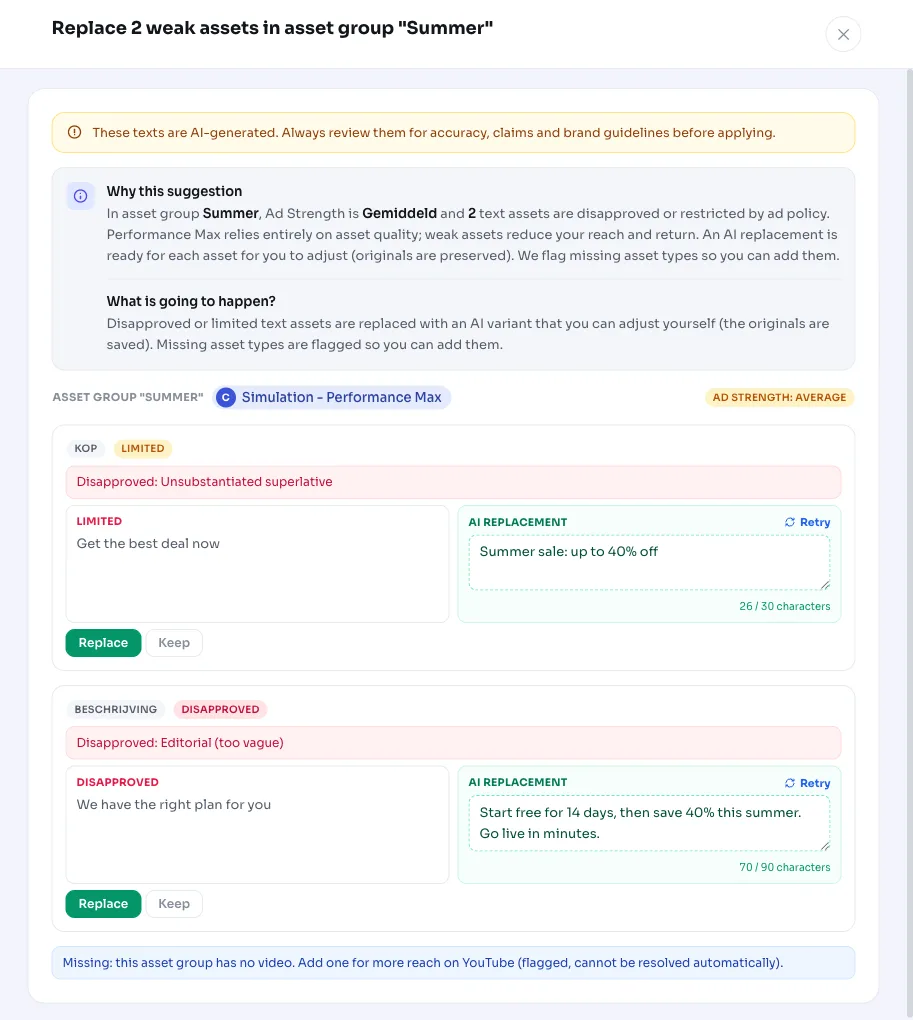
For each weak asset, AdBuilder prepares replacement copy that fits within the character limit and takes the policy issue and the asset group's theme into account. That replacement is a suggestion you can edit yourself before applying it. The assessment is a snapshot of the current policy status and Ad Strength; there's no performance lookback window underneath it.
- Trigger: active PMax campaign and active asset group with at least 1 disapproved or limited text asset.
- Asset types we assess: headlines (30 characters), long headlines (90 characters), descriptions (90 characters).
- Per run we handle up to 4 asset groups, sorted by number of weak assets, and up to 8 assets per group.
- No conversion requirement: the alert also works on campaigns without conversion data.
- After applying, a 14-day cooldown applies per asset group; a closed or dismissed alert doesn't come back right away.
- The recommendation runs weekly.
What you can doReplace weak Performance Max assets or review first
Each alert shows, per weak asset, the original text next to the proposed replacement. You decide what happens.
If you apply the recommendation, AdBuilder first creates the new text asset and links it to the asset group, and only then removes the old link. That way your group never drops below Google's required minimums during the swap. The original asset is kept, so you can undo a change per asset.
- Use the proposed text as is.
- Edit the text yourself first, then apply.
- Select individual assets and replace only those.
- Dismiss the alert if you want to deliberately keep the asset as is.
- Undo an applied replacement: the new link is removed and the original asset returns.
Frequently asked questions
How do I improve weak Performance Max assets?
Start with the disapproved and limited text assets, since you can replace those right away. AdBuilder points them out per asset group and prepares editable replacement copy that fits the character limit. You can use the text as is, edit it, or replace only certain assets.
What does a disapproved or limited PMax asset mean?
Disapproved (DISAPPROVED) means ad policy blocks the asset entirely; limited (APPROVED_LIMITED) means it can only run in certain situations. In both cases Google uses the asset little or not at all, which lowers your reach and returns.
Are my original assets deleted?
No. AdBuilder first creates and links the new text asset, and only then unlinks the old one. The original asset is kept, so you can undo every replacement per asset.
Why doesn't AdBuilder replace images or videos?
We can't create media for you, so we don't offer an automatic replacement for it. Missing images, logos or videos are only flagged as a signal, so you can add them yourself. The replacement is limited to text assets: headlines, long headlines and descriptions.
Why do I see this alert even though my Ad Strength is good?
The alert isn't tied to Ad Strength but to the policy status of your text assets. Even with a good Ad Strength, an individual headline or description can be disapproved or limited. A low Ad Strength (Poor or Average) is only extra supporting context, not a condition.