- Category
- Targeting & structure
- What it changes
- Adds negative placement criteria at account or campaign level
- Reversible
- Yes, an exclusion can be removed again later
- Data we use
- Placement report (detail_placement_view): cost, clicks, conversions and conversion value over the analysis window (30 days by default)
- Typical trigger
- A placement with at least 5 clicks, 0 conversions and less than EUR 1 in conversion value, with cost above the waste threshold
- Priority
- Medium (waste tier)
What it flagsPlacements that cost money without delivering anything
On the Display Network, via search partners and in Performance Max, your ads appear on external websites, in mobile apps and on YouTube videos and channels. Each of these positions is called a placement. Some of them never deliver anything: the clicks cost money, but no conversion follows.
AdBuilder reads the placement report (detail_placement_view) for your active campaigns and lines up cost, clicks and conversions per placement. Placements that burned budget without a single conversion are suggested for exclusion. We only look at types you can actually exclude individually: websites, mobile apps, YouTube videos and YouTube channels.
For a purely search network account, this recommendation won't find anything, simply because there are no Display or search partner placements to evaluate.
Why it mattersStop waste on Display and Performance Max
Display and Performance Max budget easily leaks into placements with little purchase intent. Think of parked domains, low-quality apps and mobile games where your ad often gets tapped by accident. Those clicks still count toward your costs, but rarely lead to a conversion.
Excluding those placements stops the waste and frees up budget for placements that actually perform. You clean up your account without touching your bids or ads.
How it worksWhich placements we exclude, and why
We pull performance per placement over the analysis window (30 days by default; this window is dynamic and can be longer for lower-volume accounts). A placement only becomes a candidate once it meets all the conditions below.
The cost threshold is relative. If there's conversion data in the account, the cost must be at least equal to two expected conversions: cost greater than or equal to the higher of the fixed floor and twice the reference CPA. That fixed floor is EUR 25 for accounts with average or high volume and EUR 10 for low-volume accounts. The reference CPA is the CPA of the campaign the placement belongs to (or the average across the placement pull), capped by the account-wide CPA, taking the lower of the two. If the account has no conversion data yet, the check falls back to a fixed floor: at least 5 clicks and at least EUR 5 in cost (scaled with the length of the window).
To avoid cutting a good placement that just had a bad stretch, we skip placements that still converted in the 60 days before the window (dip protection). If that check couldn't be performed, the recommendation flags that you should double check it's not a temporary dip.
Placements already excluded (account-wide or across all involved campaigns) are dropped, so we never suggest duplicate exclusions. Of the remaining candidates, we show the most expensive ones, up to 25 placements. This recommendation only runs if conversion tracking is on.
- Type is excludable: website, mobile app, YouTube video or YouTube channel
- 0 conversions and less than EUR 1 in conversion value within the window
- At least 5 clicks, so 0 conversions actually means something
- Cost above the waste threshold (2x reference CPA with a floor of EUR 25, or EUR 10 for low-volume accounts; without conversion data, at least EUR 5 and 5 clicks)
- Didn't convert in the 60 days before the window (dip protection)
- Not yet excluded and not manually dismissed
What you can doExclude the placements at account or campaign level
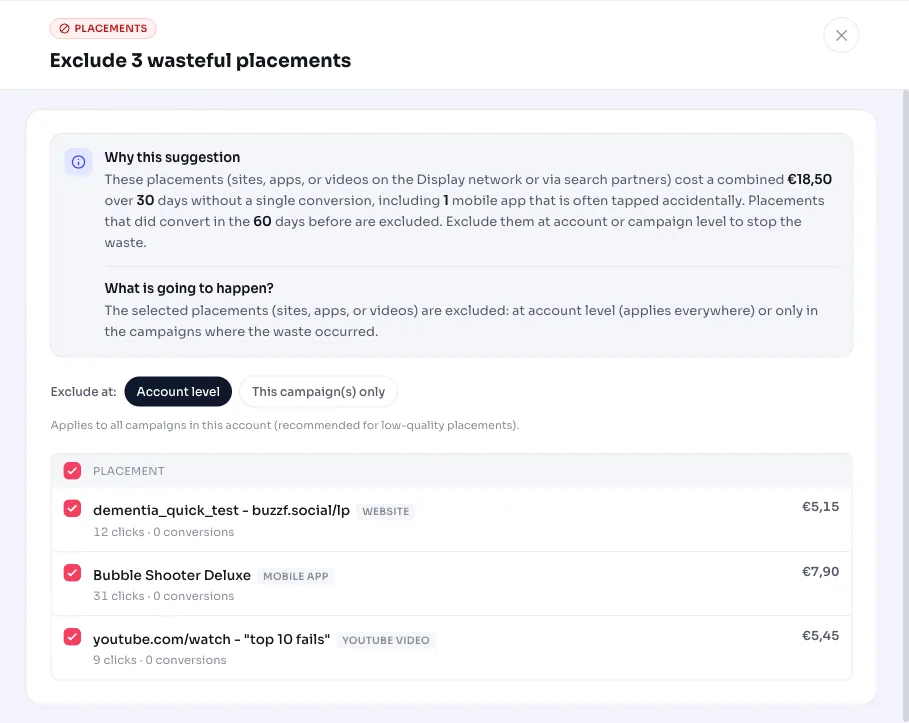
The recommendation shows the placements involved with their cost and clicks and the total waste over the window. You exclude them all at once. Since it adds a negative placement criterion, you can always remove the exclusion later if a placement turns out to be relevant after all.
If you'd rather keep certain placements, just leave them out of your selection. The recommendation doesn't force anything: you decide which placements go.
- Exclude at account level: applies immediately to all your campaigns
- Exclude at campaign level: only for the campaigns where the placement incurred cost
- Adjust your selection: keep borderline cases in and leave the rest out
- Undo: remove the negative placement criterion later
Frequently asked questions
How do I exclude placements in Google Ads?
Through this recommendation, in one click: AdBuilder has already gathered the wasteful placements for you. You choose whether to exclude them account-wide (for all your campaigns) or only for the campaigns where they incurred cost. Behind the scenes, that adds a negative placement criterion.
Does this also apply to Performance Max and Display campaigns?
Yes. The recommendation is mainly meant for campaigns with reach on the Display Network, via search partners and in Performance Max, since that's where your ads appear on external sites, apps and videos. We evaluate placements from the placement report of your active campaigns.
Why doesn't AdBuilder just exclude every placement with 0 conversions?
Because 0 conversions only means something with enough traffic and enough cost. We require at least 5 clicks, less than EUR 1 in conversion value, and cost above a threshold that scales with your account CPA (2x the reference CPA, with a floor of EUR 25, or EUR 10 for smaller accounts). We also skip placements that converted shortly before.
Can I undo an exclusion?
Yes. A placement exclusion is a negative criterion you can simply remove again. If a placement becomes relevant again over time, remove the exclusion and it starts serving again.
Why don't I see this recommendation for my account?
Usually because there's nothing to exclude: a purely search network account has no Display or search partner placements, or no placement exceeds the waste threshold. This recommendation also only runs when conversion tracking is on, and already-excluded placements are left out.