- Category
- Tracking & measurement
- What it changes
- Turns on inactive conversion actions (or just gives advice if there's nothing to activate)
- Reversible
- Yes, an activated action can be set back to inactive
- Data we use
- Conversion actions (status, category, primary or secondary) and the account's conversion tracking status
- Typical trigger
- No enabled conversion action anywhere in the account
- Priority
- High, this is the measurement layer and the foundation under all bidding
What it flagsNo primary conversion active in your account
AdBuilder retrieves all conversion actions marked as enabled in your Google Ads account. If that list is completely empty, there's no active conversion action: no purchase, no lead, no call action currently being measured.
That's different from a recommendation about the quality of your measurement. This is about the most basic question: are you measuring anything at all? As long as the answer is no, the signal that conversion-based bidding relies on is missing.
Why it mattersWithout conversion tracking, Smart Bidding flies blind
Strategies like Maximize conversions, Target CPA and Target ROAS optimize on your conversion signal. Without an active conversion action there's no signal, and the system optimizes on nothing useful. You're paying for clicks without knowing which of them lead to anything.
That's why this recommendation sits in the measurement layer, the foundation under everything else. Reporting, bid steering and growth advice only become reliable once conversion tracking is on. Fixing this is therefore high priority: it's what makes the rest of your account interpretable.
How it worksHow AdBuilder determines whether conversion actions are active
The check looks at conversion actions with status enabled. If there are zero, the recommendation proceeds; if there's at least one, it stays quiet.
AdBuilder first filters out a valid case: if your account sits under a manager account (MCC) and conversion tracking is managed there (status managed by this or another manager account), the conversion actions belong to the manager account. An empty list at account level is then normal, and the recommendation is suppressed, no false alarm.
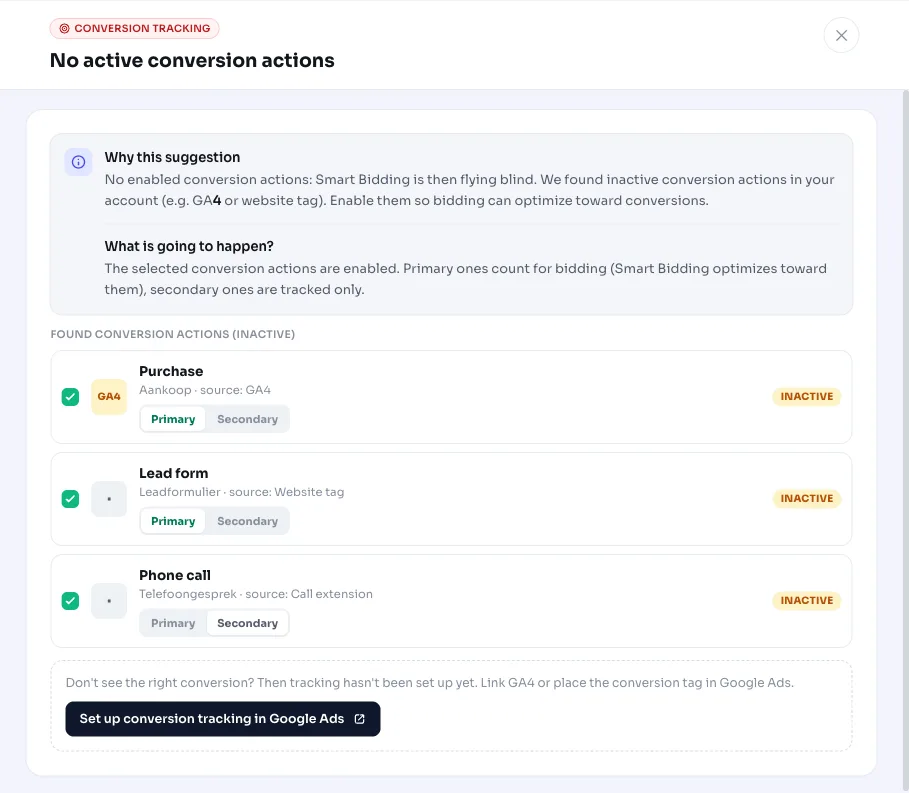
If the list stays empty without that explanation, AdBuilder looks for inactive conversion actions already sitting in your account (hidden actions, for example from a GA4 import, a website tag or a call extension). Up to twelve of these are retrieved and clearly labeled with their source.
- Trigger: no conversion action at all with status enabled.
- Exception: conversion tracking is managed at manager account (MCC) level, in which case the recommendation stays quiet.
- Micro-signals (such as page view, engagement, download, get directions, store visit and the uncategorized catch-all) default to secondary: still measured, but not a bidding signal, so bidding doesn't accidentally get steered by page views.
- Genuine macro conversions follow Google's own setting and are suggested as primary.
What you can doActivating existing actions or setting up measurement
There are two paths, depending on what AdBuilder finds in your account.
If AdBuilder finds inactive conversion actions, you can turn them on in one click. In the recommendation you choose which actions to activate and whether each one becomes primary or secondary. That way you keep control over the balance between primary and secondary conversions: only genuine macro conversions should steer your bidding as primary. This change writes to Google Ads and is reversible, you can set an activated action back to inactive later.
If AdBuilder finds no inactive actions to turn on, there's no conversion measurement set up at all yet. AdBuilder can't do that automatically: you set up measurement yourself first (for example a website tag or a GA4 link). In that case the recommendation is purely advisory and changes nothing in your account.
- Inactive actions present: select which ones to activate, choose primary or secondary per action, and apply (reversible).
- No inactive actions: set up conversion tracking manually; the recommendation only gives advice and changes nothing.
Frequently asked questions
What is a primary conversion action?
A primary conversion action is a conversion that counts toward your bidding strategy: Smart Bidding optimizes on it. Secondary actions are still measured and reported, but don't steer bidding. This recommendation suggests genuine macro conversions (like purchase or lead) as primary and micro-signals as secondary.
Why do I see this flag while my manager account handles measurement?
That shouldn't happen. If your account sits under a manager account (MCC) and conversion tracking is set up there, AdBuilder recognizes that from the conversion tracking status and suppresses the recommendation. An empty list at account level is normal in that case.
Can I undo the activation?
Yes. If you activate existing, inactive conversion actions, AdBuilder writes that to Google Ads and remembers the previous state. You can set an activated action back to inactive later.
What if there's no conversion action in my account at all?
Then there's nothing to activate and AdBuilder can't set up measurement automatically. You'll get advice to set up conversion tracking yourself first, for example via a website tag or a GA4 link. As soon as there's an active conversion action, the recommendation disappears.