- Category
- Targeting & structure
- What it changes
- Creates a new ad group (keywords + 1 ad) and adds a phrase negative for the search term in the existing group(s)
- Reversible
- Yes, undoing pauses the new group and removes the negatives
- Data we use
- Search term report from the past 30 days: impressions, clicks, CTR, conversions and cost (search campaigns only)
- Typical trigger
- A search term with 0 conversions, at least 100 impressions and 15 clicks, and a CTR above the campaign average, with no group of its own
- Priority
- Low (growth tier): address after broken and wasteful issues
What it flagsA busy search term without its own ad group
Sometimes a search term drives a lot of traffic while still having no dedicated ad group. It falls into a broader group and shares the ad and keywords there with all sorts of other terms. The term gets clicks and people respond well to it (CTR is good), but it isn't converting yet.
This recommendation flags a term like that and suggests creating a separate ad group for it. The idea: a search term that's demonstrably working deserves its own group with tailored keywords and an ad that's specifically about that term.
Why it mattersWhy a dedicated ad group per search term pays off
In a broad ad group, the search term sits under one shared ad that covers the group's whole theme, not this specific term. That drags down relevance, and with it CTR and Quality Score. A less relevant ad also means a weaker path from click to conversion.
Giving the search term its own group with its own keywords and its own ad means the ad matches what someone typed much more closely. That boosts relevance and Quality Score, and gives a term that isn't converting yet a fair shot at doing so. It's a growth move: you're building structure around traffic that's already there.
How it worksHow AdBuilder picks the candidate search term
AdBuilder pulls the search term report from the past 30 days across your search campaigns and adds up impressions, clicks, cost and conversions per search term. It also calculates the average CTR per campaign as a benchmark.
A search term only qualifies if it meets all the conditions below. From the remaining candidates, AdBuilder picks the top 3 by impressions, so you tackle the busiest terms first.
- No conversions yet: fewer than 1 conversion in the window.
- Enough volume: at least 100 impressions.
- Enough clicks: at least 15 clicks.
- Proven appeal: the search term's CTR is at or above the campaign average (without a reliable campaign benchmark, the recommendation doesn't proceed).
- No spot of its own yet: the term isn't an existing (active or paused) keyword and there's no ad group with that name yet.
- No conflicting advice: the term isn't already claimed by an open recommendation to exclude it (wasteful search term) or to harvest it as a keyword.
How it worksWhat's in the proposal
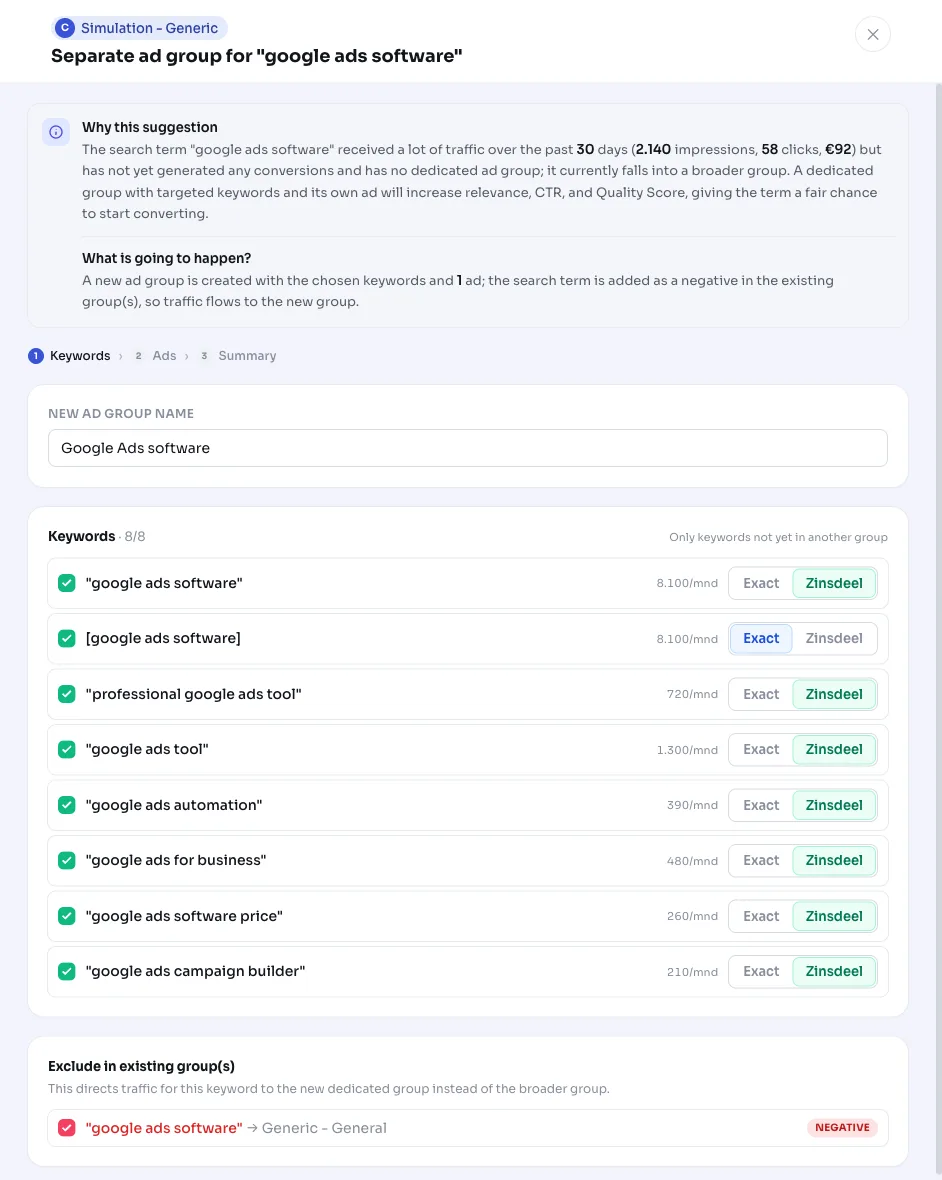
For each selected search term, AdBuilder builds a complete proposal. The keyword list starts with the search term itself as a phrase and exact keyword, and is supplemented with related keywords (0-volume terms and duplicates are dropped), up to 15 keywords in total. The new group gets 1 ad; you write the ad copy in the modal, so you stay in control and no text is generated for a recommendation you might not even open.
To actually route traffic to the new group, AdBuilder adds the search term as a phrase negative in the existing source group(s). The new group doesn't get its own bid: it automatically inherits the bid and bid strategy from the campaign. The destination URL comes from the active ad in the source group, or otherwise from your homepage.
What you can doReview, adjust and apply the proposal
Open the recommendation to review the proposal. You can still adjust everything before anything is written to Google Ads: the ad group name, the keyword list, the ad text and which negatives should or shouldn't be included. Once you're happy with it, apply it.
- Adjust keywords: add, remove or switch match types.
- Write the ad: put together headlines and descriptions in the modal.
- Choose negatives: decide per source group whether the phrase negative gets added.
- Apply: AdBuilder creates the group with keywords and 1 ad, and adds the negatives to the source group(s).
- Undo: the action is reversible. Undoing pauses the new ad group and removes the added negatives again.
Frequently asked questions
When should I create a new ad group for a search term?
As soon as a search term consistently drives a lot of traffic but sits in a broad group that isn't specifically about that term. AdBuilder flags this automatically once there are at least 100 impressions, at least 15 clicks, a CTR at or above the campaign average, and no conversions yet, provided the term doesn't already have its own keyword or group.
Why a separate ad group per busy search term?
In a broad group, the search term shares one ad with all the other keywords, so the ad isn't specifically about that term. A dedicated group with tailored keywords and its own ad boosts relevance, CTR and Quality Score, and gives the term a fair shot at converting.
What happens to the existing ad group?
The search term gets added there as a phrase negative, so traffic for that term now goes to the new group instead of the old one. The rest of the existing group is left untouched.
Does the new ad group get its own bid?
No. The new group automatically inherits the bid and bid strategy from the campaign. No separate group bid is set.
Can I undo this?
Yes. The action is reversible: undoing pauses the new ad group and removes the negatives that were added to the source group(s).