- Category
- Bidding & budget
- What it changes
- Sets the bid strategy of selected campaigns to match your target's axis (campaign update in Google Ads)
- Reversible
- Yes, the previous bid strategy and targets are recorded for a clean rollback
- Data we use
- Your performance target, the live bid strategy per campaign and your CPA/ROAS over the last 29 days
- Typical trigger
- Target set (e.g. CPA) but at least 1 active Search, Shopping or Display campaign bids on a different axis
- Priority
- Low (bidding intervention)
What it detectsWhen your bid strategy doesn't match your target
You set a performance target in AdBuilder: steer on CPA, on ROAS, on as many conversions as possible, or on as many clicks as possible. That choice determines what you measure success by. But the target does nothing as long as your campaigns in Google Ads push a different button. A campaign bidding manually or on clicks while your target is CPA never optimizes toward that number.
This recommendation exposes exactly that gap. It compares your set target with the bid strategy each campaign actually uses right now, and flags the campaigns steering on the wrong axis. That way you immediately know which campaigns are ignoring your Smart Bidding target.
Why it mattersWhy an aligned bid strategy in Google Ads matters
A bid strategy in Google Ads is the engine behind your results. Choose maximize conversions or target CPA, and Google enters every auction targeting people likely to convert. Stay on manual or maximize clicks, and Google mostly buys traffic, not results. You see that difference reflected in your cost per conversion.
If your target and your bid strategy diverge, you're giving Google conflicting signals. You measure on CPA, but the campaign is chasing clicks. Reporting looks fine while the engine is steering the wrong way. Aligning them makes sure the number you're judged on is the same number Google is optimizing for.
How it worksHow AdBuilder compares your bid strategy with your target
This recommendation only fires if a performance target is set. If there's no target, nothing happens. Then AdBuilder reads your campaigns live from Google Ads (read-only, nothing is changed at this point) and determines per campaign which axis the current bid strategy steers on.
A campaign only qualifies if it's active, uses a standard bid strategy (no portfolio or shared strategy), runs on Search, Shopping or Display, and its axis doesn't match your target. Performance Max, Video, App and Demand Gen are skipped since those have fixed or dedicated strategies. Shopping only qualifies for a ROAS or click target, since standard Shopping doesn't support maximize conversions or target CPA.
Alignment looks at the axis, not the exact type. A conversion target accepts conversion bidding and value bidding (value is a superset). A ROAS target only accepts value bidding. A click target accepts anything except pure visibility. Strategies AdBuilder can't assess are never flagged.
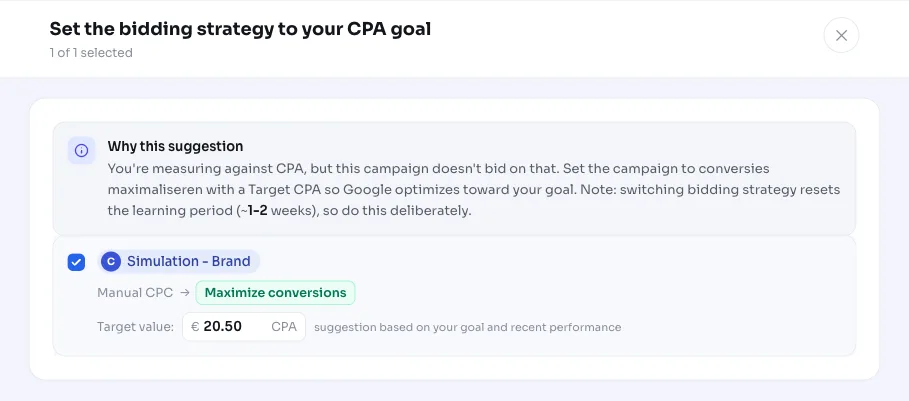
For the proposed strategy: a ROAS target gets maximize conversion value (target ROAS), a click target gets maximize clicks, and a CPA or conversion target gets maximize conversions. Where a concrete target amount fits, AdBuilder calculates a safe starting point based on your last 29 days: the target CPA becomes the lower of your target and your recent CPA, the target ROAS the higher of your target and your recent ROAS. This way you never set the target looser than what you're already achieving. The check runs weekly.
- Active campaign (ENABLED) with a standard, non-portfolio bid strategy
- Channel is Search, Shopping or Display (PMax, Video, App and Demand Gen don't qualify)
- Shopping only with a ROAS or click target
- The axis of the current bid strategy doesn't match the axis of your target
- Strategies that can't be assessed are skipped, not flagged
What you can doAlign bid strategy with your target
On the screen you see per campaign the current bid strategy and the proposal. You choose which campaigns to align yourself and can adjust the proposed target CPA or target ROAS before approving. If you push through a selection, AdBuilder only pushes those campaigns to Google Ads. If you only align part of it, the recommendation stays open with the remaining campaigns.
Keep in mind that switching a bid strategy resets the learning period (roughly 1 to 2 weeks). Your results can fluctuate during that time. So do it deliberately, and preferably not right before a busy period. The change is reversible: AdBuilder records your previous strategy and targets, so you can roll it back in one step (the learning period then restarts).
- Choose per campaign which ones to align, leave the rest as is
- Adjust the proposed target CPA or target ROAS yourself
- Deliberately factor in the 1 to 2 week learning period
- Later roll back in one step to your previous bid strategy
Frequently asked questions
Which bid strategy matches my target?
That follows from your performance target. For a CPA or conversion target, that's maximize conversions (optionally with target CPA), for a ROAS target it's maximize conversion value with target ROAS, and for a click target it's maximize clicks. AdBuilder automatically picks the matching axis and fills in a safe target amount where possible.
What's the difference between target CPA and target ROAS?
Target CPA steers on a fixed cost per conversion: Google tries to get as many conversions as possible within that amount. Target ROAS steers on revenue per euro of ad spend and is meant for when you measure conversion value. If you mainly measure counts, choose CPA; if it's about revenue or margin, choose ROAS.
Does my learning period reset if I switch bid strategy?
Yes. Switching a bid strategy starts a new learning period of roughly 1 to 2 weeks, during which your results can fluctuate. That's why AdBuilder lets you choose which campaigns to align and when, so you can do it deliberately at a calm moment.
Can I revert the change?
Yes. Before AdBuilder pushes the new bid strategy, it reads and saves your previous strategy and the associated targets. That lets you roll back in one step to how it was. Note: rolling back also restarts the learning period.
Why isn't my Performance Max or App campaign listed?
Those channels have fixed or dedicated bid strategies and are deliberately skipped. This recommendation only works on standard Search, Shopping and Display campaigns. Shopping also only qualifies for a ROAS or click target, since standard Shopping doesn't support maximize conversions or target CPA.