- Category
- Search terms & negatives
- What it changes
- Adds a negative keyword (PHRASE by default) at campaign level
- Reversible
- Yes, an exclusion can be removed again
- Data we use
- Search terms report (search_term_view) of the last 30 days
- Typical trigger
- A word recurs in 3 or more wasteful search terms and the cost is above the floor
- Priority
- Medium (waste layer)
What it flagsWords that keep recurring in wasteful search terms
In a Search campaign you pay per click on search terms, not just on your own keywords. The search terms report shows the actual searches your ad appeared for. Often the waste isn't in one single search term, but in a word that recurs across dozens of search terms and never converts.
N-gram analysis tackles exactly that. AdBuilder splits every wasteful search term into individual words and tallies, per word, how much it costs, how many clicks it gets, and how many different search terms it appears in. That surfaces which word is structurally burning money.
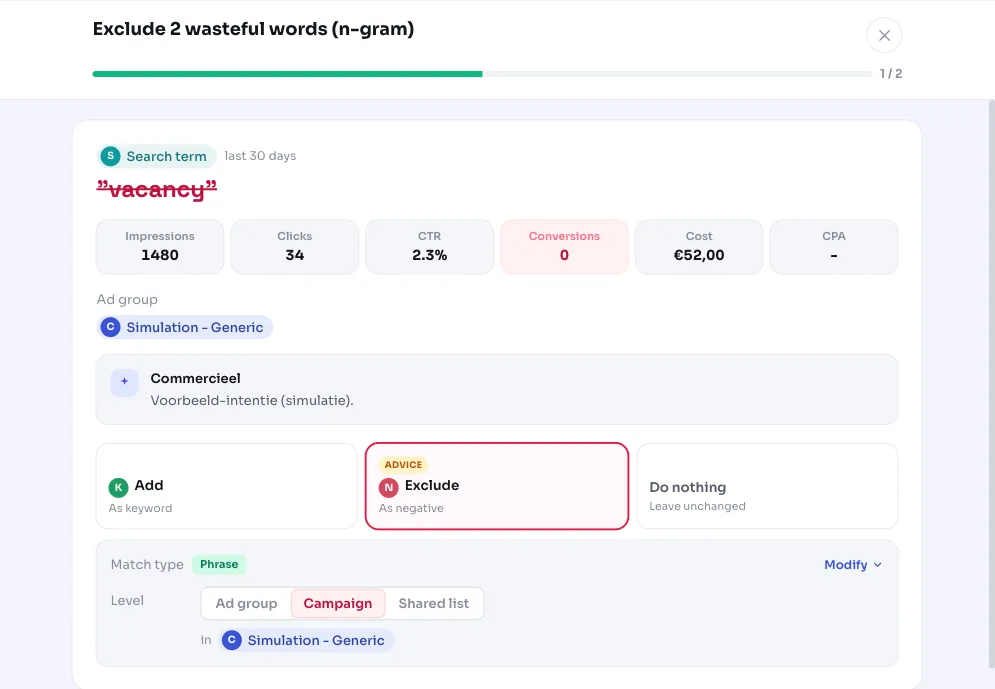
An example: the search terms 'marketing vacancy', 'sea specialist vacancy' and 'vacancy online marketing' together cost money without converting. The shared word is vacancy. Someone looking for a job isn't a customer, so excluding that one word saves a whole batch of bad search terms in one go.
Why it mattersOne negative keyword covers many search terms at once
Excluding wasteful search terms one by one works, but it's a losing battle: for every variant you exclude, three new ones pop up. A negative keyword on the recurring word also catches all future variants.
Because the exclusion is suggested as a PHRASE negative keyword by default, one word blocks every search term where that word appears in that order. That's more efficient than individual EXACT exclusions and keeps your search terms report cleaner over time.
The result is less waste and a sharper budget: money that used to go to searches without buying intent stays available for search terms that do convert.
How it worksHow AdBuilder finds wasteful n-grams
AdBuilder looks at the search terms report of the last 30 days (this window can scale with account size). Only search terms already classed as wasteful go into the n-gram analysis. Each word from those gets its own cost, click and search-term count.
A word only becomes a candidate if it meets all the conditions below. The exclusion lands in the campaign where that word costs the most, and the cost check is also measured on that campaign (that's where the evidence is).
- The word appears in at least 3 different wasteful search terms.
- Words shorter than 3 letters and stop words (like 'de', 'het', 'en', 'voor', 'the', 'and') don't count.
- With conversion tracking: the cost in the destination campaign is at least the higher of the floor or 2x the reference CPA. The absolute floor is €25, and €10 on small (low-volume) accounts.
- Without conversion tracking, the cost check falls back to at least €8 in waste and at least 5 clicks (that €8 scales with the analysis window).
- Protected words are never suggested: words from your own active keywords, words that appear in converting search terms, and dominant core words (present in 30% or more of all your search terms, provided there are at least 8 search terms).
- Per recommendation a maximum of 10 words appear, sorted by cost. If there are more, the rest follow in a later round.
What you can doWhat you can do with the recommendation
For each word you see how much it cost, how many search terms it appeared in, and a few example search terms it covers. That way you can check yourself whether the word really doesn't fit your target audience before you exclude it.
If you don't have conversion tracking on, this isn't a hard verdict but a click and cost signal. The recommendation is then called 'words to review': words with a lot of impressions, a notably low click-through rate and an above-average cost per click. Review them and exclude them if they don't fit, or mark them as not applicable.
- Check the words you want to exclude and leave uncertain cases alone.
- The exclusion is a PHRASE negative at campaign level by default; you can adjust the match type (exact, phrase or broad) and the level (ad group, campaign or shared list).
- Applying adds the negative keywords directly in Google Ads. This is reversible: remove the exclusion again and those search terms can serve again.
- Unsure about a word that's close to your core offering? On accounts with fewer than 8 different search terms the dominance protection doesn't kick in yet, so review those cases extra carefully.
Frequently asked questions
What is n-gram analysis in Google Ads?
N-gram analysis splits your search terms into individual words (or phrases) and tallies what each word costs and delivers. This shows you which word is structurally wasting money, even if no single search term is big enough to stand out on its own. AdBuilder uses individual words here and counts how often each word recurs in wasteful search terms.
What exactly do negative keywords do?
A negative keyword prevents your ad from showing on searches containing that word. With a PHRASE exclusion, that applies to every search term where the word appears in that order. This way you block a whole batch of wasteful search terms with a single word instead of excluding them one by one.
Doesn't this accidentally block my own keywords?
No, the detector accounts for that. Words present in your own active keywords, words that appear in converting search terms, and dominant core words (present in 30% or more of all your search terms) are never suggested. On very small accounts (fewer than 8 search terms) that last protection doesn't kick in yet, so review those cases yourself.
Does this also work without conversion tracking?
Yes, but then the recommendation changes character. Without conversion data AdBuilder can't see whether a word pays off, so it relies on clicks, impressions, click-through rate and cost per click. The recommendation is then called 'words to review' and is a signal to check, not a definitive verdict.
Why do I only get ten words at a time?
The recommendation shows a maximum of 10 words per round, sorted by cost, so you tackle the biggest wasters first without getting overwhelmed. If there are more candidates, the rest appear in a later round.