- Category
- Bidding & budget
- What it changes
- Adjusts the target CPA or target ROAS, in steps of at most 25% at a time
- Reversible
- Yes, the old target is preserved, so you can restore it
- Data we use
- 90 days of cost, conversions, conversion value and impression share lost to budget, plus the preceding 90 days as a trend check
- Typical trigger
- At least 30 conversions in 90 days and the target deviates 25% or more from the actual CPA or ROAS
- Priority
- Medium (bid optimization)
What it detectsWhen your Smart Bidding target deviates from performance
With Smart Bidding you give Google a target: a target CPA (the cost you want to pay per conversion on average) or a target ROAS (the conversion value you want to see back per euro spent). Google steers bids so the campaign works toward that target. If actual performance consistently drifts from the set target, that target works against you instead of for you.
AdBuilder flags campaigns where the set target is far from the measured reality. Think of a target CPA of 20 euros while the campaign has been running around 30 euros for 90 days, or the reverse, a target ROAS set much lower than what the campaign is really delivering.
Why it mattersWhy a realistic bid target matters
A target that's too strict chokes volume: Google doesn't dare bid enough and leaves conversions on the table that you'd actually have been fine with. A target that's too loose lets Google buy too expensively. In both cases, the bidding engine drifts away from your intent.
On top of that, Smart Bidding keeps learning better with an achievable target. If you set the target too far from reality, the strategy keeps fluctuating and never settles. A target that matches measured performance leads to calmer, more stable bidding and more predictable results.
How it worksHow AdBuilder calibrates the bid target
AdBuilder measures actual performance per campaign over 90 days and compares it with the set target. For a target CPA that's cost divided by conversions, for a target ROAS that's conversion value divided by cost. Only campaigns with enough data and a real deviation qualify.
Tightening a target costs the volume currently within your target, so AdBuilder is careful with that. A stricter target (a lower target CPA or a higher target ROAS) is only proposed if the campaign is demonstrably not budget-constrained (less than 5% impression share lost to budget) and the overperformance was also visible in the preceding 90 days. This prevents a one-off lucky streak from continually tightening your target. Making an unrealistic target more achievable (loosening it) is always allowed, even with a tight budget.
- Window: 90 days, with a 3-day margin on the most recent data so not-yet-fully-reported conversions don't skew the picture.
- At least 30 conversions in that window, so the verdict rests on enough data.
- The deviation must be at least 25%: the difference between actual and target, divided by the target, is 0.25 or more.
- Only active campaigns on Search, Shopping or Performance Max with a set target CPA or target ROAS.
- Campaigns whose target or bid strategy changed in the last 14 days stay out of view, since they're still in the learning phase.
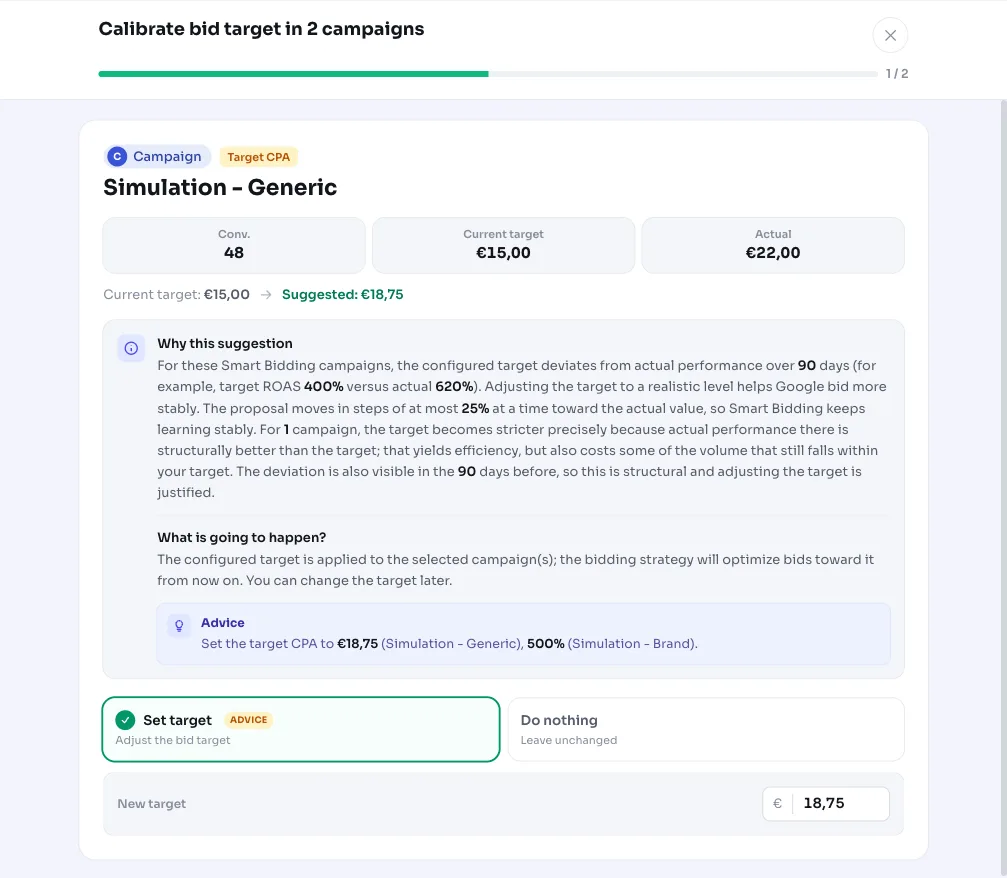
- The proposal moves in steps: at most 25% at a time toward the actual value, not in one jump.
- After a proposal, a 90-day cooldown applies before the same campaign can be calibrated again.
What you can doWhat you can do with the recommendation
The recommendation shows per campaign what the current target is, what the campaign actually achieves, and what target AdBuilder proposes. You apply it with one click, after which the new target is written to Google Ads. For a campaign like Brand search NL, for example, you'll see the current target CPA, the actual CPA over 90 days, and the proposed intermediate step.
- Apply: AdBuilder sets the proposed target CPA or target ROAS on the campaign.
- Adjust per campaign: you can tweak the proposed value before applying.
- Tighten or loosen: for campaigns consistently beating their target, the target gets stricter (more efficiency, less volume), for campaigns missing their target, the target becomes more realistic.
- Revert: the old target is preserved, so you can always undo the change.
Frequently asked questions
What is a target CPA in Google Ads?
Target CPA is the average price you want to pay per conversion. You give Smart Bidding that amount, and Google steers bids so cost per conversion averages around it.
What's the difference between target CPA and target ROAS?
Target CPA steers on cost per conversion, in other words a maximum price per conversion. Target ROAS steers on conversion value per euro spent, in other words a return target. CPA suits a fixed conversion value (like leads), ROAS suits varying order values (like a webshop).
Why does AdBuilder adjust the target in steps instead of all at once?
Jumping straight to the measured value bakes the measurement window's incidental inefficiency into your target, or abruptly chokes volume. Steps of at most 25% at a time keep Smart Bidding learning steadily.
Will my target get stricter if the campaign outperforms it?
Only if that's structural. Tightening doesn't happen if the budget is constraining the campaign (since then the good CPA is a budget artifact) and not if the overperformance only shows in the latest window. If it was also visible in the preceding 90 days and there's no budget ceiling, the target can be made stricter.