- Category
- Ads & assets
- What it changes
- When you wrap up the test, AdBuilder pauses the losing ad so the winner keeps running
- Reversible
- Yes, you can turn a paused ad back on and rotation is restored
- Data we use
- Impressions, clicks and conversions per ad since the test started (CTR or conversion rate)
- Typical trigger
- 95% confidence, enough data per ad and at least 3 days runtime
- Priority
- Medium
What it flagsYour A/B test has a clear winner
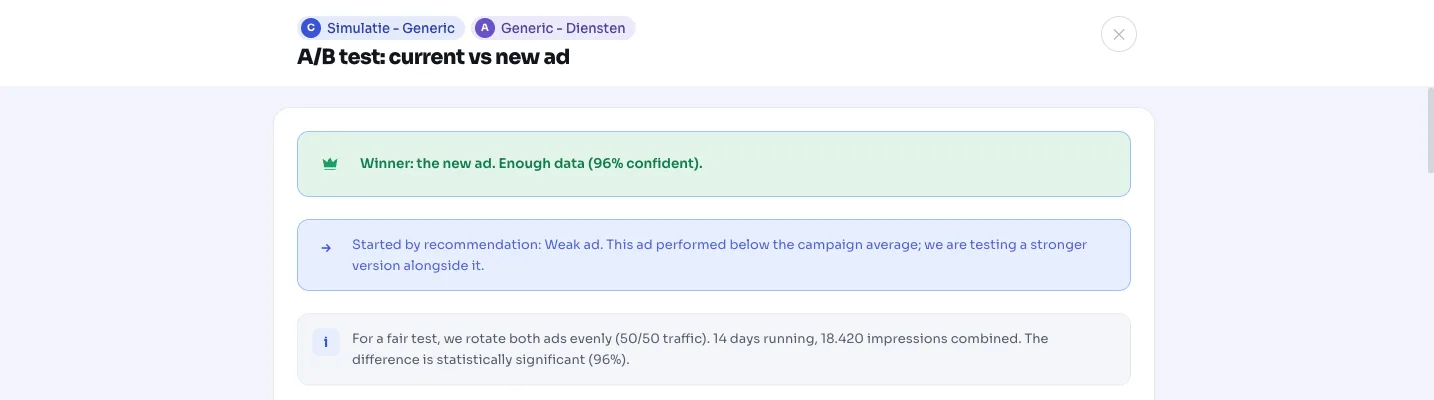
When you test two ads against each other in the same ad group in AdBuilder (an existing ad against a new variant), the tool tracks performance daily. As soon as a reliable winner emerges from the numbers, this recommendation appears in your optimization overview, letting you know the test is ready to wrap up.
The card tells you which ad wins (the current one or the new one), how confident that verdict is, and which metric it won on. For a text or pinning test we look at CTR (clicks divided by impressions); for a landing page test we look at conversion rate (conversions divided by clicks), since the ad copy is identical in that case.
This is a heads-up, not an automatic action: AdBuilder doesn't pause anything until you wrap up the test yourself.
Why it mattersA wrapped-up test is the only one that pays off
While a test is running, the ad group splits traffic evenly between both ads (ROTATE_FOREVER, so Google's rotation optimization is switched off). That's needed for a clean measurement, but it also means part of your impressions keep going to the weaker ad as long as you don't wrap up the test.
Wrapping up on time sends all your traffic to the ad that's demonstrably performing better. Bonus: while a test is running, other ad recommendations (like weak ads and asset improvements) skip that group. After wrapping up, they pick it back up and rotation returns to the original mode, so Google can optimize again.
How it worksWhen AdBuilder declares a winner
AdBuilder only declares a winner once three conditions are met at the same time. That way we avoid pausing a perfectly good ad based on random noise.
The sample size is determined upfront, not along the way. We calculate how many observations per ad are needed to reliably detect a 20% effect, given your current ad's baseline rate. Only once both ads hit that threshold do we look at the outcome. That prevents so-called peeking: if you re-check a test every day and cut it off the moment it happens to look significant, the odds of a false alarm are much higher than the intended 5%.
- At least 95% confidence (two-proportion z-test on CTR, or on conversion rate for a landing page test).
- Enough data: both ads hit the pre-calculated sample threshold, with an absolute floor of 200 observations per ad (impressions for a text test, clicks for a landing page test).
- At least 3 days runtime, measured from the test's start.
- There's a genuine lead (not a tie between the two ads).
What you can doWrap up the test or leave it running
Open the test from the card to compare both ads side by side (headlines, descriptions and the daily charts). You wrap up the test from that screen.
Wrapping up pauses the losing ad and keeps the winner active. AdBuilder first checks that the ad you're keeping can actually serve: if it's disapproved or paused elsewhere, the tool refuses to wrap up the test, so your ad group doesn't end up without an active ad. Everything is reversible: you can turn a paused ad back on later, and rotation returns to its pre-test setting.
- Wrap up the test and pause the loser (the winner keeps running).
- Choose yourself which ad to pause if you disagree with the outcome.
- Optionally add labels marking the winner and loser in your account.
- Archive the test without pausing anything (both ads stay in place).
- Dismiss the recommendation; it won't come back automatically for this test.
Frequently asked questions
How long should an A/B test run?
At least 3 days, but in practice for as long as it takes both ads to gather enough data and hit 95% confidence. On an ad group with little traffic that can take longer. If a test still hasn't found a winner after 60 days, we wrap it up automatically without pausing anything.
What happens if there's no clear winner?
The test keeps running until both the confidence level and the sample threshold are reached. If that doesn't happen within 60 days, AdBuilder quietly closes the test: both ads stay in place, rotation returns to its original mode and nothing gets paused.
Does AdBuilder wrap up the test automatically?
No. This recommendation is a heads-up that the test is ready. The loser only gets paused once you wrap up the test yourself, and you can choose which ad to keep.
Can I undo the pausing?
Yes. The loser gets paused, not deleted, so you can re-enable it later. The ad group also reverts to the rotation setting it had before the test.
What decides the winner: CTR or conversions?
For a text or pinning test it's CTR, since you're comparing different copy. For a landing page test the copy is identical, so we look at conversion rate (conversions per click).