- Category
- Quality Score & landing page
- What it changes
- Nothing automatically. It's a signal with advice; we only generate an improved wireframe of the page on request.
- Reversible
- Not applicable, nothing is changed in Google Ads.
- Data we use
- keyword_view: Quality Score, the component scores, and impressions over 30 days.
- Typical trigger
- Keyword with Quality Score 4 or lower and a below-average landing page experience, with at least 50 impressions.
- Priority
- High: quality tier, just above bidding and structure advice.
What it flagsKeywords with a low Quality Score and a weak landing page
Google Ads gives every active keyword a Quality Score from 1 to 10. That score is made up of three components: expected click-through rate (CTR), ad relevance, and landing page experience. Each component gets a rating of below average, average, or above average.
This recommendation looks specifically at keywords with a low Quality Score where the landing page experience is rated below average. That's the component you have the most direct control over: you can improve the page without touching bids or ad copy.
This is a purely signaling recommendation. AdBuilder doesn't change anything in your account; it identifies the keywords where the landing page is dragging down the Quality Score and shows the weakest component per keyword.
Why it mattersWhy a low Quality Score costs you money
Quality Score helps determine how much you pay per click and what position your ad appears in. With a low score, you often pay more for the same position than a competitor with a higher score, or you don't reach that position at all.
Landing page experience is a separate lever alongside your ad copy and your bid. If visitors land on a page that doesn't match what they searched for, loads slowly on mobile, or doesn't immediately show the promised content, the score stays low, no matter how good your ad is.
By improving the landing page for keywords with a lot of impressions, you tackle two things at once: a higher Quality Score in Google Ads and a page that converts visitors more often.
How it worksHow AdBuilder determines a low Quality Score
AdBuilder pulls the quality data for each active keyword from keyword_view over a 30-day window ending 3 days back (so fresh, still-incomplete days don't skew the numbers). Only keywords, ad groups, and campaigns with ENABLED status are included.
Impressions over that window are totaled per keyword. To filter out noise, only keywords with a Quality Score above 0 and at least 50 impressions remain.
AdBuilder then keeps the keywords with a Quality Score of 4 or lower where the landing page experience is below average. That list is sorted by impressions (biggest reach first) and the top 12 appear in the card. Ad groups that already have an open ad-and-landing-page recommendation, or that have an A/B test running, are left out here, since that action is already covered there.
- Source: keyword_view, 30-day window ending 3 days back.
- Only ENABLED keyword, ad group, and campaign.
- Baseline threshold: Quality Score above 0 and at least 50 impressions.
- Signal: Quality Score 4 or lower and landing page experience below average.
- Sorted by impressions, top 12 shown in the card.
- No conversion tracking needed: this is a quality and click signal.
- Groups with an open ad-and-landing-page recommendation or A/B test are excluded.
What you can doWhat you can do about a low Quality Score
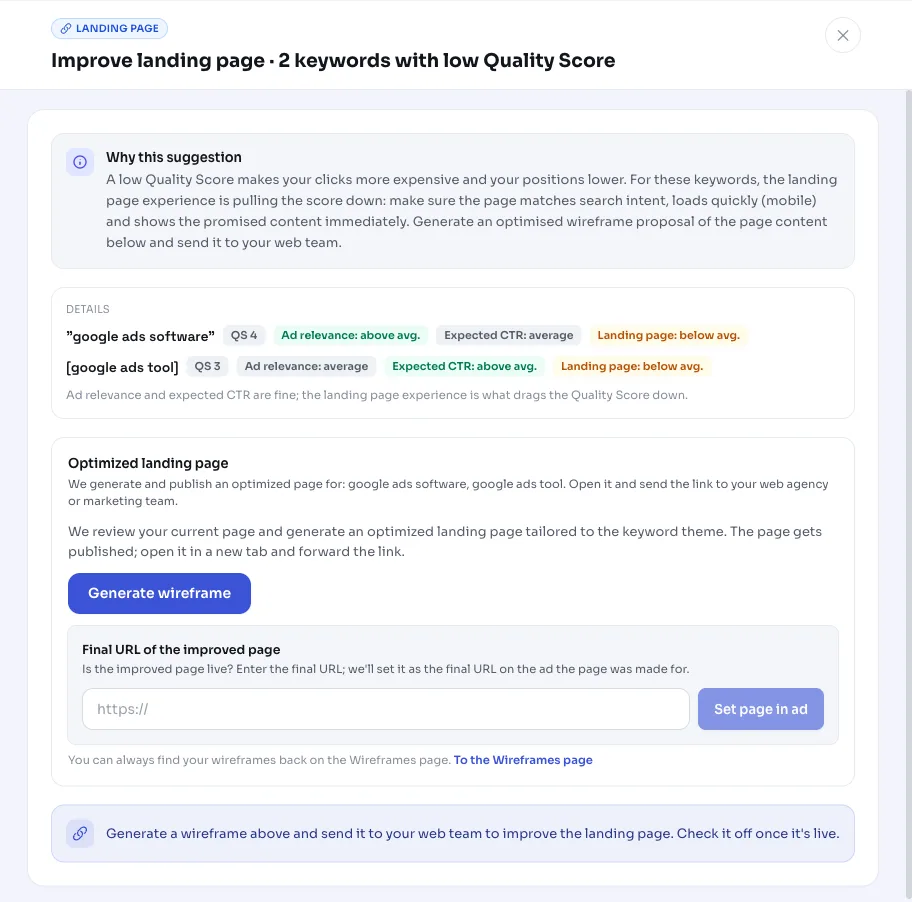
The recommendation itself doesn't change anything. It gives you the keywords where the landing page is dragging down the Quality Score, plus the weakest component per keyword, so you can improve in a targeted way.
If you want a concrete starting point, you can use a button to generate an optimized wireframe proposal for the page content. We only create it at that point, so we don't crawl your page on every check. You can forward the proposal to your web team as a basis for the new page.
- Make sure the landing page matches the search intent behind the keyword.
- Make the page fast, especially on mobile.
- Show the promised content right at the top, without distractions.
- Have an optimized wireframe proposal generated on request and share it with your web team.
- If the advice doesn't apply, mark the card as not applicable or dismiss it.
Frequently asked questions
What is Quality Score in Google Ads?
Quality Score is a rating from 1 to 10 that Google Ads gives every keyword. It's made up of three components: expected click-through rate, ad relevance, and landing page experience. A higher score generally means lower cost per click and better positions. This recommendation focuses on keywords with a low score where the landing page is the main weak link.
Does AdBuilder change anything about my campaign with this recommendation?
No. This is a signaling recommendation: nothing is changed in your Google Ads account. You see the keywords with a low Quality Score and can optionally have an improved wireframe proposal for the page created. That proposal is advice for your web team, not an automatic change.
Why don't I see this recommendation for a keyword with a low score?
The keyword needs at least 50 impressions in the last 30 days, a Quality Score of 4 or lower, and the landing page experience needs to be below average. If the weakness lies in ad relevance or expected CTR rather than the landing page, it won't show up here. We also leave out ad groups that already have an open ad-and-landing-page recommendation or an A/B test running.
How do I improve a keyword's Quality Score?
For this recommendation, start with the landing page: make the page match the search intent, make sure it loads fast (especially on mobile), and show the promised content right away. Ad relevance and expected CTR are separate levers you improve through your ad copy.