- Category
- Bidding & budget
- What it changes
- Lowers the daily budget to match actual spend (never raises it)
- Reversible
- Yes, the old daily budget is saved and can be restored
- Data we use
- Spend versus daily budget over 30 and 90 days plus the busiest day; no conversion data needed
- Typical trigger
- Average daily spend under 50% of the daily budget (30 days) and under 60% (90 days)
- Priority
- Low (budget scaling)
What it signalsCampaigns not using up their Google Ads budget
Some search campaigns have a daily budget set much higher than what they actually spend. The campaign runs fine, but day after day it doesn't come close to its cap. That's classic underspend: the budget is set high, but the demand or the bids just aren't there for it.
AdBuilder spots this by comparing average daily spend with the set daily budget. If that spend consistently stays well under budget, the tool flags it and suggests a lower, more realistic daily budget. The name you see in the app is Campaigns not using their full budget.
Why it mattersAn overly high daily budget skews your budget picture
Important to be upfront: a daily budget that isn't used up doesn't reserve anything in Google Ads, so it doesn't cost you anything either. Lowering it doesn't save you a euro. The gain lies elsewhere.
An inflated cap like that skews your view of your budget. You think you're setting aside more room than the campaign ever uses, and every signal that watches your budget (reports, projections, other recommendations) works off a number that isn't accurate. Aligning the daily budget with actual spend gives you a true picture of where your money is going, and keeps you focused on campaigns that actually do run up against their budget.
How it worksStructural underspend, with peak-day protection
The recommendation only looks at active search campaigns and requires underspend across two windows at once, so a temporary seasonal or holiday dip doesn't count. Only once both windows point to structural underspend does a campaign qualify.
To avoid a decrease trimming exactly the busy days conversions come from, a peak-day safeguard applies. Google may spend up to 2x the daily budget on a busy day and balances that out within the month. So AdBuilder only lowers a budget if it still comfortably exceeds even the busiest day of the last 90 days, and never sets the new budget below that peak.
- 30-day window: average daily spend under 50% of the daily budget, with at least €10 spent in that period.
- 90-day window: average daily spend also structurally under 60% of the daily budget.
- Peak-day gate: the daily budget must be at least 2x the busiest day of the last 90 days. If no peak is known, AdBuilder doesn't lower it.
- Proposed amount: just above the busiest day and comfortably above the average daily spend (at least 1.2x the average), always lower than the current budget.
- Excluded: campaigns on Target CPA or Target ROAS (there, underspend is expected behavior, the budget is just a cap), shared budgets, campaigns younger than 14 days, and campaigns losing meaningful impression share due to their budget (there, the budget genuinely is the constraint).
- Cooldown: budgets already changed in the last 30 days, or already carrying another open budget recommendation, are skipped to avoid back-and-forth adjustments.
What you can doApply the proposal or choose your own amount
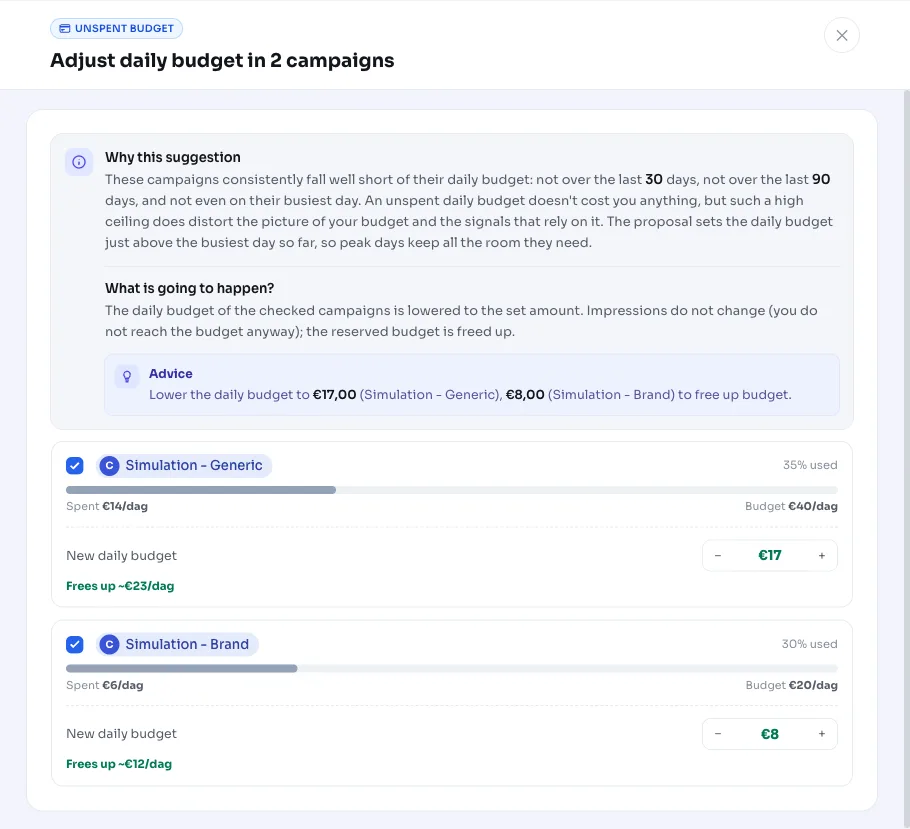
This recommendation carries out the change for you once you apply it: the daily budget of the relevant campaign(s) drops to the proposed amount. Since the old daily budget is saved, you can always undo the decrease.
- Apply the proposal: lower the daily budget to the proposed amount, just above your busiest day.
- Choose your own amount: adjust the new daily budget before applying, for example if you deliberately want more peak room.
- Ignore or postpone: leave the budget as is, for example if you're planning to scale up soon or a campaign has just restarted.
- Undo: if the campaign starts picking up again after all, revert the decrease back to the old daily budget.
Frequently asked questions
Why isn't my campaign spending its budget?
Usually because demand or bids aren't enough to use up the full daily budget: there simply aren't enough auctions you're competing in. That's not a mistake, but it does mean your daily budget is set higher than needed. One exception is a budget-constrained campaign that's actually losing impression share due to its budget; AdBuilder explicitly excludes that from this recommendation.
Do I save money by lowering my daily budget?
No. An unspent daily budget doesn't reserve anything in Google Ads, so it doesn't cost you anything either. Lowering it doesn't produce a direct saving. What it does do is make your budget picture, and the signals that watch it, accurate again, while your peak days keep all their room.
Does a campaign on Target CPA or Target ROAS also get flagged?
No. With target-driven Smart Bidding (Target CPA or Target ROAS), underspend is expected behavior: the budget there is just a cap, and the bid strategy determines how much gets spent. That also applies to a shared (portfolio) bid strategy with a target. Such campaigns aren't flagged.
Doesn't a lower daily budget cut into my best days?
There's a safeguard for that. AdBuilder only lowers a budget if it still exceeds even the busiest day of the last 90 days by at least a factor of 2, and sets the new budget just above that busiest day. Peak days keep their room this way.
Can I undo the decrease?
Yes. The old daily budget is saved, so you can put the budget back to its original value in a couple of clicks if the campaign picks up.