- Category
- Keywords
- What it changes
- Lowers the max CPC bid or pauses the keywords in a word cluster
- Reversible
- Yes, every pause and bid reduction can be undone
- Data we use
- Cost, clicks, and conversions per keyword over 365 days
- Typical trigger
- A word or word pair in 3+ keywords, together 0 conversions above the cost and click floor
- Priority
- Waste (tier 3 of 4)
What it flagsWords that keep recurring and together yield nothing
AdBuilder takes all your active keywords in active search campaigns and splits each keyword into individual words (unigrams) and word pairs (bigrams). For each keyword search, we then add up the cost, clicks, and conversions around each shared word. This creates a cluster per word or word pair: every keyword that contains that word.
If a word or word pair recurs in at least three keywords that together spent money but produced not a single conversion, that's a suspicious root word. Think of a product term, a place name, or an intent word that appears in many of your keywords but structurally doesn't convert. Very generic words (like the, for, buy, best, online) are excluded, and words shorter than three letters don't count, so you don't end up with clusters built on noise.
Why it mattersOne weak root word leaks budget across multiple keywords
A single keyword sometimes doesn't have enough traffic to draw conclusions from. But if the same word appears in ten or twenty keywords, all those small bits of traffic add up to enough clicks for a fair verdict. If that whole group then shows zero conversions, chances are the problem lies in the shared word, not in one isolated keyword.
That also makes it the cheapest place to intervene: you fix things at the root-word level instead of reviewing dozens of keywords one by one. This mostly comes up with broad match keywords in Google Ads and with long, specific terms, where the same weak word easily recurs across many variants. The recommendation shows how much the keywords involved spent together and roughly how much you'd save per month.
How it worksThe thresholds: 3+ keywords, 0 conversions, enough clicks and cost
We look back 365 days by default. That long window gives low-volume keywords, like long tail keywords, enough time to convert, and it captures seasonal conversions, so a word that only converts in a particular season isn't unfairly flagged as waste.
For each word cluster, we look at the combined cost, clicks, and conversions. A cluster only becomes a candidate if it meets all the conditions below. The click floor is a fair-chance threshold: we derive from your account-wide conversion rate (conversions divided by clicks, across all campaign types) how many clicks a word needed at minimum to expect one conversion on average. If it got fewer clicks, zero conversions is simply too little traffic, not proof of waste.
Keywords already picked up by the poorly performing keywords recommendation are excluded here, so you don't get two conflicting actions on the same keyword. And keywords that did convert in the 60 days before the window are likely in a temporary dip and don't count, neither as an action nor as evidence for the cluster.
- Lookback window: 365 days (active keywords in active search campaigns).
- Zero conversions: the whole cluster together has fewer than 1 conversion.
- Cost floor: at least 10 euros per 30 days, so about 122 euros in shared costs over the full-year window.
- Click floor: at least the maximum of 10 clicks and (2 divided by your account conversion rate), rounded up; if there's no usable average, a fixed floor of 25 clicks applies.
- At least 3 keywords per cluster that actually spent (each with at least 1 click and cost above zero), after removing duplicates and keywords already picked up elsewhere.
- Up to 12 clusters, sorted by cost (the most expensive first).
- Conversion gate: the recommendation only appears if conversion tracking is on.
What you can doPer cluster: lower the bid or pause the keywords
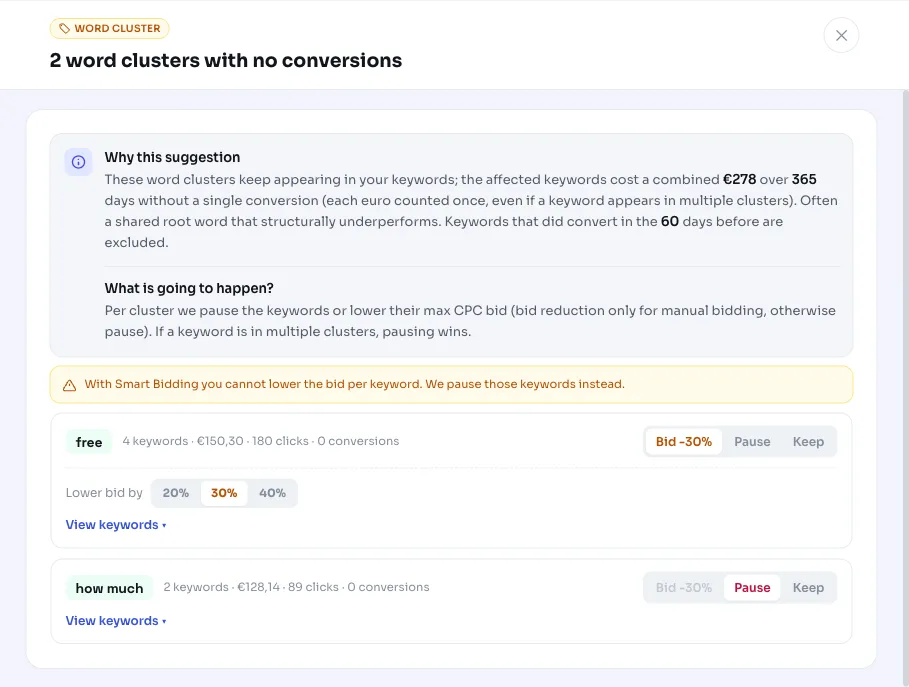
You decide per word cluster what should happen. With manual bidding, you can lower the max CPC bid of the keywords involved; we suggest 30 percent by default, adjustable between 5 and 80 percent. Want to go further? Pause the keywords in the cluster entirely.
If the campaign uses smart bidding, the bid can't be adjusted per keyword. In that case we pause the keyword instead of lowering the bid, and the recommendation flags that too. Within a cluster, you can also check or uncheck individual keywords, so you only include the real waste. If a keyword falls into multiple clusters, pausing wins over lowering the bid, and the largest reduction applies.
Everything is reversible: a paused keyword can be reactivated and a lowered bid can be restored to its previous value. After applying, we keep the recommendation quiet for about 30 days, so new waste can surface again later without you getting the same alert right away.
- Lower the bid: only with manual bidding, 30 percent by default, adjustable from 5 to 80 percent.
- Pause: the keywords in the cluster stop serving.
- Smart bidding: bid can't be lowered per keyword, so we pause instead.
- Check or uncheck individual keywords within a cluster.
- Fully reversible; roughly a 30-day cooldown after applying.
Frequently asked questions
What's a word cluster or root word?
A word cluster is the set of keywords that share a particular word or word pair. AdBuilder splits each keyword into individual words (unigrams) and word pairs (bigrams) and groups around those. If that shared word, the root word, performs poorly across all those keywords together, it's likely the real cause of the waste.
Why do I sometimes get a bid reduction and sometimes a pause?
With manual bidding, we can lower a keyword's max CPC bid directly. With smart bidding, the bid strategy sets the bids and there's no per-keyword bid to lower; pausing is then the logical move, and that's what the recommendation suggests.
Why does AdBuilder look back a full year?
Low-volume keywords, like long tail keywords, need time to build up conversions. A year gives them that chance and also captures seasonal peaks, so a word that only converts in a particular season isn't unfairly flagged as waste.
Does this recommendation work without conversion tracking too?
No. The whole logic is based on keywords that spend money without converting. If conversion tracking is off, we have no reliable conversion signal, so this recommendation is suppressed.
Can I undo this if it turns out to be the wrong call?
Yes. Every action is reversible: a paused keyword can be reactivated and a lowered bid can be restored to its original max CPC. You're never locked in.