- Category
- Ads & assets
- What it changes
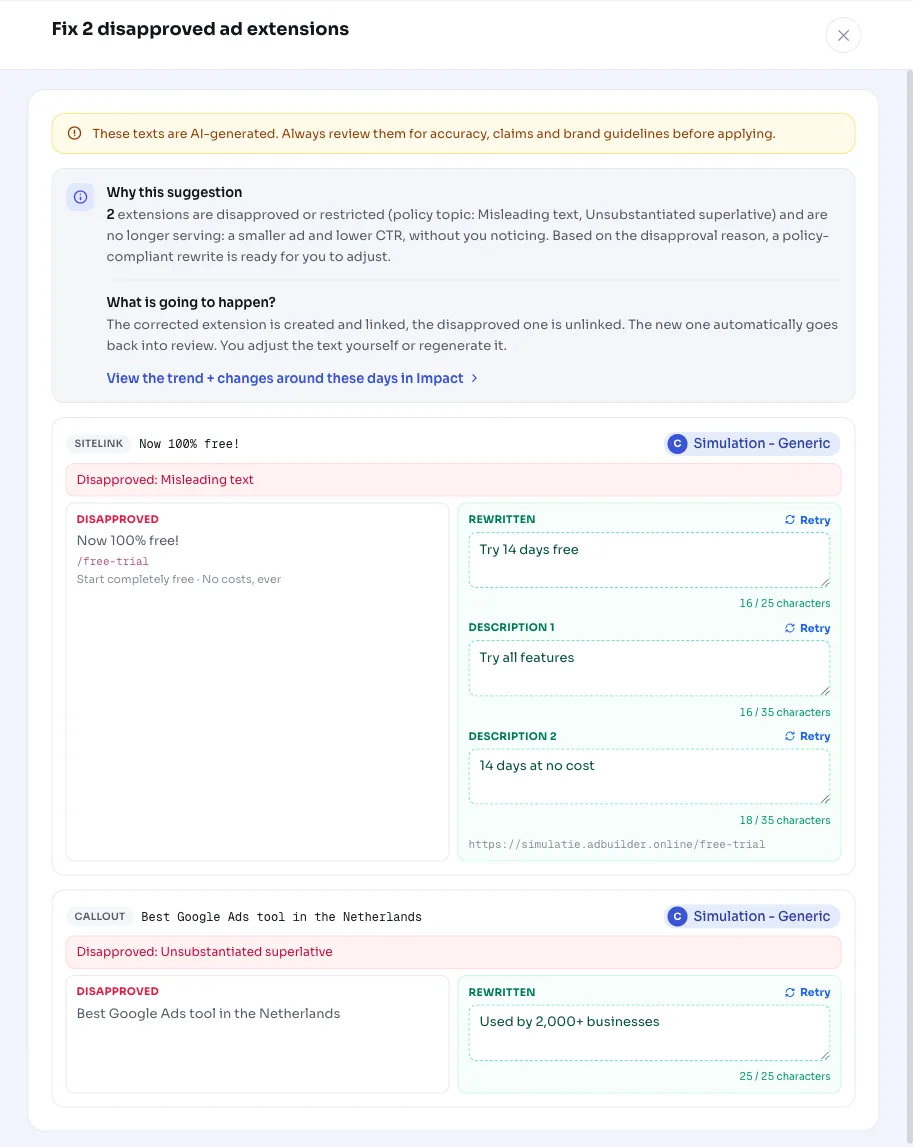
- Prepares a rewritten replacement for each disapproved text extension; applying it links the new extension and unlinks the old one
- Reversible
- Yes, reversible per link
- Data we use
- Approval status and policy topics of your extension assets (no performance figures)
- Typical trigger
- At least 1 extension with status disapproved or approved with limitations and a policy reason
- Priority
- High (critical), same policy layer as disapproved ads
What it flagsDisapproved and limited extensions you don't see
Ad extensions are the extra lines under your ad: sitelinks, callouts and structured snippets. They make your ad bigger and more informative and generally boost click-through rate. Each extension is reviewed separately by Google Ads, and Google can disapprove it or approve it only with limitations.
The annoying part is that this happens silently. Your ad keeps running, just smaller and with fewer lines, while your overview shows nothing unusual. This recommendation surfaces exactly those extensions: which ones are disapproved, which ones are approved with limitations, and which policy topic caused it.
Why it mattersA disapproved sitelink costs you impressions and clicks
A disapproved sitelink or callout no longer serves. Your ad is shown smaller as a result, takes up less space in the search results and often gets fewer clicks, without any warning appearing anywhere. With multiple disapproved extensions, that adds up.
An extension approved with limitations (APPROVED_LIMITED) is more nuanced: it still runs, but not everywhere, for example not in every country. AdBuilder deliberately separates these two statuses, so you make an informed choice and don't accidentally replace something that's still working fine.
This is about policy, not performance. That's why this recommendation sits in the highest layer alongside disapproved ads: first make sure everything is allowed to run, then optimize on the numbers.
How it worksHow AdBuilder detects disapproved extensions
AdBuilder reads the linked extensions at campaign and ad group level and only looks at what's actually live: the campaign, the ad group and the link must all be active (ENABLED). Of those extensions, we keep only the assets with status disapproved (DISAPPROVED) or approved with limitations (APPROVED_LIMITED) and at least one concrete policy reason.
An extension can be linked to multiple campaigns or groups. AdBuilder therefore groups by asset, so one rewrite covers all its links at once. For text extensions (sitelink, callout, structured snippet), AdBuilder immediately prepares a policy-compliant rewrite, with a limit of 6 rewrites per run. Non-text extensions (image, promotion, video) can't be fixed with a text change; those are only flagged, up to a maximum of 10.
This recommendation doesn't use a conversion or performance threshold, since it's a policy judgment, not a matter of figures. If you dismiss the card, it stays hidden for 14 days. Right after applying, it's also briefly not shown again, so the fix and the undo option stay preserved in your history.
- Source: linked extensions at campaign and ad group level (campaign_asset and ad_group_asset).
- Status: disapproved (DISAPPROVED) or approved with limitations (APPROVED_LIMITED), with at least 1 policy reason.
- Text extensions (sitelink, callout, snippet): rewrite prepared, up to 6 per run.
- Non-text extensions (image, promotion, video): flagged only, up to 10.
- Active campaigns, groups and links only; dismissed cards stay hidden for 14 days.
What you can doFix it, edit it, or leave it
For text extensions, the recommendation opens with a proposal per extension: the original text stays visible next to a rewritten version that avoids the policy issue. You can edit any suggestion first. When you apply it, AdBuilder creates the new extension, links it everywhere the old one was linked, and unlinks the old one. The old asset itself is kept, only the link changes, so you can undo the action per link.
For an extension approved with limitations, for example in the Summer sale campaign, a warning applies: you'd be replacing something that's currently still running, and the new asset has to go through review again. If you don't want that risk, leave it as is. For non-text extensions there's no automatic fix button; you resolve those manually in Google Ads using the given policy reason.
- Edit the suggested text or accept it and apply.
- Applying links the new extension and unlinks the disapproved one.
- Undoing is possible per link; the old asset is kept.
- You may prefer to leave a limited-approval extension as is to avoid the new review.
- Fix image, promotion and video extensions yourself in Google Ads.
Frequently asked questions
What are ad extensions?
Ad extensions are the extra elements under your ad, such as sitelinks, callouts and structured snippets. They make your ad bigger and more informative and often boost click-through rate. Each extension is reviewed separately by Google Ads.
Why was my extension disapproved?
A sitelink, callout or snippet gets disapproved when the text conflicts with ad policy, for example due to capitalization, punctuation or a disallowed claim. AdBuilder shows the policy topic per extension and prepares a rewrite that avoids that topic.
What happens to a sitelink approved with limitations (APPROVED_LIMITED)?
It still serves, but not everywhere, for example not in every country. You can replace it, but doing so removes something that's currently still running, and the new asset has to go through review again. AdBuilder calls this out separately, so you decide whether to leave it as is.
Can I undo the fix?
Yes. Applying it links a new extension and unlinks the disapproved one; the old asset is kept. You can undo the action per link, which restores the old extension exactly.