- Category
- Search terms & negatives
- What it changes
- Removes the blocking negative keyword and/or pauses the positive keyword
- Reversible
- Yes, the negative is recreated and the keyword reactivated
- Data we use
- Active keywords and negative keywords at ad group, campaign and list level (Search), plus 180 days of history as context
- Typical trigger
- An active keyword overlaps with your own negative keyword
- Priority
- Quality and policy layer: a precondition you fix before bidding or scaling up
What it flagsActive keywords blocked by your own negative
In every Google Ads account you can set negative keywords in multiple places: per ad group, per campaign and via a shared negative keyword list. Handy, but it also makes it easy to accidentally exclude a keyword you actually want to advertise on.
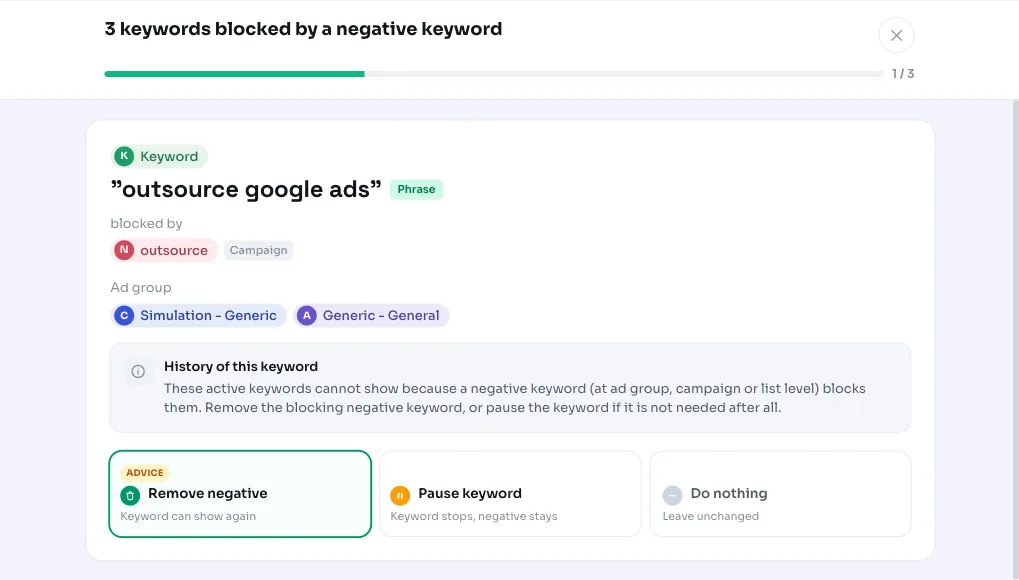
This recommendation looks at all your active keywords in active Search campaigns and checks whether one of your own negatives at any of the three levels overlaps with them. If there's a conflict, AdBuilder flags the keyword along with the negative that's blocking it, so you can check whether that exclusion was really intended.
Why it mattersYou're paying for a keyword you've switched off yourself
A keyword you deliberately added, but that's being choked off by your own exclusion, is wasted effort and sometimes wasted reach. How hard the conflict hits depends on the match type of the positive keyword.
With an exact keyword, the negative blocks all impressions: the keyword can't run at all anymore. With a broad or phrase keyword, the negative only blocks the searches that match the negative, while the keyword keeps serving on other searches. That's why AdBuilder doesn't automatically conclude that the keyword is dead: it may be that the exclusion is doing exactly what you want. The point is that you check it consciously.
How it worksHow we track down a conflict
AdBuilder pulls all active keywords from active ad groups in active Search campaigns, and lines those up against all negative keywords at ad group, campaign and list level. For each keyword we determine whether one of those negatives blocks it. The matching logic follows the match type of the negative:
- Exact negative: blocks only if the text is exactly identical to the keyword.
- Phrase negative: blocks if the full negative text appears as a contiguous sequence of words within the keyword.
- Broad negative: blocks if all the individual words of the negative appear somewhere in the keyword.
- Match-type variants of the same keyword in the same ad group are merged into one item. A maximum of 10 conflicts are shown at a time.
How it worksHistory as context, no conversion threshold
There's no conversion threshold on this recommendation: every conflict is relevant, even without recent conversions. We do add the history of the past 180 days per blocked keyword (clicks, impressions, CTR, conversions and CPA), derived from a window ending three days back so the conversion data is complete.
That history is purely context. If the keyword had clicks or conversions during that period, you'll get a note to double-check whether the exclusion is warranted, since the keyword may have been blocked by accident. If there were no impressions or clicks, you can safely leave it excluded or paused. The history doesn't determine whether the recommendation appears, only how we color the advice.
What you can doResolve the conflict or deliberately leave it
For each conflict you decide what should happen. The action is a real change in Google Ads, but fully reversible: removed negatives are recreated on revert and paused keywords reactivated.
- Remove the blocking negative keyword, at the level where it sits (ad group, campaign or shared list).
- Pause the positive keyword if you don't actually need it: that keeps the exclusion intact for the rest of the account.
- Leave the conflict as is if the exclusion is deliberate. Removing a negative can reopen traffic you deliberately shut off, so don't force anything.
Frequently asked questions
How do I find conflicting negative keywords?
AdBuilder automatically scans your active Search keywords against all negative keywords at ad group, campaign and list level. If it finds an overlap, this recommendation appears with the keyword and the negative blocking it.
Does a negative keyword always block all impressions?
No. With an exact keyword, the negative blocks all impressions. With a broad or phrase keyword, it only blocks the searches that match the negative, while the keyword keeps running on other searches.
Does AdBuilder also look at shared negative lists?
Yes. Besides negatives at ad group and campaign level, we also check the shared negative keyword lists linked to your active campaigns.
Can I undo the change?
Yes. A removed negative keyword is recreated on revert and a paused keyword reactivated, so you're back to the old situation.