- Category
- Bidding & budget
- What it changes
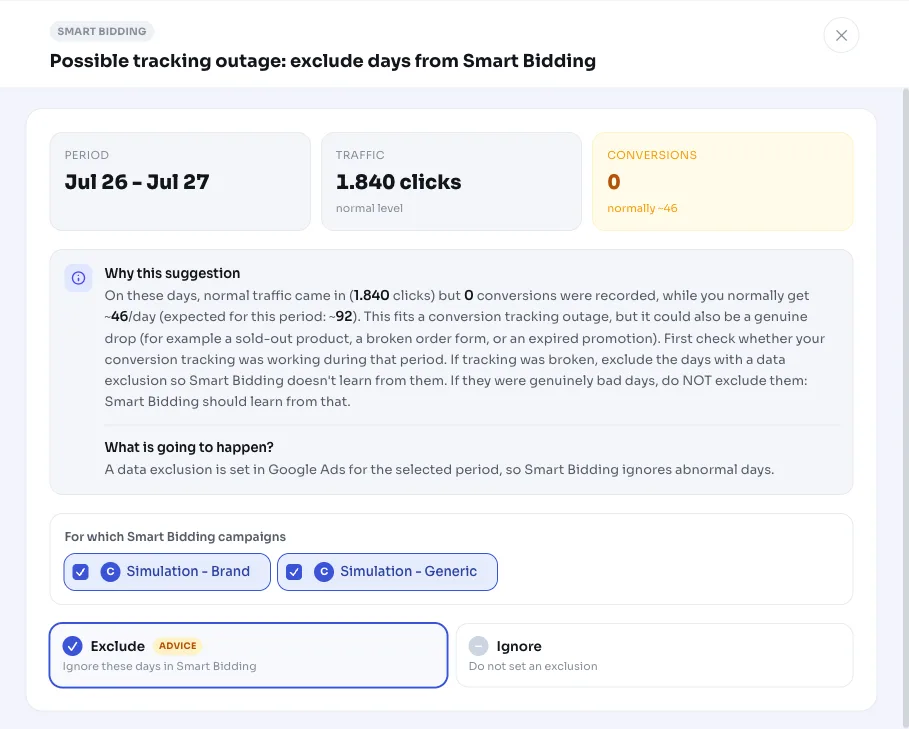
- Creates a data exclusion (bidding data exclusion) for the anomalous days, per Smart Bidding campaign
- Reversible
- Yes, the exclusion can be removed again
- Data we use
- Account-wide daily figures (clicks and conversions) over 60 days, plus existing data exclusions in Google Ads
- Typical trigger
- One or more consecutive days with at least half of your median daily clicks but 0 measured conversions
- Priority
- Medium (bidding tier)
What it detectsDays with normal traffic but zero conversions
AdBuilder looks at your account-wide daily figures and searches for days that don't add up: clicks came in as usual, but not a single conversion was measured that day. If your account normally gets conversions every day, a gap like that is suspicious.
Often there's a measurement problem behind it: a conversion tag that stopped firing temporarily, a changed thank-you page, a broken script, or another tracking error. But it could also be a genuine downturn, for example a sold-out product, a broken order form, or a promotion that just ended. The recommendation flags the pattern and deliberately leaves the conclusion to you, since the numbers alone can't distinguish between the two.
Why it mattersSmart Bidding learns from your conversions, including the wrong ones
Conversion-driven bid strategies in Google Ads (like target CPA, target ROAS and maximize conversions) steer your bids based on measured conversions. If your measurement dropped out for a few days, Smart Bidding sees those days as hopeless traffic and pulls bids down. You end up paying later for a dip that never actually happened.
With a data exclusion you tell Smart Bidding to ignore those specific days when learning. The bid strategy then bases itself only on data that's correct. Important: this is only the right move if the measurement was genuinely broken. If they were real bad days, Smart Bidding should learn from them, and you should NOT exclude them.
How it worksHow AdBuilder detects a measurement gap
The detector looks back 60 days at account level and needs at least 14 days of data. It only runs if you have at least one campaign on conversion-driven Smart Bidding, since exclusion has no effect without that bid strategy. Your account also needs to convert normally: the daily average is above 0.2 conversions per day, otherwise a day with 0 conversions doesn't tell you much.
- Anomalous day = at least half your median daily clicks, but 0 measured conversions.
- The last 3 days don't count. Conversions are recorded on click date and those days are still catching up, so 0 conversions there is normal.
- Consecutive anomalous days are merged into one period.
- A period only stands if 0 conversions is statistically near-certain not to be chance: the number of conversions you'd normally expect over those days (daily average times number of days) must be at least 3, and more the more days we've scanned (a correction for multiple testing).
- Periods already covered by a data exclusion in Google Ads are skipped. Only a new, not-yet-covered gap leads to a recommendation.
What you can doCheck your measurement first, then exclude
The recommendation names the exact period, the number of clicks, and the number of conversions you'd normally expect. First check whether your conversion measurement was working during those days: did anyone monitor the tag, was the thank-you page reachable, did anything change on the site or the script?
- Measurement was broken: apply the recommendation. AdBuilder creates a data exclusion for the period. By default it applies to all your Smart Bidding campaigns, but you can choose which campaigns the exclusion covers yourself.
- They were genuine bad days: do NOT exclude them. Doing so removes healthy data and steers Smart Bidding in the wrong direction.
- Not sure? You can remove the exclusion again later. The action is reversible.
Frequently asked questions
What is a data exclusion in Google Ads?
A data exclusion (bidding data exclusion) tells Smart Bidding to ignore a certain period when learning from your conversions. Use it if your measurement temporarily broke down, so your bid strategy doesn't base itself on incorrect numbers.
When should I exclude days, and when not?
Only exclude if your measurement was genuinely broken, for example a conversion tag that stopped firing or a changed thank-you page. If they were real bad days (sold-out product, broken order button, promotion ended), don't exclude them: Smart Bidding should learn from them.
Why doesn't AdBuilder count the last few days?
Conversions are recorded on click date and often still trickle in for a few days. So the last 3 days are still catching up, making 0 conversions normal there. Those days are skipped to prevent false alarms.
Which campaigns does this work on?
On campaigns with conversion-driven Smart Bidding: Search, Shopping, Display and Performance Max. By default the exclusion applies to all your Smart Bidding campaigns, but you can adjust the selection yourself.
Can I revert an exclusion?
Yes. The recommendation is reversible: the created data exclusion can be removed again, after which Smart Bidding counts that period again.