- Category
- Search terms & negatives
- What it changes
- Adds negative keywords (you choose the match type); sometimes a term is moved instead
- Reversible
- Yes, you can always remove a negative keyword again
- Data we use
- Search terms report plus your active keywords, the last 30 days by default, with a 90-day dip check
- Typical trigger
- 0 conversions, less than 1 euro in value, at least 5 clicks, and cost above the floor (10 euros for small accounts, otherwise 25 euros, or 2x your reference CPA)
- Priority
- Waste tier: comes after tracking and structure fixes
What it flagsSearch terms that cost you money without delivering anything
If you advertise on broad or phrase match keywords, Google also matches your ads to searches you never chose yourself. The search terms report shows exactly which ones those were. Some of them got clicks and burned budget but delivered zero conversions. That's exactly what this recommendation looks for.
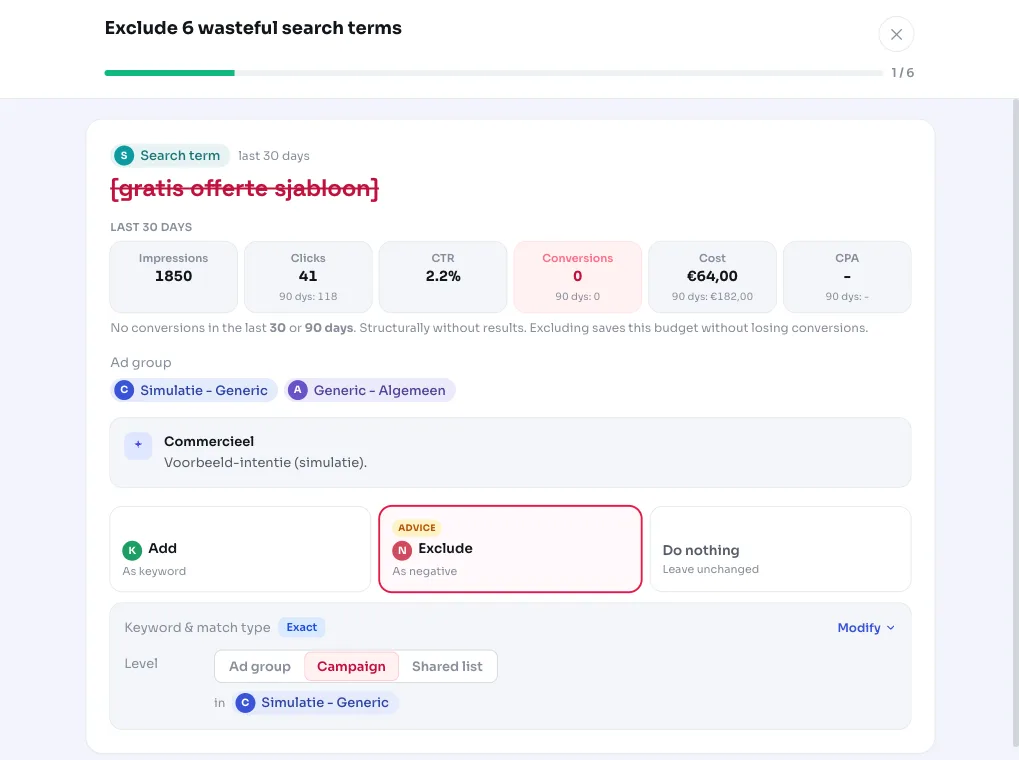
AdBuilder gathers clicks, cost, and conversions per search term and campaign. A search term stands out if it had 0 conversions, less than 1 euro in conversion value, at least 5 clicks, and enough cost to be meaningful. For those terms, we suggest excluding them as negative keywords so you don't keep paying for them.
Why it mattersWhy negative keywords protect your budget
Every click on an irrelevant search term is money that isn't going to searches that actually bring in customers. Negative keywords are the tool for cutting off that waste without touching your good keywords. They simply tell Google: I don't want to show up for this search.
Manually combing through the search terms report is tedious, especially with multiple campaigns. This recommendation does that work for you and lists only the terms that actually cost money, sorted by cost. That way you tackle the biggest leaks first and stay on top of your spend without going through the full report every week.
How it worksThe thresholds and checks behind the recommendation
By default we look at the last 30 days (this window can be longer for accounts with less data). Each search term and campaign must meet all the base requirements: 0 conversions, less than 1 euro in conversion value, and at least 5 clicks. On top of that, a cost threshold applies so we don't flag noise.
That cost threshold is relative to your account. If you have conversion tracking, cost must be at least 2x your reference CPA (roughly two missed conversions' worth of burned budget), with an absolute floor: 10 euros for small accounts and 25 euros for larger ones. That reference CPA is a weighted mix of your campaign CPA and your non-brand account CPA, so cheap brand conversions don't artificially lower the bar. Without conversion tracking as a reference, a fixed floor applies: at least 5 clicks and at least 5 euros (scaled with the window).
To avoid accidentally cutting off good searches, several safeguards are built in. We look back 90 days: a term that converted within that window at an acceptable CPA (no more than 2x your benchmark) is protected from exclusion, since it could just be a temporary dip. If it did convert, but far too expensively, it stays a candidate with that context added. If a search term is also your own active keyword in the same ad group, we never suggest it as a negative. And if the search term contains your brand name, we flag that, since excluding it in a generic campaign effectively redirects traffic to your brand campaign.
We show a maximum of 10 terms at a time, sorted by cost. If there are more, they follow in a later round once you've handled these. If individual terms don't hit the threshold, but at least 4 small zero-conversion terms together burn enough (above the floor and 2x your non-brand reference CPA), we suggest them as a bundle. If you have no conversion tracking set up at all, a fair review variant runs instead: it flags terms with high impressions, a notably low click-through rate, and an above-average cost per click as candidates to review, without pretending we know whether they convert.
- Base requirements per search term and campaign: 0 conversions, less than 1 euro in value, at least 5 clicks.
- With conversion tracking: cost at least 2x reference CPA, with a floor of 10 euros (small accounts) or 25 euros.
- Without a CPA reference: at least 5 clicks and at least 5 euros in cost (scaled with the window).
- 90-day dip check protects terms that converted profitably recently.
- Your own active keywords in the same ad group and brand terms are handled separately.
- Maximum of 10 terms at a time; the rest follow in a later round.
What you can doExclude, move, or mark as not applicable
The recommendation is advice with choice: you decide which terms to exclude and with which match type (exact, phrase, or broad). That way you stay in control of how strict the cutoff is. For a term that's simply leaking budget, excluding it is the logical step.
For some terms you'll see a move option instead of excluding. That happens when the same search term is already an active keyword elsewhere that's performing worse there (no conversions, lower quality). Then you can add the term here and pause the weaker keyword elsewhere, so you consolidate instead of just cutting. If you see a term with your brand name in it, consider routing it to your brand campaign instead of excluding it entirely.
Not sure about a term? Mark it as not applicable. The recommendation disappears and won't come back. A negative keyword you later want removed can always be deleted manually, so the action is reversible.
- Exclude with your chosen match type (exact, phrase, or broad).
- Move: add the term here and pause the weaker keyword elsewhere, where that's the smarter option.
- Route brand terms to your brand campaign rather than excluding them entirely.
- Mark as not applicable if a term is actually relevant.
Frequently asked questions
How do I exclude search terms in Google Ads?
You add the search term as a negative keyword at the campaign or ad group level and choose a match type. AdBuilder prepares the candidates that actually cost money, so all you have to do is pick the match type and confirm.
What's the difference between a search term and a negative keyword?
A search term is what someone actually typed into Google that triggered your ad; you see them in the search terms report. A negative keyword is an instruction to Google not to show your ad for searches containing that word. This recommendation turns wasteful search terms into negative keyword suggestions.
When does a search term count as wasteful?
When it had 0 conversions over the measurement period, less than 1 euro in conversion value, at least 5 clicks, and cost high enough: at least 2x your reference CPA with a floor of 10 euros for small accounts or 25 euros above that. Without conversion tracking, a fixed floor of 5 clicks and 5 euros in cost applies.
Could this accidentally exclude good searches?
We try to prevent that. We look back 90 days and protect terms that converted profitably recently, we never suggest your own active keywords in the same ad group as negatives, and brand terms are flagged separately. You also always have the final say and choose the match type.
Does this work without conversion tracking?
Yes, but it works differently, in fairness. Without conversion tracking we can't tell if a term converts, so a review variant runs instead, suggesting terms with high impressions, a low click-through rate, and a high cost per click for you to check. That's a click and cost signal, not a definitive judgment.