- Category
- Bidding & budget
- What it changes
- Pauses the search campaign (after your approval); alternatively lowers CPC or budget first
- Reversible
- Yes, you can turn a paused campaign back on
- Data we use
- Cost, clicks, conversions and conversion value per campaign (last 30 days, up to 3 days back) plus 60 days of history before that
- Typical trigger
- 0 conversions and 0 conversion value on at least 50 euro of cost and at least 30 clicks over 30 days
- Priority
- High (waste tier); also blocks scaling up the same campaign
What it signalsA campaign with no conversions that keeps costing money
AdBuilder tallies cost, clicks and conversions per search campaign over the last 30 days. If it finds a campaign that's using up budget but delivering 0 conversions and 0 conversion value, it surfaces as a recommendation titled "campaign with cost and 0 conversions".
The alert only covers search campaigns (Search). Other campaign types have their own checks. Waste in Shopping, for example, is reviewed separately at the product level.
This recommendation doesn't answer "why does my campaign have no conversions" with a cause, but it does put the campaign on the table with the exact cost and clicks, so you can step in with intent instead of letting it run.
Why it mattersMoney leaking out with no result
A campaign with 0 conversions in Google Ads over a full month means every euro in that campaign is currently delivering nothing. The recommendation shows how much was wasted in the period and an estimate of what stepping in would save per month.
As long as this alert is open, AdBuilder also blocks proposals to scale up that same campaign. It doesn't make sense to raise the budget of a campaign you might actually want to pause, so those conflicting recommendations are held back for a while.
How it worksThe thresholds and the dip-versus-dead check
A search campaign is flagged if it meets all the conditions below over the 30-day window. That window ends 3 days ago, so late-arriving conversions can still come in and aren't counted as zero.
To avoid false alarms on fresh campaigns, campaigns younger than 14 days are excluded. They're still ramping up, and 0 conversions doesn't tell you much yet.
- 0 conversions and less than 1 in conversion value (so a campaign measuring on value alone isn't unfairly caught)
- At least 50 euro of cost in the window
- At least 30 clicks in the window
- Campaign at least 14 days old
- Search campaigns only
How it worksTemporary dip or structurally dead
Before AdBuilder proposes pausing, it looks at the 60 days before the window (day 31 through 90). That's how it determines whether the zero is new or has been going on longer.
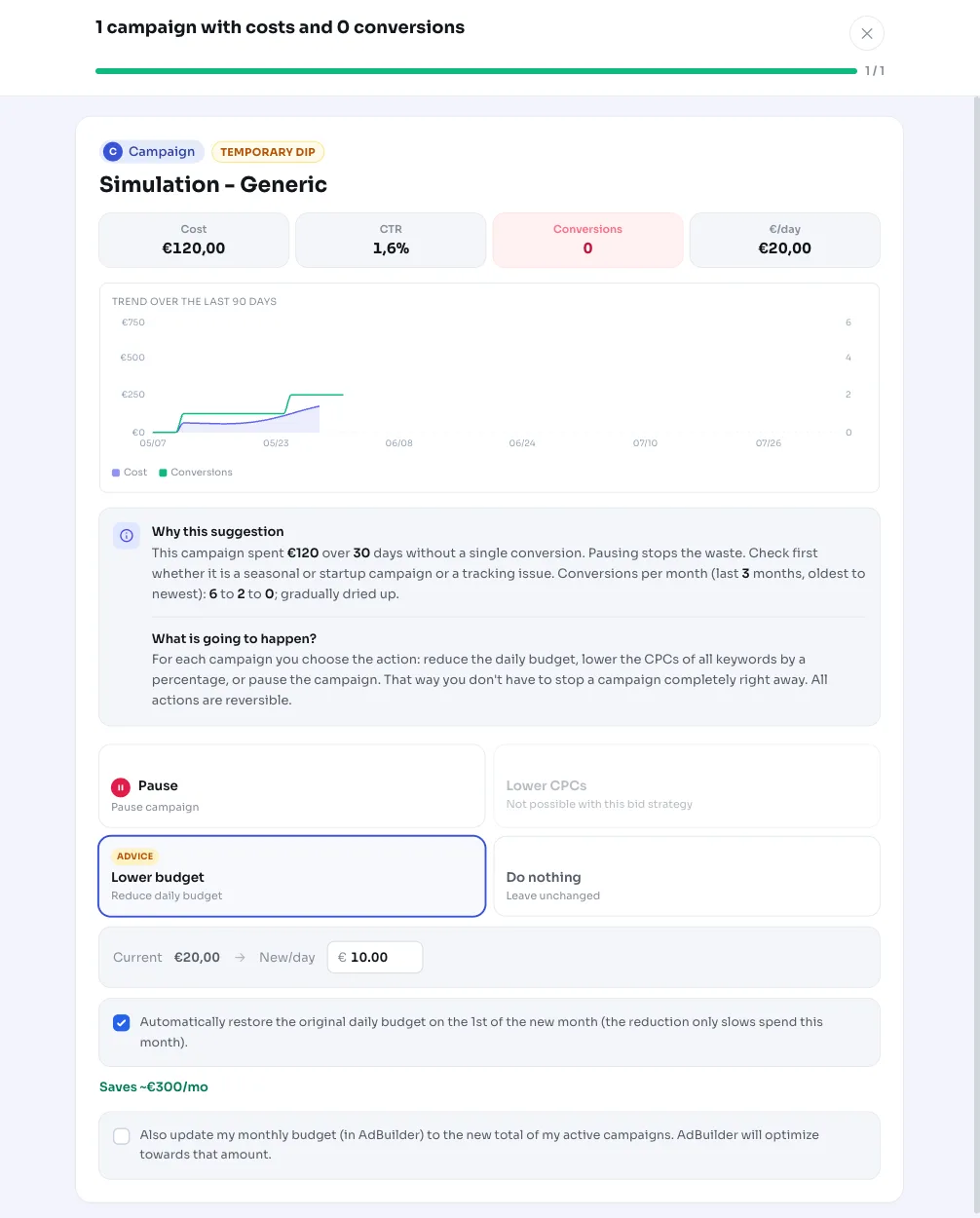
If the campaign still had conversions or conversion value in that earlier period, AdBuilder calls it a dip: probably temporary or seasonal. The advice then is not to pause right away, but to first lower the CPC on expensive keywords or the budget, so you keep the traffic and the chance to convert.
If there were also 0 conversions in those 60 days, and there's enough history (at least 14 days of daily figures), the zero is structural and pausing is the logical step. If there's not enough history to say that with confidence, AdBuilder reports that honestly and recommends a milder adjustment first. The reasoning shows conversions per month from old to new, plus a 90-day chart of cost and conversions.
What you can doPause, adjust, or postpone
You stay in control. AdBuilder changes nothing in Google Ads until you approve. You have these choices:
- Pause: AdBuilder sets the campaign to paused. This is reversible, you just turn the campaign back on later.
- Adjust first (recommended for a dip): lower the CPC on the expensive, non-converting keywords or lower the campaign's Google Ads budget, and see if it recovers before pausing.
- Postpone: leave the recommendation alone for 30 days ("review again"). It reappears afterward if the situation hasn't improved.
- Dismiss: if you don't find the alert relevant, hide it.
Frequently asked questions
Does AdBuilder pause my campaign automatically?
No. The recommendation is a proposal. Nothing changes in Google Ads until you approve it yourself. If you do end up pausing, it's reversible: you turn the campaign back on later.
Why does my campaign have no conversions according to this alert?
AdBuilder sees that the campaign cost at least 50 euro and 30 clicks over the last 30 days without a single conversion or conversion value. This recommendation doesn't itself name the cause (wrong keywords, weak landing page, tracking), but it does put the campaign clearly on the table so you can look into it with intent.
What if it's just a temporary dip?
AdBuilder accounts for that. If the campaign still had conversions in the 60 days before that, it's flagged as a dip, and the advice is to lower your CPC or budget first rather than pause right away.
Does this also apply to Shopping or Display campaigns?
No, this recommendation only looks at search campaigns. Waste in other channels is picked up through separate checks, like wasteful products in Shopping.
Why does the window end 3 days ago?
Conversions sometimes arrive with a delay. By ending the 30-day window 3 days early, late conversions still count, and a campaign isn't wrongly labeled as zero-conversion.