- Category
- Tracking & measurement
- What it changes
- Nothing in Google Ads, it's a signal; you apply the fix yourself
- Reversible
- Not applicable (nothing is changed in Google Ads)
- Data we use
- Enabled conversion actions (default value) plus 90 days of reported conversion value
- Typical trigger
- All enabled conversion actions have a default value of 0
- Priority
- High: this sits in the measurement layer (layer 0), the foundation under bidding and scaling
What it flagsYour conversions carry no value
You're measuring conversions (there's at least one enabled conversion action), but none of them have a value. Google Ads counts how often a conversion happens, but not how many euros are behind it. A 20-euro order and a 2,000-euro order then count exactly the same.
This flag is specifically about conversions without value. If no conversion action is enabled at all, you'll see the "No active conversion actions" recommendation first, not this one. This signal only appears once measurement is working but value is missing.
Why it mattersWithout conversion value, you can't bid on revenue or ROAS
Value-based bidding strategies like Maximize conversion value and target ROAS (tROAS) need conversion value to work. Without value there's nothing to maximize on revenue: bidding then optimizes on counts at best, treating every conversion as equally valuable.
This falls in the measurement layer (layer 0), the foundation all bidding and scaling decisions rest on. It's not a hard blocker (it doesn't suppress other recommendations), but it does limit how precisely you can steer. If you want to bid on ROAS with conversion value, you need that value first.
How it worksHow AdBuilder determines this
AdBuilder retrieves your enabled (ENABLED) conversion actions and looks at the default value (default_value) per action. The recommendation only fires if no enabled action has a default value above 0.
- There must be at least one enabled conversion action. If the list is empty, that's a different signal (No active conversion actions), not this one.
- Trigger: all enabled conversion actions have a default value of 0.
- Gate: the signal only appears if conversion tracking is on and the account-level conversion value toggle is on. If you turn that toggle off in AdBuilder, the recommendation won't appear.
- False-positive check: if at least one action has a dynamic value (always_use_default_value is off), AdBuilder first checks whether conversion value was actually reported in the last 90 days. If value is coming in, value measurement is working through the tag and the flag won't appear.
- If that 90-day check is inconclusive or the query fails, the recommendation deliberately doesn't fire: better no recommendation than a false one.
- If the conversion actions live under a manager account (MCC), an empty list at account level is expected and no false measurement alarm is raised.
What you can doAdd conversion value or mark that value doesn't matter
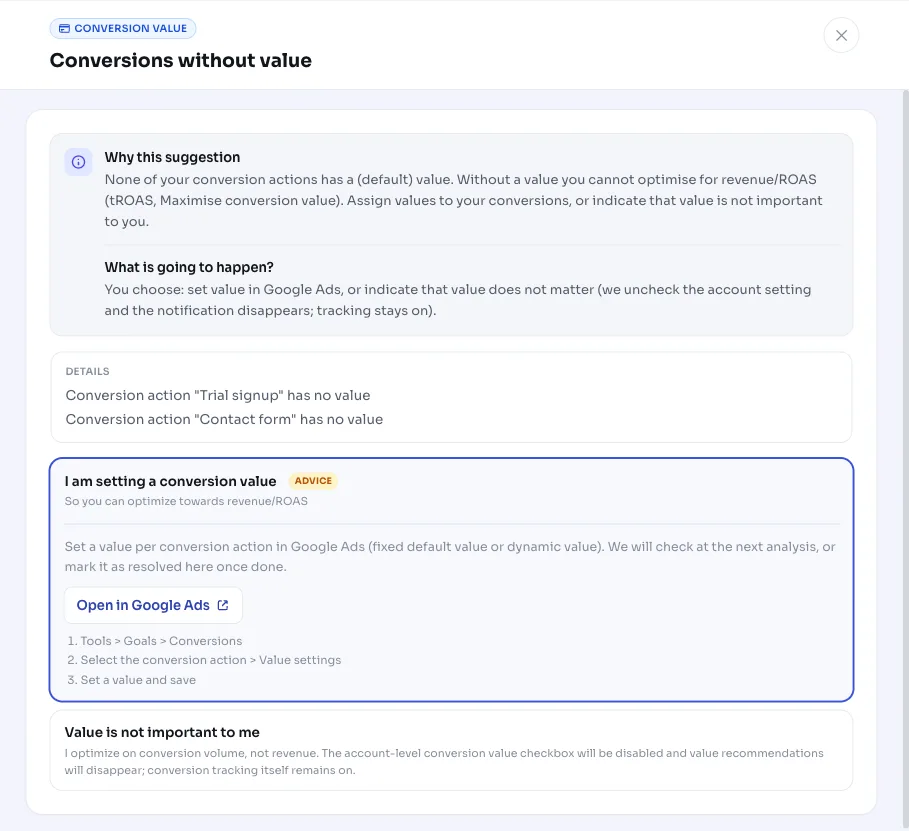
AdBuilder doesn't change anything in Google Ads here. You have two ways to make this signal disappear.
- Set conversion value in Google Ads: give your conversion actions a value. This can be a fixed default value per action, or a dynamic transaction value passed along by your tag or GA4 link (recommended for online stores). This is how you set a conversion value in practice: it's done in the value settings of the conversion action.
- Mark that value isn't important to you: fits, for example, pure lead generation where every lead counts equally. This choice only turns off an internal preference toggle in AdBuilder (your conversion tracking stays on as-is) and makes the recommendation disappear. You can turn that choice back on later.
Frequently asked questions
How do I set a conversion value?
In Google Ads, in the value settings of the conversion action. Choose a fixed default value per action, or let your tag or GA4 link pass a dynamic transaction value. AdBuilder doesn't do this automatically; the flag disappears once at least one enabled action has a value.
Does AdBuilder change my Google Ads settings?
No. This is a diagnostic signal. Adding conversion value is something you do yourself in Google Ads. The only button that does anything turns off an internal preference toggle in AdBuilder; AdBuilder doesn't touch your Google Ads account.
My conversions really have no value (lead generation), what now?
Choose the option that says conversion value isn't important to you. That turns off the internal toggle and makes the recommendation disappear, while your conversion tracking keeps running as normal. You can turn that choice back on later.
Why don't I see this flag when my default value is 0?
Usually because conversion value is still coming in through a dynamic tag: AdBuilder checks the last 90 days for reported value and holds back the flag if it finds any. Also, if conversion tracking is off or the account-level conversion value toggle is off, the recommendation won't appear.