- Category
- Bids & budget
- What it changes
- Shows alerts at 80%, 90% and the hard limit; with auto-pause on, it pauses your active campaigns at the hard limit
- Reversible
- Yes: paused campaigns automatically turn back on on the 1st of the new month, and you can always restore them yourself
- Data we use
- Month-to-date spend (daily figures, supplemented from 90% with a live check), your set monthly budget and the allowed overage
- Typical trigger
- Your spend reaches 80%, 90% or the hard limit (monthly budget plus allowed overage, default +10%)
- Priority
- Low (tier 5, budget scaling), but the hard-limit alert is an important safety net
What it detectsWhen do you get an alert about your Google Ads budget?
Budget monitoring compares how much you've spent this calendar month so far with the monthly budget you set yourself in the account settings. Once your spend passes 80% of that monthly budget, an alert appears. At 90% a second, more urgent alert follows. And when you reach your hard limit, you get the strongest alert of the three.
The hard limit isn't the same as your monthly budget. It's higher: your monthly budget plus a margin you set yourself (default 10%). That way you get a warning before you actually hit your ceiling.
Without a set monthly budget, there's nothing to monitor. If you haven't set a limit, this alert stays hidden.
Why it mattersWhy a budget alert protects you from unexpected costs
Google Ads spends what it can within the bounds of your bid strategy and daily budgets. A spike in traffic, a new campaign or a more aggressive bid strategy can make your spend climb faster than expected. Without monitoring, you often only notice once the month is over.
The figures monitoring normally relies on run about a day or two behind. That means a campaign can already be well past your limit before it shows up in the daily reporting. To close that gap, from 90% of your monthly budget AdBuilder pulls your actual month-to-date spend live and uses the higher of the two values. That way monitoring steps in on time instead of too late.
The hard-limit alert is mainly a safety net: it stops you from silently overspending your budget for days on end.
How it worksHow budget monitoring calculates your spend and limit
Budget monitoring runs daily alongside account sync, for every connected account. The calculation uses three ingredients: your spend this month, your monthly budget and the allowed overage.
The hard limit is monthly budget times (1 plus the overage). With a monthly budget of, say, 1,000 euros and the default 10% overage, the hard limit is 1,100 euros. The thresholds where an alert appears depend on your spend as a percentage of the monthly budget.
- 80% of your monthly budget: alert "You're at 80% of your monthly budget", showing your spend, your budget and where the hard limit sits.
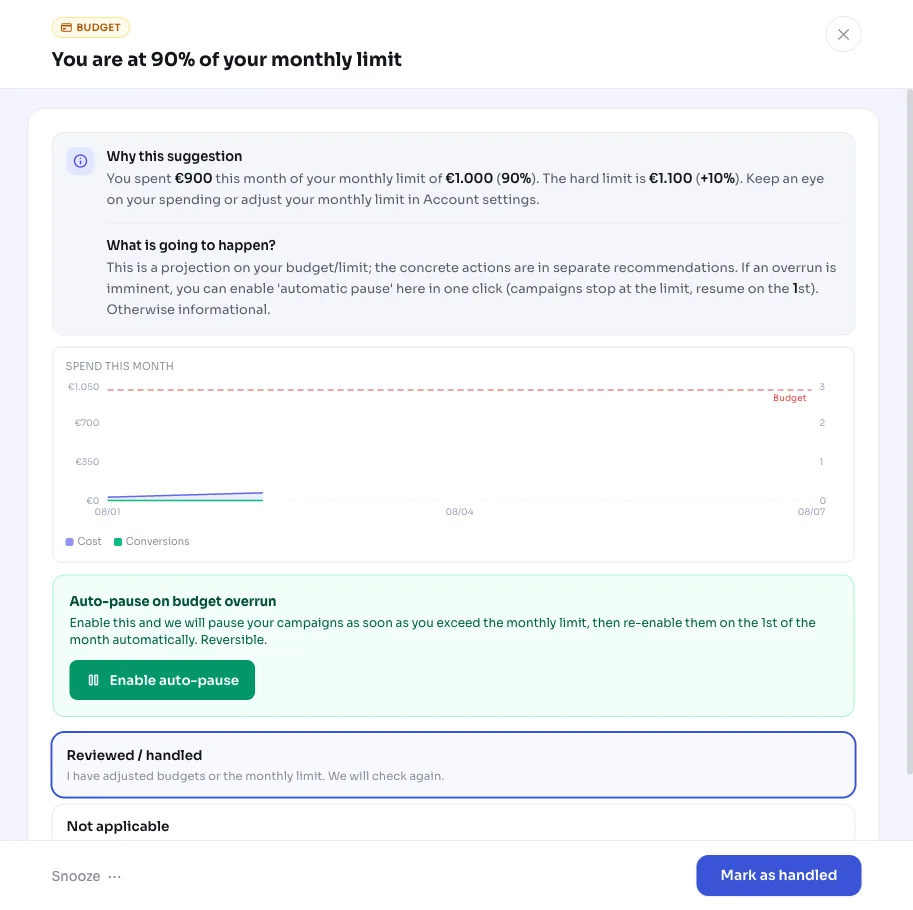
- 90% of your monthly budget: alert "You're at 90% of your monthly budget". From here we supplement the stored figures with a live check of your actual spend.
- Hard limit reached, auto-pause off: alert "Hard budget limit reached". Your campaigns keep running.
- Hard limit reached, auto-pause on: alert "Monthly budget reached: campaigns paused". Your active campaigns are paused once.
What you can doWhat you can do with the alert
The 80% and 90% alerts are signals: you don't have to do anything, but you can adjust your spending or your monthly budget in the account settings. For the hard limit, you decide yourself how strict to be with the auto-pause setting.
If auto-pause is on and you hit the hard limit, AdBuilder pauses all your active campaigns and remembers exactly which ones. On the 1st of the new month, those campaigns are automatically turned back on. Campaigns you've touched yourself in the meantime are left alone; they're not automatically restored. You can of course also turn campaigns back on manually at any time.
- Leave auto-pause off if you'd rather step in yourself: you'll then just get the alerts and your campaigns keep running.
- Turn auto-pause on if you want a hard brake: campaigns stop at the limit, with automatic recovery in the new month.
- Adjust your monthly budget or allowed overage in the account settings if the thresholds don't fit your situation.
- Raise your monthly budget if you're structurally hitting the limit and the extra spend is paying off.
Frequently asked questions
How do I set up a budget alert for Google Ads?
Set a monthly budget and, optionally, an allowed overage in the account settings. Once that's in place, AdBuilder automatically monitors your spend and shows alerts at 80%, 90% and the hard limit. Without a set monthly budget there's nothing to monitor and the alert stays hidden.
What's the difference between my monthly budget and the hard limit?
Your monthly budget is your target. The hard limit sits above it: your monthly budget plus the allowed overage (default 10%). With a monthly budget of 1,000 euros, the hard limit is 1,100 euros. The 80% and 90% alerts relate to the monthly budget; the pause (if enabled) is tied to the hard limit.
Are my campaigns really paused automatically?
Only if you've turned on auto-pause and you reach the hard limit. Then AdBuilder pauses your active campaigns once and automatically turns them back on on the 1st of the new month. If auto-pause is off, you just get an alert and your campaigns keep running.
Can I revert an automatic pause?
Yes. Paused campaigns turn back on automatically at the start of the new month. Campaigns you've adjusted yourself in the meantime are deliberately left alone by the monitoring. And you can turn any campaign back on yourself at any time.
Why does AdBuilder pull my spend live from 90% onward?
The daily figures run about a day or two behind. So from 90% of your monthly budget, AdBuilder pulls your actual month-to-date spend live and uses the higher of the two values. That way monitoring steps in on time instead of only once the delayed figures arrive.