- Category
- Targeting & structure
- What it changes
- Sets the campaign's location option to 'presence in your targeted locations' (PRESENCE)
- Reversible
- Yes, we restore the previous setting in one go
- Data we use
- Campaign cost and conversions plus the geographic report (where people physically were), 30 days
- Typical trigger
- Search campaign on 'presence or interest' with >= €20 in cost and demonstrable waste outside your target area
- Priority
- Medium (waste layer)
What it flagsYou're paying for people outside your target area
In Google Ads, the location options don't just determine where you advertise, but also whether someone needs to be in that area or just show interest in it. The default setting is 'presence or interest': your ad then also shows to people outside your target area who are searching about it. For a local or regional search campaign, that's often exactly the traffic that doesn't convert.
This recommendation triggers when a search campaign is set to 'presence or interest' and the geographic report shows that people who were physically outside your targeted areas cost money without producing a conversion. So we don't flag every campaign that isn't set to 'presence', only the ones where the waste actually shows up in the numbers.
Why it mattersDifference between presence and interest in Google Ads
The difference between presence and interest looks small, but it determines who sees your ad. With 'presence', you pay for people who are in your area or regularly visit it. With 'presence or interest', that expands to anyone searching about or showing interest in your area, even from the other side of the country or abroad.
For brands that only deliver in a specific region, that traffic is usually wasted budget: those clicks cost money but rarely lead to a purchase or inquiry. By targeting presence, you keep your budget in your own market and your impressions go to people you can actually serve.
How it worksHow AdBuilder proves the waste
AdBuilder doesn't guess here, it proves the waste with data first. The check runs over the last 30 days, with a window ending 3 days back so late conversions are included.
First we pre-select active search (SEARCH) campaigns whose location setting is anything other than 'presence', usually the default 'presence or interest', and that cost at least €20 in that period. Then we check the cost per campaign of regions that were physically outside your targeted areas.
- The regions outside your target area together produced less than 1 conversion.
- And the cost there is high enough: with conversion data, at least 2x your reference cost per conversion and above the fixed floor of €25 (€10 on small accounts); without conversion data, at least 5 clicks and €20 in cost.
- If the campaign has no explicit target area (targeting the whole world), we can't determine 'outside', so the recommendation stays silent.
- If the setting is already 'presence', there's nothing to tighten, so the recommendation stays silent there too.
What you can doSet targeting to presence
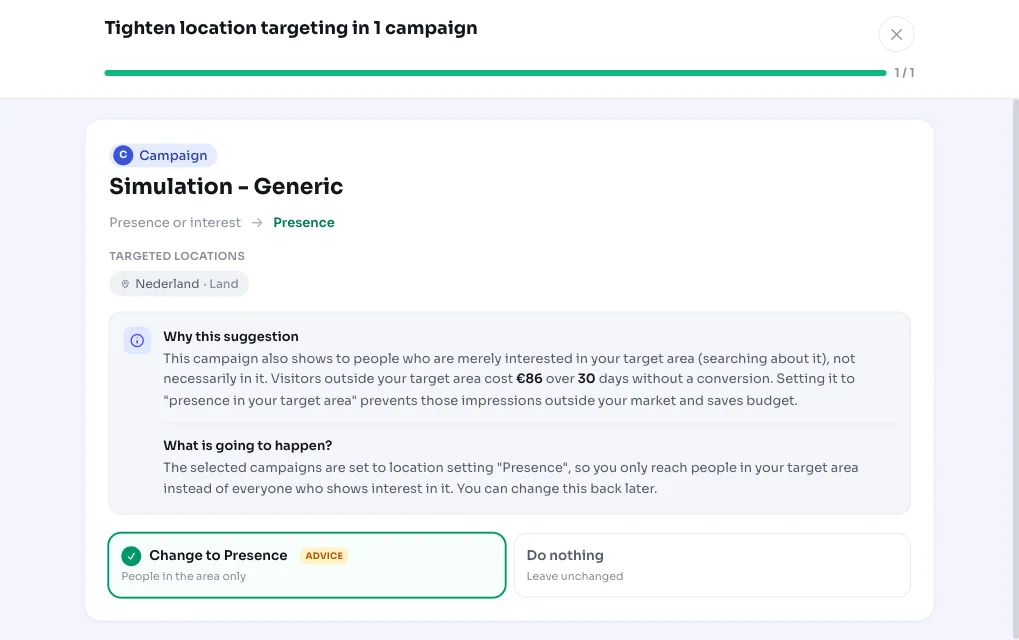
When the recommendation appears, you see per campaign which target areas are involved, how much was lost outside your area, and the estimated monthly saving. You apply it to all shown campaigns, or pick a few yourself.
Applying it sets the location setting of those campaigns to 'presence in your targeted locations'. Not happy with it? Revert it in one go: AdBuilder restores the previous setting.
- Apply to all, or choose per campaign which ones to change.
- The setting moves to 'presence in your targeted locations' (PRESENCE).
- Fully reversible: the previous setting is restored.
- Don't want to switch the whole campaign? Instead, you can just exclude the regions outside your area (the 'exclude regions' recommendation). AdBuilder never counts the same euros twice as savings.
Frequently asked questions
What's the difference between presence and interest in Google Ads?
With 'presence', your ad shows to people who are in your targeted area or regularly visit it. With 'presence or interest' (the default), that expands to people who are just searching about or showing interest in your area, even from outside your market. This recommendation suggests the first, tighter option.
Do I lose reach if I target on presence?
Your reach narrows, since you drop the interest-based traffic from outside your area. That's why we only flag this when that traffic demonstrably cost money without converting. You're trading reach that wasn't converting anyway for budget that stays in your own market.
Can I undo this change?
Yes. AdBuilder remembers the previous setting per campaign and restores it with one click. The recommendation then becomes available again.
Why don't I see this recommendation for my campaign?
Several possible reasons: the campaign is already set to 'presence', it cost less than €20, it targets the whole world (so 'outside' can't be determined), or there's simply no demonstrable waste outside your target area. In all those cases, the recommendation deliberately stays silent.