- Category
- Quality Score & landing page
- What it changes
- With your approval, pushes a more relevant, complete ad to Google Ads (new ad goes live, old one gets paused) and then offers a landing page step: a better final URL or a wireframe.
- Reversible
- Yes. The new ad replaces the old one, which is only paused, not removed. You can revert by reactivating the old ad.
- Data we use
- Quality Score components per keyword (ad relevance, expected CTR, landing page experience), impressions and clicks over 30 days, plus the final URL and its content.
- Typical trigger
- Quality Score 1 to 4, at least 50 impressions, and both the ad (relevance or expected CTR) and the landing page experience below average.
- Priority
- High. Quality tier, right after measurement issues and policy issues.
What it flagsTwo bottlenecks in the same ad group
In Google Ads, Quality Score is made up of three components: ad relevance, expected CTR (click-through rate), and landing page experience. This recommendation triggers when an ad group falls short on two fronts at once: the ad is weak (ad relevance or expected CTR is below average) and the landing page experience is also below average.
That's different from just a weak ad. If only the ad falls short, you get the standalone ad quality recommendation. If the landing page experience is also below average, AdBuilder tackles both together, because a new ad alone won't fix a weak page.
Why it mattersWhy Quality Score carries so much weight in Google Ads
Quality Score helps determine what position your ad appears in and what you pay per click. A low score (1 to 4) often means a higher cost per click for a weaker position: you pay more to stand out less. The two components this recommendation targets are exactly the ones you control yourself.
You improve ad relevance and expected CTR with an ad that genuinely addresses the keyword and earns the click. You improve landing page experience with a page that matches the search intent. What you can actually influence about your Quality Score largely comes down to these two links in the chain, and that's exactly where this recommendation steps in.
How it worksHow AdBuilder finds the weak groups
AdBuilder looks at the Quality Score data from Google Ads for each keyword over the last 30 days (the most recent 3 days don't count, since those numbers are still settling). Only active keywords in active ad groups and campaigns are included.
A keyword comes into view if its Quality Score is between 1 and 4 and it has at least 50 impressions. Then one of the ad components must be weak: ad relevance or expected CTR below average. If that's the case, AdBuilder checks whether the landing page experience (the post-click component) is also below average. If so, it's a case for the combined recommendation.
For the landing page step, AdBuilder runs one more check. Since the same final URL is often used by multiple ad groups, AdBuilder adds up the clicks to that page across all groups that flag it as weak. Only once that page has 100 clicks does building a new page become worthwhile, otherwise too few visitors land there for the improvement to show any effect.
AdBuilder also checks whether another group uses the same URL successfully. If the page works fine elsewhere, the page itself is probably not broken and simply doesn't match this group's search intent (a mismatch). If every group on that URL finds the page weak, the page itself is falling short.
- Window: last 30 days, excluding the most recent 3 days.
- Keyword thresholds: Quality Score 1 to 4 and at least 50 impressions.
- Weak ad: ad relevance or expected CTR below average.
- Weak landing page: the post-click experience is below average.
- Click threshold for the landing page step: at least 100 clicks to the page, combined across the groups that flag it as weak.
- Up to 5 groups at a time, sorted by impressions (largest first).
- Groups with an active A/B test are skipped, since the improvement is already underway there.
What you can doThe two steps: first the ad, then the landing page
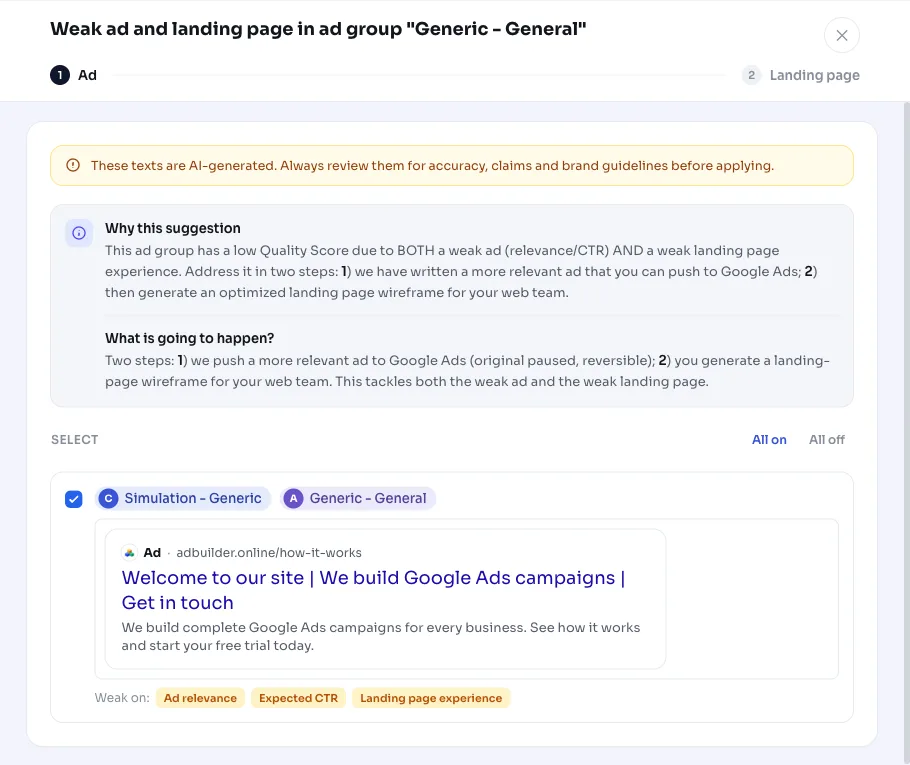
AdBuilder writes a more relevant, complete ad in advance. Existing headlines and descriptions are rewritten in place (pinned positions are preserved), and the empty slots are filled up to Google's maximum of 15 headlines and 4 descriptions. More strong, relevant copy means a higher Ad Strength and a better shot at a higher Quality Score. If you approve, AdBuilder makes the new ad live and pauses the old one. This is reversible: you can simply reactivate the old ad to go back.
The second step depends on the diagnosis. In case of a mismatch (the page works fine in other groups), the recommendation is to choose a final URL that better fits this group; rebuilding a page usually isn't needed then. If every group finds the page weak, you can have an optimized landing page wireframe generated for your web team. Either way, you also get three concrete tips for improving the landing page experience (matching search intent, load speed and mobile, and a clear message with call-to-action).
- Step 1 (always): push the more relevant ad to Google Ads. The old ad gets paused; you can reactivate it.
- Step 2 for a mismatch: choose a better-matching final URL for this group.
- Step 2 without a mismatch: generate a wireframe for a better landing page.
- Three concrete tips for improving the landing page experience are included by default.
Frequently asked questions
What affects my Quality Score in this recommendation?
Two components you control yourself: the ad (ad relevance and expected CTR) and the landing page experience. This recommendation triggers when both are below average and addresses both.
Will my old ad be deleted?
No. When you push the new ad, AdBuilder pauses the old one instead of deleting it. If you want to go back, just reactivate the old ad. So the change is reversible.
Do I need conversion tracking set up?
No. This is a quality signal based on Quality Score, not conversions. The recommendation appears even without conversion tracking set up.
The page works fine in other ad groups. What then?
Then the page probably isn't broken, it just doesn't match this group's search intent. AdBuilder recognizes that as a mismatch and recommends a better-matching final URL instead of a new page.
How many of these recommendations can I get at once?
AdBuilder handles up to 5 weak ad groups at a time, sorted by impressions so the groups with the most traffic come first. You get one recommendation per ad.