- Category
- Search terms & negatives
- What it changes
- Adds search terms as a keyword (exact match by default) in the relevant ad group
- Reversible
- Yes, added keywords can be removed again
- Data we use
- Search terms report (search term view) over a recent window, plus a cross-check against your active keywords
- Typical trigger
- A search term with at least 1 conversion and at least 2 clicks that isn't yet a keyword
- Priority
- Low (growth category)
What it flagsSearch terms that are already working but aren't yet a keyword
Your search terms report in Google Ads shows the actual searches your ads appeared for. Often it includes search terms that already generated conversions, while they aren't set up as a separate keyword in your campaign at all. They come in through a broader match on another keyword.
This recommendation identifies those promising search terms: terms that demonstrably perform but that you currently have no direct control over. The idea is called harvesting: you turn a well-performing search term into an actual keyword, so you can control bid, match type and quality for it yourself.
Why it mattersMore control over what's already earning you money
As long as a converting search term only comes in via a broad match, the system decides how much you bid for it and which ad group it lands in. Turning the search term into a keyword gives you direct control over that. You can bid specifically on what's already generating revenue, and your Quality Score improves because keyword, ad and search align better.
It's a growth recommendation, not an emergency. That's why it has low priority: it only appears after more urgent matters (waste, bid and budget) have been handled. But consistently harvesting from your search terms report is one of the most reliable ways to grow a campaign based on what's proven to work.
How it worksHow we choose which search terms to suggest
AdBuilder reads your search terms report (search term view) over a recent window of roughly 30 days by default. The main source is search terms that converted: at least 1 conversion, at least 2 clicks, not yet present as a keyword or exclusion for that search term, and linked to an ad group. They're sorted by number of conversions, and by conversion value in case of a tie.
Before a search term makes the list, we cross-check it against your actually serving keywords. If the term already exists somewhere as an active keyword, we skip it: adding it again would create a duplicate that bids against your own keyword.
If the conversion harvest is thin (fewer than 3 terms) or you don't have conversion tracking on, AdBuilder supplements it with a click and CTR signal. Then we look at search terms without a conversion that clearly attract relevant traffic: at least 8 clicks and a click-through rate (CTR) of at least 1.2 times your account average. Brand terms don't count here, since they naturally have a high CTR and would skew the picture. We present such terms explicitly as something to consider, not as a certain verdict.
We suggest a maximum of 10 search terms at a time. If there are more candidates, the rest follow in a later round. If there are no more candidates, the recommendation disappears on its own.
- Main source (conversion): at least 1 conversion and at least 2 clicks, not yet a keyword.
- Supplement (click/CTR), only when the harvest is thin or without conversion tracking: at least 8 clicks and CTR of at least 1.2 times the account average, no brand terms.
- Cross-check against active keywords, so you don't add a duplicate.
- Maximum 10 terms per batch, sorted by performance.
What you can doAdd keywords in Google Ads
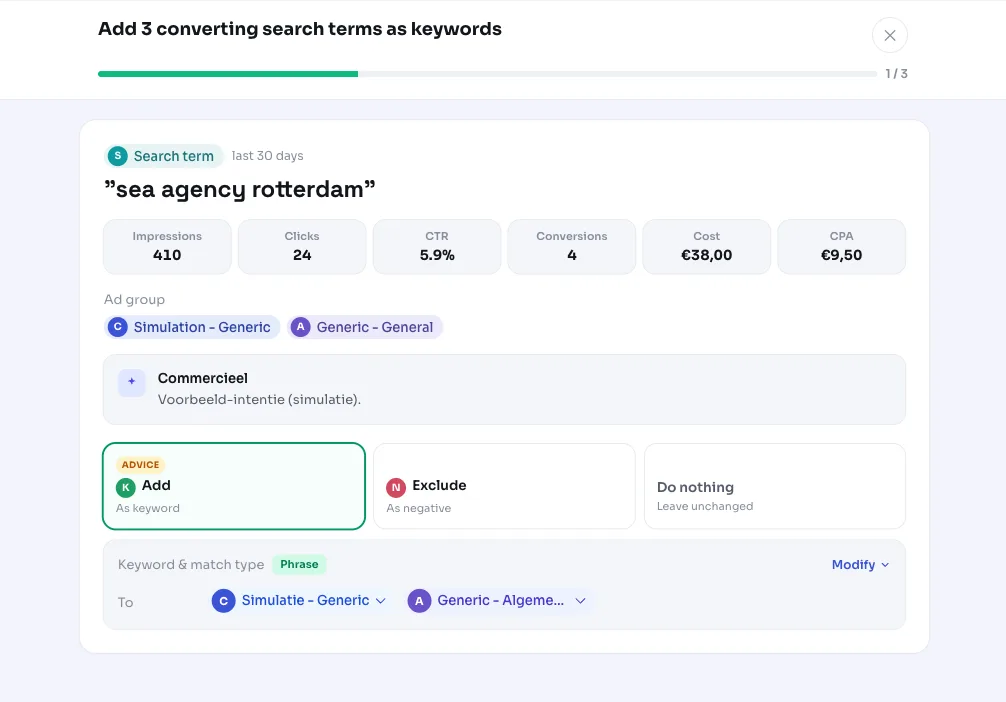
You get a list of promising search terms and the ad group they belong to. Review them, check the search terms you want to harvest and apply them. AdBuilder then adds them as an active keyword to the relevant ad group in Google Ads.
By default we add the keywords as exact match, so you capture exactly the search behavior that already converted. You can choose a different match type per search term if you want to go broader. If you don't want a suggested term, just leave it out of your selection.
The action is reversible: any added keyword can be removed again later. Terms that only come in via the click and CTR signal (so without a conversion) are best judged individually, since that's a signal of relevance, not proof of revenue.
- Select the search terms you want to turn into a keyword.
- Choose the match type per term (exact by default).
- Apply: the keywords are actively added to the right ad group.
- You can revert later by removing the added keywords.
Frequently asked questions
How do I add keywords from my search terms?
AdBuilder pulls the search terms from your search terms report that already perform but aren't yet a keyword. You select the terms you want and apply them; they're added as a keyword to the relevant ad group in Google Ads. By default that happens as exact match.
Why isn't a search term I think is doing well showing up?
There can be several reasons: the term already exists as an active keyword in your account (then we skip it to avoid a duplicate), it doesn't meet the threshold of 1 conversion and 2 clicks, or it's a brand term that would only come in via the click and CTR signal. We also show a maximum of 10 terms at a time, so the rest can appear in a later round.
Does this also work without conversion tracking?
Yes. If conversion tracking is off, or the conversion harvest is thin, AdBuilder suggests search terms based on the click and CTR signal: terms with at least 8 clicks and a click-through rate of at least 1.2 times your account average. We present those as something to consider, not as a certain verdict.
Can I undo the addition?
Yes. Any keyword added through this recommendation can be removed again later. So the change is reversible.