- Category
- Bidding & budget
- What it changes
- Splits a shared daily budget into a separate daily budget per campaign (total stays the same)
- Reversible
- Yes, the campaigns can be moved back onto the shared budget
- Data we use
- Cost, conversions, CPA and impression share lost to budget over 30 days
- Typical trigger
- Shared budget with at least 2 active campaigns, a minimum of 25 euro group spend and a CPA spread of 2x or more
- Priority
- Normal (budget tier, weekly check, after critical fixes)
What it signalsWhen a shared budget pits campaigns against each other
A shared budget in Google Ads is a single daily budget attached to multiple campaigns. The campaigns draw from the same pot, and Google splits that room however it sees fit at the time. That sounds flexible, but it also means you're not steering per campaign: a campaign that eats up a lot comes at the expense of the rest.
This recommendation looks at every shared budget with at least two active campaigns on it, and measures cost, conversions, CPA and impression share lost to budget per campaign over the last 30 days. We trigger as soon as returns within such a group diverge sharply: one campaign gets cheap conversions while another converts much more expensively or not at all, or an efficient campaign misses impressions because the shared budget ran out.
In short: the shared budget hides the fact that the campaigns are essentially fighting for the same euros, and that the wrong campaign is winning.
Why it mattersWhy a shared budget in Google Ads often works out expensive
The biggest downside of a shared budget is that you lose the dial. If you want to give a well-performing campaign more room, you can't do it without also feeding the campaign hanging off the same pot. In practice, the expensive campaign rides on the budget room the efficient campaign could have used, and that costs you conversions without your spend going down.
With its own daily budget per campaign, you get that control back. You can scale the efficient campaign in a targeted way and adjust or squeeze the expensive one separately, without either one getting in the other's way. It also matters for Smart Bidding: a bid strategy steers more cleanly on a budget that belongs to one campaign than on a pot being drained by several.
Important: AdBuilder doesn't lower your total budget. The split shifts, the sum stays the same. So you're not spending less, you're spending it more precisely.
How it worksHow AdBuilder splits a shared budget
AdBuilder groups campaigns by shared budget and also pulls in campaigns that had no traffic in the window (for example paused campaigns), so no one gets left behind on the budget. At least 25 euro must have been spent by the group before we make a call, and there must be at least two active campaigns with data on the budget.
Then at least one of two signals must hold before the recommendation appears:
- CPA spread: the most and least expensive campaigns in the group (both with at least one conversion) differ by a factor of 2 or more in cost per conversion.
- Starved efficient campaign: a campaign performing below the group CPA is losing at least 10 percent impression share due to budget, while another campaign on the same pot isn't converting or is well above the group CPA.
What you can doWhat you can do with the proposal
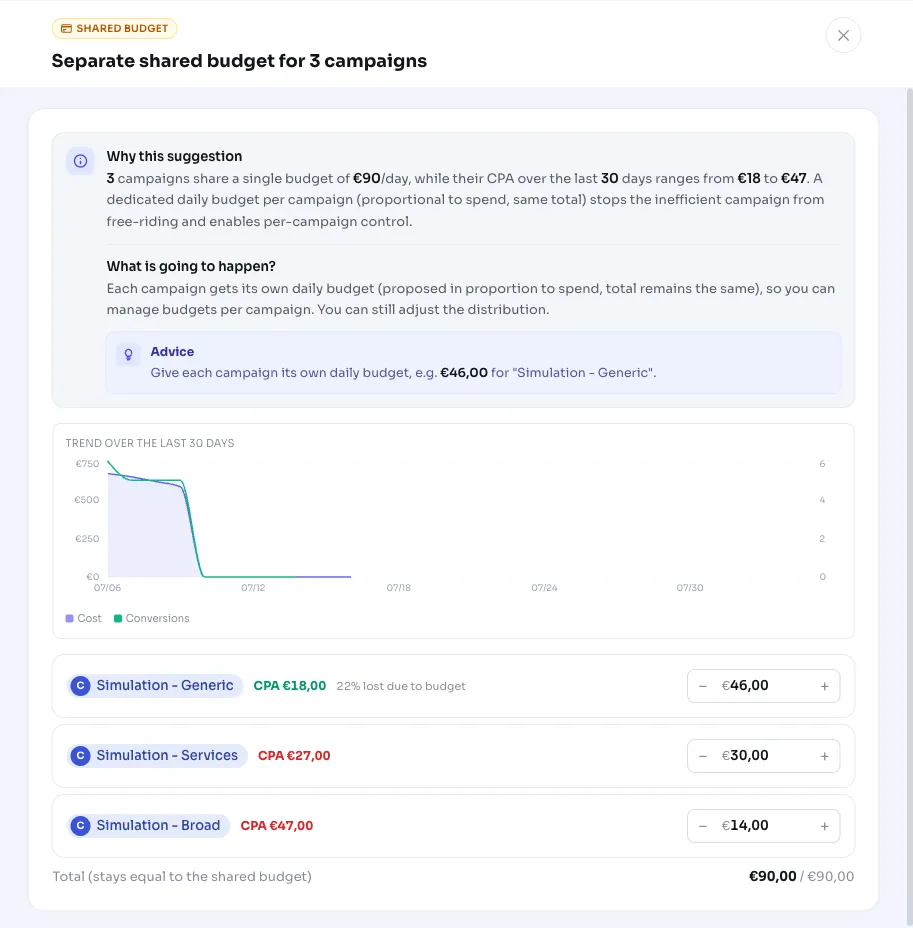
AdBuilder works out a separate daily budget per campaign in proportion to spend over the last 30 days. A quiet campaign gets a floor of 5 percent so it doesn't come out at zero, and the remainder goes to the largest proposal so the total exactly matches the old shared budget. Each recommendation covers at most the three largest shared budgets.
You have the following choices:
- Apply as proposed: each campaign gets its own budget and the campaigns are unlinked from the shared budget.
- Adjust amounts: you can change the proposed daily budgets per campaign before applying, as long as the sum matches the old shared budget.
- Choose per shared budget: if multiple shared budgets are in the proposal, you can apply them separately.
- Undo: after applying, you can move the campaigns back onto the original shared budget.
Frequently asked questions
Does my total budget stay the same if I apply this?
Yes. AdBuilder distributes the shared daily budget across the campaigns in proportion to their spend, with a floor of 5 percent per campaign. The sum of the new budgets exactly equals the old shared budget, so your total spend doesn't change.
Can I undo the split?
Yes. The action is reversible: you can move the campaigns back onto the original shared budget. AdBuilder keeps track of which budget they were originally on.
What happens if not all campaigns on the budget are visible?
Then we skip the shared budget. AdBuilder only splits it if every campaign attached to the budget is actually accounted for in the group. If a campaign can't be retrieved, or Google counts more campaigns than we can find, a campaign could be left on the full shared budget, and we want to avoid that.
When does this recommendation not appear?
If the campaigns already each have their own budget, if less than 25 euro was spent by the group, if the CPAs are close together (less than 2x difference) and there's no starved campaign, or if another open budget recommendation already touches the same budget. In those cases the detector stays silent.