- Category
- Ads & assets
- What it changes
- Creates a corrected ad and pauses the disapproved one
- Reversible
- Yes, the new ad is removed and the original is reactivated
- Data we use
- Approval status and disapproval reasons from Google Ads
- Typical trigger
- Active RSA with disapproved status for a text or style reason
- Priority
- High (critical, tier 1)
What it flagsAn active ad that's disapproved and not running
AdBuilder looks at responsive search ads set to ENABLED in an active ad group and campaign, but whose approval status in Google Ads is disapproved. That kind of ad isn't shown: it counts toward your setup, but delivers no impressions, clicks or conversions.
The recommendation reads the disapproval reasons (the policy topics) for each ad. Based on those, it splits the cases into two paths. If the disapproval is about the ad's text or style, it's fixable. If it's about something you can't fix with the ad copy, such as the landing page, the URL, trademark or a prohibited or sensitive category, it's an appeal matter.
Why it mattersA disapproved ad is lost reach
As long as an ad is disapproved, it sits idle. In an ad group with no other active ad, that means immediately less or no traffic, while your keywords and bids keep running as normal. That's exactly why this recommendation sits in the highest priority tier (critical, tier 1): it's not about fine-tuning, it's about getting something broken running again.
Most text-based disapprovals are also easy to fix. Excessive capitals, repeated punctuation or gimmicky symbols are common causes. Bringing those back in line with Google Ads' ad policy often lets the same message run again, without you having to rethink the ad from scratch.
How it worksFixable gets rewritten, the rest goes to appeal
The recommendation looks at the current approval status, so there's no lookback window and no conversion threshold. It's a policy verdict: no metrics are needed to see that an ad is disapproved. Only active responsive search ads in active ad groups and campaigns with disapproved status qualify.
Every disapproved ad gets sorted by its disapproval reason. Reasons about the landing page, URL, trademark or a prohibited or dangerous category can't be fixed with text. Those go into the appeal path. An ad group disapproved again after an earlier fix also goes to appeal, since another text edit clearly won't solve it.
For the fixable ads (up to eight per run), AdBuilder first tries a minimal, deterministic fix: capitals back to normal sentence case, excess punctuation removed, keeping your wording intact. That resolves the vast majority of caps and punctuation disapprovals. If there's offensive language, or the deterministic step makes no change, an automated, policy-compliant rewrite follows as a fallback, kept as minimal as possible and within Google Ads' ad policy. If no safe fix is possible, nothing gets proposed.
- Trigger: active RSA with approval status disapproved in an active ad group and campaign.
- Split: text and style reasons are fixable; landing page, URL, trademark and prohibited or dangerous categories go to appeal.
- Fix: deterministic first (capitals and punctuation), then a policy-compliant rewrite as a fallback.
- Maximum eight fixable ads per run; groups disapproved again go to appeal.
What you can doFix it in one click or file an appeal
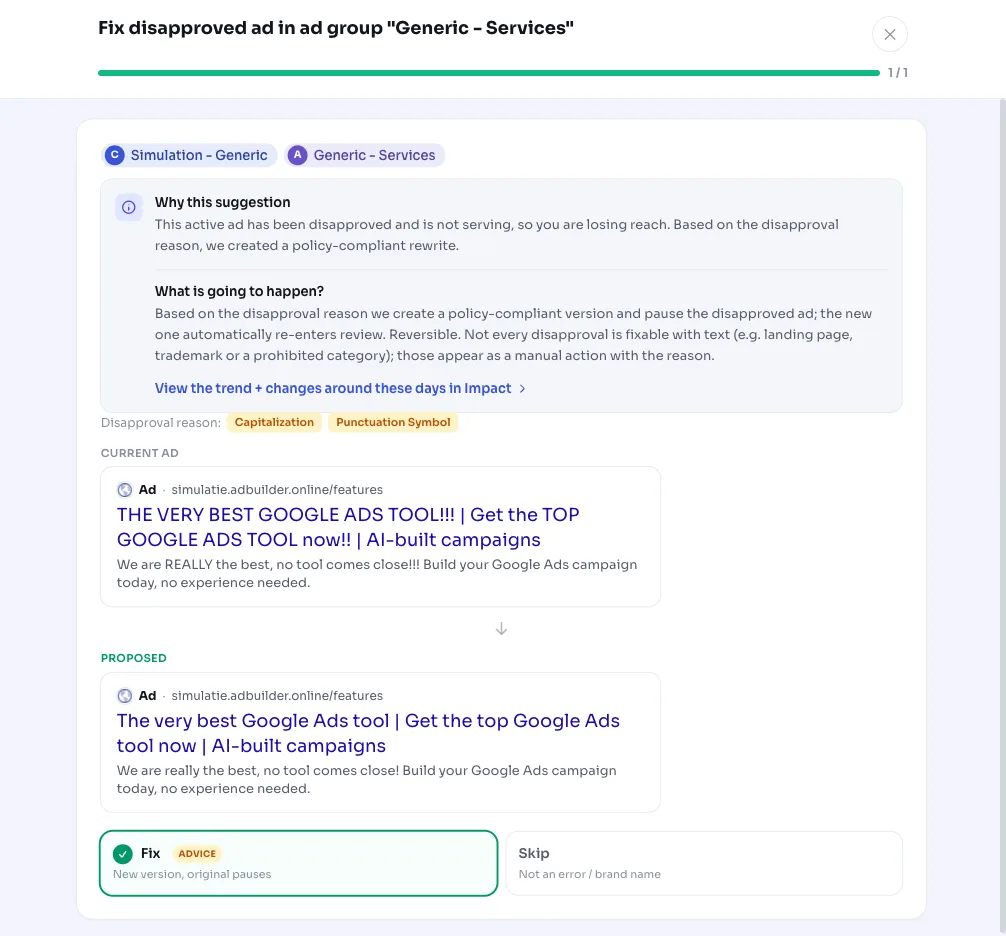
For a fixable disapproval, you get a card per ad with the disapproval reason and the proposed rewrite. If you apply it, AdBuilder creates the corrected ad (which goes live immediately) and pauses the disapproved one. Since a new, adjusted ad is created, it automatically goes back into Google Ads review. An A/B test is never started for disapproved ads, since a disapproved ad can't serve and simply gets replaced.
You don't have to accept the rewrite as is. You can edit the headlines and descriptions in the editor first and apply it after. And the action is reversible: reverting removes the new ad and reactivates the original.
Disapprovals that aren't about text show up as a separate card with the reason per ad and a deep link to Google Ads. Filing an appeal can't be done through the Google Ads API, so this is deliberately an advisory signal with no change: remove the cause (for example the landing page or URL) or file an appeal via Google Ads.
- Apply: corrected ad goes live, disapproved one paused, automatically back in review.
- Edit first: adjust headlines and descriptions before applying.
- Revert: new ad removed, original reactivated.
- Appeal cases: remove the cause or file an appeal via Google Ads (no automatic change).
Frequently asked questions
How do I get my ad approved again?
For a text or style disapproval, AdBuilder applies a policy-compliant rewrite: the corrected ad goes live and the disapproved one gets paused, then automatically goes back into review. Most caps and punctuation disapprovals are resolved this way.
What if the disapproval is about the landing page or trademark?
Then you can't fix it with the ad copy. Those cases show up as a separate card with the reason and a deep link to Google Ads. Remove the cause (landing page, URL or trademark) or file an appeal via Google Ads. AdBuilder doesn't change anything itself here, since appeals can't go through the API.
Can I revert the fix?
Yes. Reverting removes the new, corrected ad and reactivates the original ad, putting you back exactly where you started.
Does AdBuilder change my ad copy without asking?
No. The rewrite is a proposal you can review and edit in the editor first. Nothing changes in Google Ads until you apply the recommendation, and even then the original ad is kept (paused) so you can revert.