- Category
- Tracking & measurement
- What it changes
- Nothing automatically, this is a signal with advice
- Reversible
- Not applicable, no change is applied in Google Ads
- Data we use
- Customer data terms status, active website conversion actions, and 90 days of conversion volume
- Typical trigger
- Customer data terms are off and an active website conversion action measures 10 or more conversions combined in 90 days
- Priority
- Medium
What it flagsWhat this recommendation flags
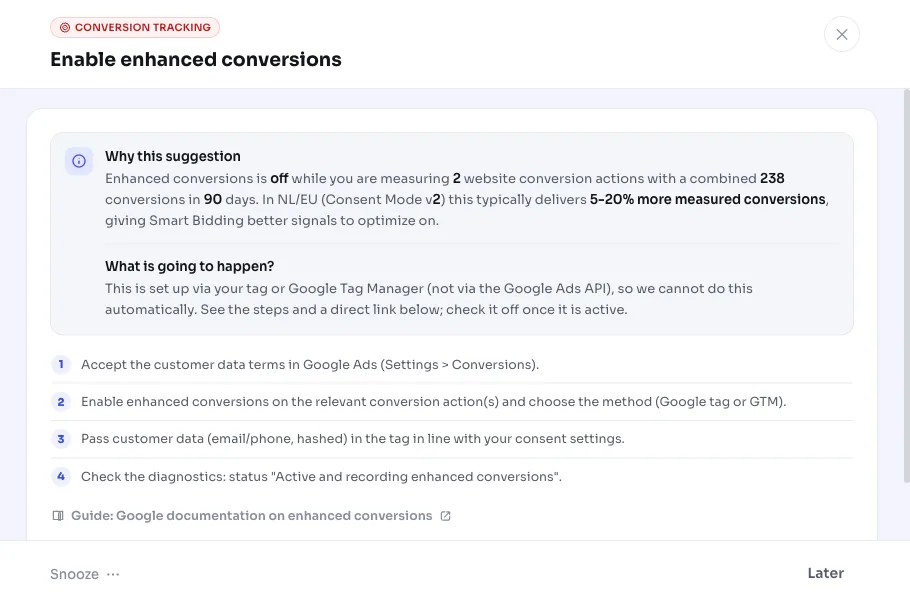
AdBuilder sees that enhanced conversions is likely off in your Google Ads account, while you're measuring website conversions with real volume. Enhanced conversions is a setting that sends hashed first-party data along with a conversion, so Google can match more conversions to a click.
To determine whether it's off, we look at the account flag for customer data terms (accepted_customer_data_terms). If those terms haven't been accepted yet, enhanced conversions demonstrably can't be active. If the flag is on, or enhanced conversions for leads is already on, we don't show this advice, since it may already be (partly) set up.
Why it mattersWhy enhanced conversions makes a difference
In the Netherlands and EU, Consent Mode v2 loses part of your measured conversions: visitors who don't give consent leave no conversion in standard measurement. Enhanced conversions partly fills that gap with safe, hashed first-party data you already have.
In practice this typically wins back 5 to 20% more measured conversions in the Netherlands and EU. That's not just nicer reporting: Smart Bidding is steered directly by this conversion data. If you measure more, the strategy bids more precisely on the searches that actually convert. So this is an improvement to your measurement and conversion tracking, not a fix for something broken.
How it worksHow AdBuilder determines this
The detector runs weekly and uses three checks. Only once all three hold does the recommendation appear. Since the Google Ads API has no queryable field for "enhanced conversions for web active", we deliberately go conservative on the account flag: when in doubt, we show nothing.
The recommendation is deliberately not among the measurement blockers. Measurement isn't broken here, this is an improvement, so it shouldn't block bidding or scaling. That's why the recommendation still runs even if measurement is having trouble elsewhere.
- Account flag: customer data terms haven't been accepted (accepted_customer_data_terms is off) and enhanced conversions for leads is also off.
- Active website conversion action: there's at least 1 enabled conversion action of type website (WEBPAGE) that's primary for the goal. GA4 imports, call actions and upload actions deliberately don't count.
- Volume: across those website conversion actions combined, at least 10 conversions were measured in the last 90 days. Without that volume, we don't give advice.
What you can doWhat to do with this recommendation
This recommendation doesn't change anything automatically in your account. You set up enhanced conversions via the Google Ads website tag or via Google Tag Manager, outside of AdBuilder. AdBuilder points out the opportunity and tracks the advice; turning it on happens yourself in the tag.
Once you're done, or if the advice doesn't apply to your account, wrap it up here with one of the two choices below.
- Mark as set up: you've turned on enhanced conversions in the tag. We remove the advice and later re-check whether the account flag is indeed on.
- Not applicable: the advice doesn't fit this account (for example because you deliberately don't send first-party data). We won't show it again.
Frequently asked questions
What are enhanced conversions?
Enhanced conversions is a setting in Google Ads that sends encrypted (hashed) first-party data along with a conversion, such as an email address a customer enters themselves. Google uses that data to match more conversions to an ad click. This is especially valuable in the Netherlands and EU, where Consent Mode v2 would otherwise make part of your conversions invisible.
Does AdBuilder change my account if I see this recommendation?
No. This is a signal, not an automatic action. Enabling enhanced conversions happens via the Google Ads website tag or Google Tag Manager, not via the Google Ads API. You turn it on yourself, then mark the advice as set up.
Why don't I see this recommendation while I think enhanced conversions is off?
We only show the advice if customer data terms are off, enhanced conversions for leads isn't already on, there's an active website conversion action, and those actions together measure at least 10 conversions in 90 days. If the account flag is accepted, we assume it may already be set up and deliberately stay quiet.
Does this also apply to enhanced conversions for leads?
This recommendation focuses on website conversions. If enhanced conversions for leads is already on for your account, we don't show this advice, since the customer data terms will already have been accepted in that case.