- Category
- Search terms & negatives
- What it changes
- Attaches a brand exclusion list as a negative to your Performance Max campaigns
- Reversible
- Yes, the campaign exclusion can be removed again
- Data we use
- Campaign structure (active PMax and Search campaigns, brand name); no click or conversion figures
- Typical trigger
- At least 1 active PMax campaign without a brand exclusion, a brand name of 3+ characters, and a Search campaign that catches the brand
- Priority
- Medium (catching waste); check runs weekly
What it flagsPerformance Max without a brand exclusion
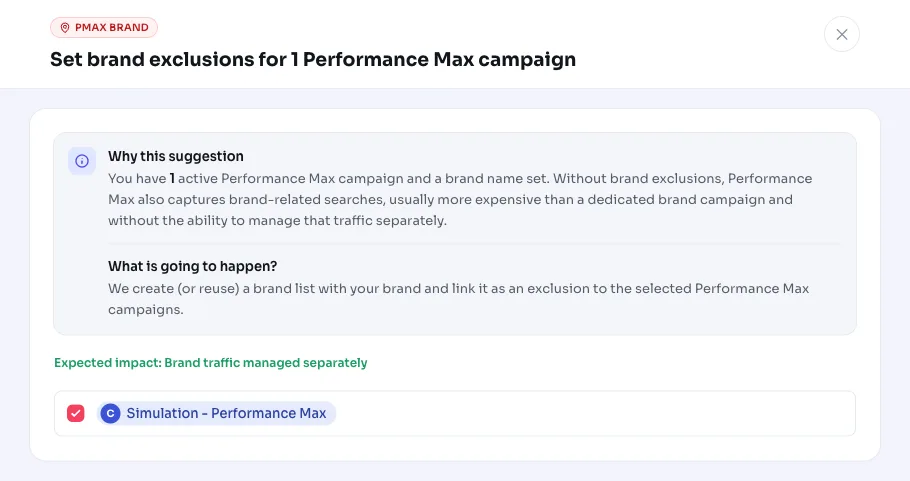
The recommendation appears if your account has at least one active Performance Max campaign, a brand name is set up, and that PMax campaign doesn't yet carry a brand exclusion. Performance Max also shows your ads on brand-related searches, but you can't route that traffic separately there.
This is a structural check, not a performance measurement. We look at how your campaigns are set up, not at click or conversion figures. Google aggregates PMax search terms (you see categories, not individual searches), so brand traffic isn't measurable at the term level here. That's why this is a best-practice check: if the brand traffic belongs somewhere else, we flag it.
AdBuilder only emits the recommendation if there's also an active Search campaign that can catch that brand traffic. If you run Performance Max exclusively, the tip stays quiet, because otherwise no one would be advertising on your brand anymore.
Why it mattersBrand traffic belongs in your brand campaign
Whoever searches for your brand name already knows you. You want to control that traffic yourself: your own copy, your own bid, your own destination. If it runs through Performance Max, you usually pay more for it than in a dedicated brand campaign and have no control over what's shown.
Because PMax doesn't show individual brand searches, you also can't optimize that traffic in a targeted way there. By excluding your brand in Performance Max, you push those searches to your own brand campaign, where you can measure and manage them separately. That's the same logic as using negative keywords to route traffic to the right campaign.
How it worksWhen the check suggests excluding brand traffic
The trigger is purely structural. There's no conversion threshold, no cost threshold and no lookback window: we only look at how your campaigns are set up.
When determining the catch-all campaign, we first look for a Search campaign with your brand name in the name. If we don't find one, we look for an active (non-negative) keyword that contains your brand name. If neither works, the recommendation still appears, but the copy honestly says we didn't find a Search campaign that demonstrably targets your brand, so you can arrange that first.
- The configured brand name is at least 3 characters long.
- There's at least one active Performance Max campaign (status ENABLED).
- There's at least one active Search campaign that can catch the brand traffic; if not, the recommendation stays quiet.
- PMax campaigns that already have a brand exclusion (negative brand list) are skipped, so you're not nudged repeatedly.
- No conversion or cost threshold and no lookback window: the check is structural and runs weekly.
What you can doExclude brand in Performance Max
When applied, AdBuilder creates a brand list called Brand exclusion (your brand) or reuses an existing one, adds your brand from Google's verified brand list, and attaches that list as a negative to the selected PMax campaigns. You choose which Performance Max campaigns to exclude.
The action is reversible: the campaign exclusions can be removed again (the brand list itself stays and can be reused later). If Google doesn't find a verified brand matching your brand name, AdBuilder reports this and you set up the brand exclusion manually via the PMax campaign settings.
- Select which Performance Max campaigns get a brand exclusion.
- Applying attaches the brand list as a negative brand_list criterion to those campaigns.
- Make sure your brand searches are caught by a Search campaign before you exclude.
- Reverting removes the exclusion again; the brand list stays available for reuse.
Frequently asked questions
How do I exclude my brand in Performance Max?
AdBuilder creates or reuses a brand list with your brand and attaches it as a negative to the selected PMax campaigns. You choose which campaigns are involved; we handle the brand list and the link.
Does this block all my brand traffic?
No. The exclusion pushes brand traffic away from Performance Max to your own brand campaign. That's why AdBuilder only emits the recommendation if there's a Search campaign that catches that brand traffic; if there isn't one, the tip stays quiet or the copy warns you.
Why don't I see individual search terms for Performance Max?
Google only provides PMax search terms in aggregated form (categories, not individual searches). That means brand traffic isn't measurable at the term level, so this is a best-practice check based on your campaign structure, not on figures.
Can I undo the brand exclusion?
Yes. The campaign exclusions can be removed again. The brand list itself stays and can be reused later.
What if AdBuilder doesn't find a verified brand?
Then the brand list can't be filled automatically and you'll get a message to set up the brand exclusion manually via the PMax campaign settings.