- Category
- Ads & assets
- What it changes
- Adds strong new sitelinks or callouts and unlinks the weak ones
- Reversible
- Yes, undoing it relinks the weak ones and removes the new ones
- Data we use
- Impressions and clicks (CTR) per extension over 30 days
- Typical trigger
- An extension with at least 500 impressions and a CTR below half the group median
- Priority
- Low (refinement, doesn't block anything)
What it flagsWhat this recommendation detects
Ad extensions are the extra lines under your Google Ads ad: sitelinks (clickable links to other pages) and callouts (short text snippets without a link, like 'Free shipping'). They give people more reasons to click and make your ad take up more space in the results.
But not every extension pulls its weight. A sitelink or callout can get plenty of impressions while barely generating clicks, while other extensions in the same campaign do attract clicks. This recommendation points out exactly those underperforming sitelinks and callouts: extensions with a low CTR relative to their direct peers.
This is the counterpart to two other signals. The missing-extensions recommendation checks whether extensions exist at all, this one checks whether they actually do anything. And where the broken-URL recommendation looks at dead links, this one looks purely at performance.
Why it mattersWhy weak extensions cost you ad space
Every spot taken by a weak extension could have gone to a stronger one. Google decides which extensions to show, and a sitelink or callout that gets lots of impressions but almost no clicks crowds out better candidates. That way it costs you ad space without giving anything back.
With a low CTR on one extension, you're missing clicks you could have gotten with punchier copy or a more relevant destination. Cleaning up and replacing weak extensions is therefore one of the cheapest ways to get more out of the same ads, without touching your budget or bids.
How it worksHow AdBuilder identifies a weak extension
AdBuilder pulls impressions and clicks over the last 30 days for all active sitelinks and callouts in your active campaigns. These are grouped by campaign and by type, because you compare a sitelink to a sitelink and a callout to a callout: click patterns differ a lot by type.
Within such a group, AdBuilder calculates the median CTR (the middle value, not the average, so one outlier doesn't skew the picture). An extension counts as weak if its CTR drops below half that median. The actual thresholds are:
- Lookback window: 30 days of impressions and clicks.
- At least 3 extensions of the same type in the campaign, otherwise there's too little to compare against.
- At least 500 impressions on the extension itself, otherwise a low CTR is just noise.
- Weak = CTR below 0.5 times the group's median CTR.
- Never the last active extension of a type: replacing it would remove coverage entirely (that's a missing-extension case handled by the other recommendation).
- Up to 8 weak extensions at a time, the most wasteful (highest impressions with a low CTR) first.
What you can doWhat you can do with the recommendation
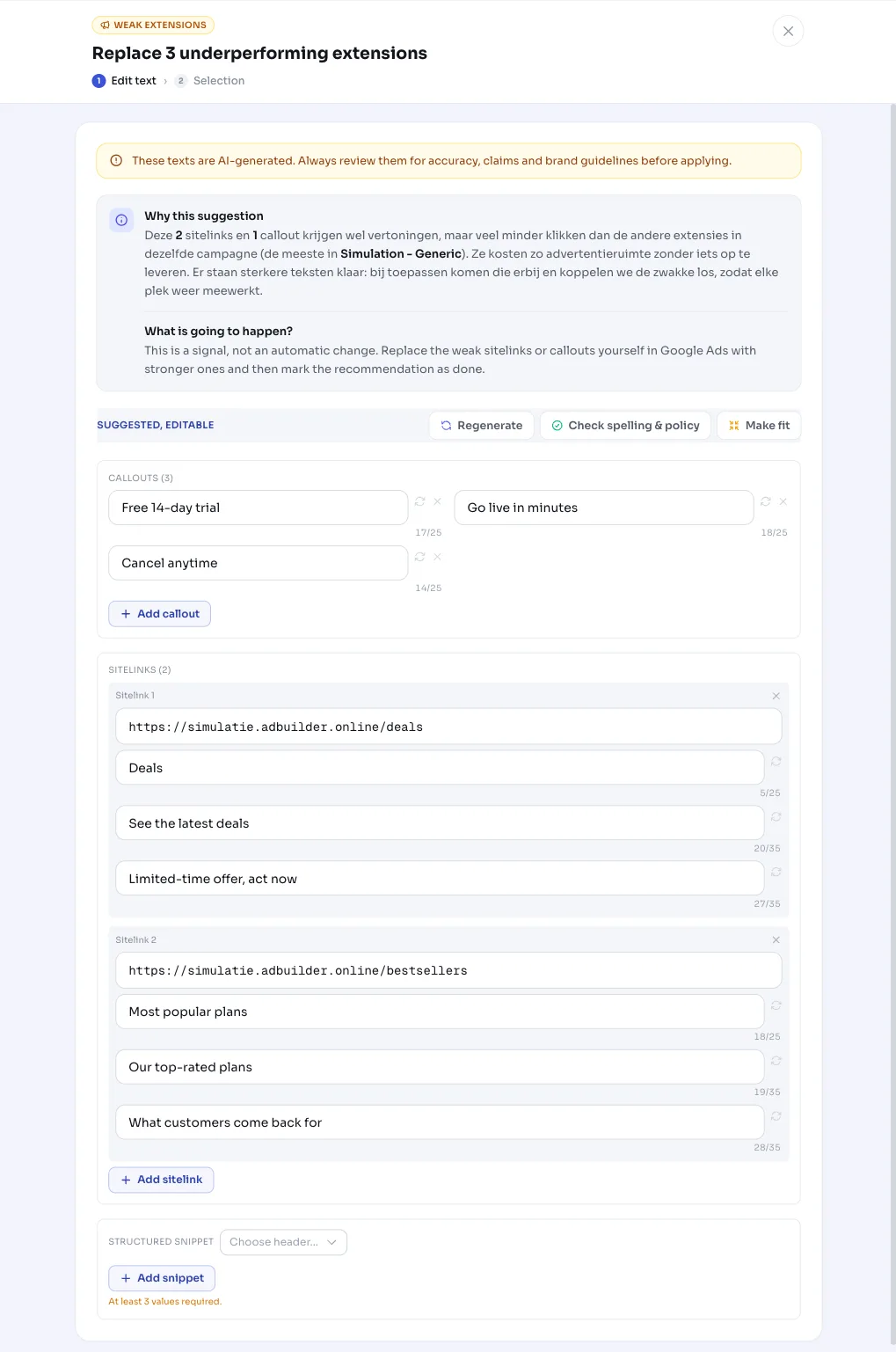
The recommendation is directly actionable. AdBuilder first generates strong new copy (for sitelinks, your final URLs are considered as candidate links) and shows you per campaign what's being replaced, for example: 2 sitelinks and 1 callout in Summer sale.
When you apply it, the new extensions are added and AdBuilder unlinks the weak ones. This only happens if a replacement could actually be created, and never below Google's requirements (at least 1 callout, at least 2 sitelinks per campaign). That way a campaign never drops below the coverage it needs to keep serving.
You can choose per campaign whether to join in. And it's reversible: undoing it removes the newly linked extensions and relinks the original weak ones.
- Apply: strong new sitelinks/callouts added, weak ones unlinked.
- Select per campaign which replacements you want to apply.
- Undoing it restores the situation to how it was.
Frequently asked questions
What exactly are ad extensions?
They're the extra elements under your ad. Sitelinks are clickable links to separate pages, callouts are short text snippets without a link (like 'Free shipping' or '24/7 support'). They give people more reasons to click and make your ad take up more space in the search results.
Why does AdBuilder replace sitelinks instead of just pausing them?
You can't really delete individual extensions in Google Ads: an asset has no remove option. So AdBuilder unlinks the weak ones from the campaign and at the same time puts strong new ones in their place, so every spot keeps contributing and you never drop below the minimum coverage.
Is a sitelink with few impressions also flagged as weak?
No. An extension needs at least 500 impressions of its own before AdBuilder judges it. With less data, a low CTR is just chance, and the extension is left alone.
Which sitelinks work best?
AdBuilder doesn't decide that in advance, it's based on your own data: it compares each sitelink's CTR to the median of the same campaign. Sitelinks clearly above that median are doing their job. The laggards below it are the candidates for replacement.
Can I undo it if I don't like the new extensions?
Yes. The action is reversible. Undoing it unlinks the newly added extensions and puts the original weak extensions back, so your campaign returns to how it was before applying.