- Category
- Targeting & structure
- What it changes
- Turns off search partners for the affected search network campaigns (target_search_network = false)
- Reversible
- Yes, AdBuilder restores the previous setting exactly
- Data we use
- Cost, clicks and conversions per network type (search network vs search partners) over the last 30 days
- Typical trigger
- Search partners are on, at least 5 clicks, and 0 conversions above the waste floor, or a partner CPA at least 1.5x the search network
- Priority
- Medium (waste layer)
What it flagsSearch partners costing money without payoff
The search partner network in Google Ads consists of external search sites and apps that show your search ads, alongside Google Search itself. Search partners are on by default for search network campaigns. That traffic is often cheaper, but doesn't always perform as well as Google Search.
AdBuilder splits the numbers into two streams per search network campaign: the regular search network and search partners. The recommendation appears when search partners are on and demonstrably underperform, while the search network in that same campaign is converting fine. That way you know it's specifically the partners, not the campaign as a whole.
Why it mattersBudget to where it actually works
Every euro going to underperforming search partners is a euro you can't put toward Google Search, where the campaign does convert. Since search partners are on by default, it's easy to pay for this without noticing.
Turning off search partners concentrates budget on the search network. Not sure? The action is fully reversible, so you can turn partners back on later if the situation changes.
How it worksWhen AdBuilder suggests turning off search partners
AdBuilder looks at all active search network campaigns with search partners on, where at least 5 clicks went to partners in the last 30 days (dynamic window). A campaign becomes a candidate through one of two routes:
- No payoff: search partners produced 0 conversions, while the cost is worth at least 2 expected conversions. Concretely: partner cost is above 2x the search network's cost per conversion for that same campaign, and above an absolute floor of €25 (€10 on small accounts). If the campaign has no conversion reference yet, the simple minimum applies: at least 5 clicks and at least €5 in cost (scaled with the window).
- Too expensive a payoff: search partners do convert (at least 3 conversions) and the search network provides enough of a reference (at least 10 conversions), but the cost per conversion on partners is at least 1.5x higher than on the search network, with partner cost above the €5 floor.
- Dip protection: for the zero-conversion route, AdBuilder checks the 60 days before the analysis window. Campaigns whose search partners were still converting back then are excluded, so a temporary seasonal dip isn't mistaken for structural waste. If that check couldn't run, AdBuilder says so honestly in the text so you can verify it yourself.
- AdBuilder shows the campaigns with the highest partner cost first (up to 20 at a time).
What you can doTurn off search partners in one click
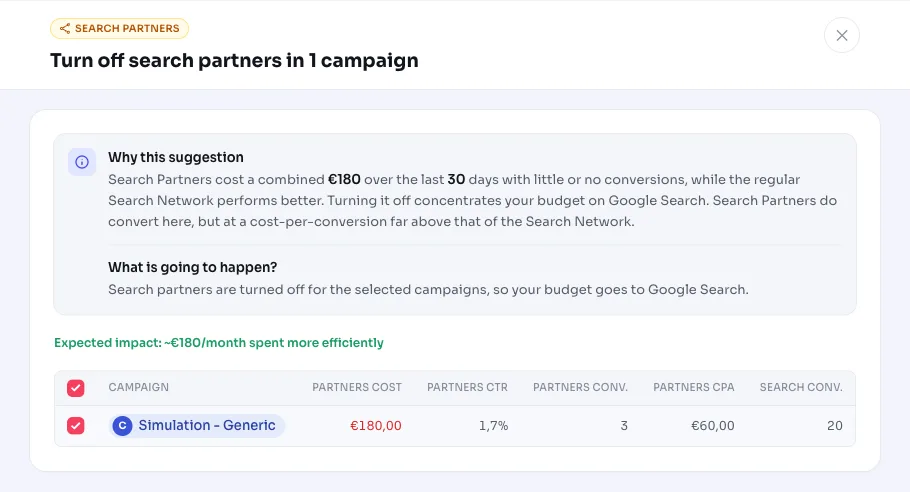
This recommendation shows, per campaign, how much the search partners cost and what they delivered in conversions compared to the search network. You choose which campaigns to include.
- Apply: AdBuilder turns off search partners for the selected campaigns (target_search_network off). Campaigns where partners are already off are skipped.
- Select: include all suggested campaigns, or tick only the ones you're confident about.
- Undo: changed your mind? AdBuilder restores the exact original setting for each campaign.
- Ignore: if you deliberately keep search partners on (for extra reach, for example), you can dismiss the recommendation.
Frequently asked questions
What are search partners in Google Ads?
Search partners are external search sites and apps that show your Google search ads alongside Google Search itself. For search network campaigns, this partner network is on by default. The traffic is often cheaper, but quality varies a lot per account.
Should I turn search partners on or off?
That depends on the numbers. If search partners generate few or no conversions while still costing money, or their cost per conversion is far above the search network, turning them off is usually better. AdBuilder makes that comparison per campaign and only suggests turning off search partners if the regular search network is demonstrably doing better.
Can I undo turning off search partners?
Yes. AdBuilder remembers the previous setting per campaign and restores it exactly on request. This change only affects the search partner setting, not your keywords, bids or ads.
Why don't I see this recommendation for my campaign?
Then at least one condition isn't met: search partners are already off, there aren't enough clicks on partners (fewer than 5), costs stay below the waste floor, or partners still converted in the 60 days before (possible seasonal dip).