- Category
- Search terms & negatives
- What it changes
- Replaces an invalid negative keyword with a corrected version at the same level
- Reversible
- Yes, undo with one click (correction removed, original restored)
- Data we use
- Only the text and match type of your negative keywords (no cost or conversions)
- Typical trigger
- A '+' right before a word, or an unequal number of brackets, or an odd number of quotation marks
- Priority
- Medium (quality and hygiene layer)
What it flagsNegative keywords with invalid syntax
An exclusion keyword only works if the syntax is correct. In Google Ads, negative keywords don't support a broad match modifier, so a '+' right before a word (like +free) isn't valid exclusion syntax. And an exact or phrase exclusion needs balanced characters: brackets that open and close cleanly ([free]) and quotation marks that come in pairs ("free"). If a character is missing, the exclusion is broken.
This recommendation scans all your keyword-type negative keywords at three levels: ad groups, campaigns and your shared negative keyword lists. Anything with invalid syntax ends up on the list of suggestions.
Why it mattersA broken exclusion fails without a warning
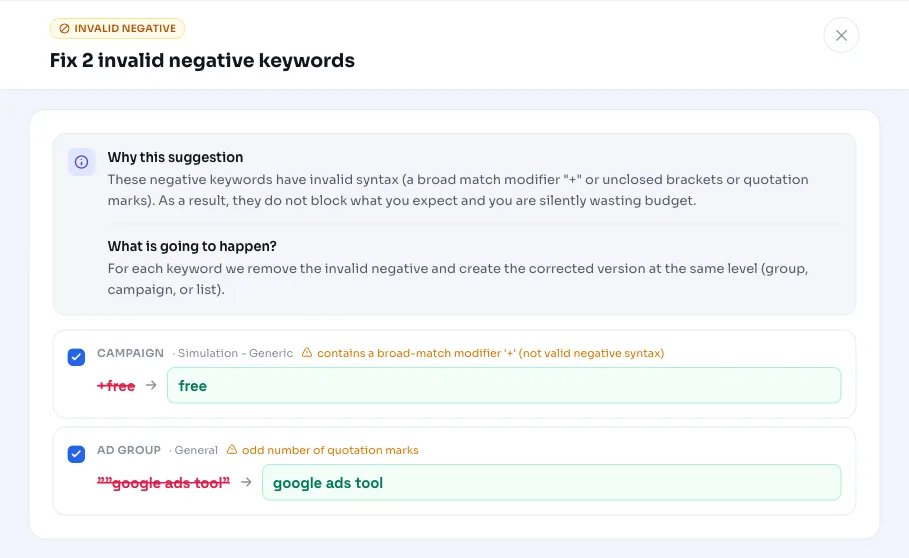
The annoying thing about an invalid negative keyword is that it just sits there as if it's working. You see +free in your list and think 'free' searches are blocked, but because of the invalid syntax the exclusion isn't filtering the traffic you meant. That way budget leaks away to irrelevant search terms without anyone noticing.
Because the error is silent, it's rarely caught during a normal review: the keyword is there, it's not paused, yet it does nothing. This recommendation makes that visible and immediately provides the correct spelling, so your negative keywords go back to blocking what they should block.
How it worksHow we recognize and fix invalid negative keywords
We pull all active negative keywords from your ad groups, campaigns and shared negative keyword lists (keyword type only, removed criteria are skipped). We check every text for three clear syntax errors. There's no conversion, cost or lookback-window threshold: this is purely a syntax check, not a performance judgment.
Important: a '+' in the middle of a term is often meaningful and we leave it alone. Think of 65+ homes or c++. Only a '+' that sits directly before a word is recognized as a broad match modifier and corrected.
Per recommendation we show a maximum of 10 keywords to correct. Each keyword comes with the reason and a suggested corrected version.
- Broad match modifier: a '+' directly before a word (like +free). Fix: remove the '+', the match type stays the same.
- Unequal number of brackets [ ]: the stray brackets are removed. The exclusion then works as a broad exclusion.
- Odd number of quotation marks: the stray quotation marks are removed (here too: the exclusion becomes broad).
- Extra spaces are cleaned up and the keyword stays at the same level (ad group, campaign or shared list).
What you can doReview and apply the fixes
You get a list of the invalid negative keywords and the suggested fix for each one. Review them, adjust a suggestion if you want a different spelling, and apply them. AdBuilder then removes the invalid keyword and creates the corrected version at exactly the same level.
The action is reversible: revert it and the correction disappears and the original keyword comes back. If you'd rather deliberately leave a keyword as is, you can also ignore the recommendation.
- Apply all at once, or choose per keyword.
- Adjust a suggested correction yourself before applying.
- Ignore the recommendation if the syntax is intentional.
- Undo applied corrections later with one click.
Frequently asked questions
What are negative keywords again?
Negative keywords (called exclusion keywords in Google Ads) prevent your ad from showing on searches you don't want. They only work if you write them in the correct syntax; if that's wrong, they block nothing.
Why doesn't a negative keyword with a plus sign work?
The broad match modifier '+' isn't valid syntax for negative keywords. A '+' right before a word isn't processed as intended, which means the exclusion doesn't block the traffic. We remove that '+' and keep your match type.
Does the correction change my match type?
With the '+' fix, your match type stays the same. With an unequal number of brackets or an odd number of quotation marks, we remove the stray characters; if those characters were the only indicator of an exact or phrase exclusion, the exclusion works as a broad exclusion afterward.
Do you also look at cost or conversions?
No. This is a pure syntax check with no conversion, cost or lookback-window threshold. We only assess whether the negative keyword's spelling is valid.
Can I undo an applied correction?
Yes. The action is reversible: the corrected version is removed and the original keyword comes back at the same level.