- Category
- Targeting & structure
- What it changes
- Adds your account's target language as a positive language criterion to the selected search campaigns
- Reversible
- Yes, the added language criterion can be removed again in one step
- Data we use
- The language targeting settings of your enabled search campaigns (no performance data)
- Typical trigger
- A search campaign targets one or more languages, but not your account's language
- Priority
- Medium (tier 2: structure and targeting hygiene)
What it flagsWhat this recommendation flags
We look at the language targeting of all your enabled search campaigns. Every campaign in Google Ads has one or more languages set that it may serve on. This recommendation fires when a campaign targets languages, but not your account's target language.
The target language is the language tied to your AdBuilder account (Dutch by default). If a campaign, for example, only targets English while your account is set to Dutch, Dutch-speaking searchers get missed. That's exactly the kind of language setting we catch here.
Why it mattersWhy the right language targeting matters
Language targeting in Google Ads determines who your ads can be shown to based on the user's language setting (the language of their Google interface or browser), not based on the language of the search query itself. If a campaign only has an unrelated language set, you're silently excluding everyone with a different language setting.
For a Dutch business, that means: if Dutch is missing from your language targeting, you may be missing out entirely on relevant traffic from people with a Dutch language setting. That's a shame, because you never see those clicks anywhere, they simply aren't served. Adding the target language widens your reach, and the risk of harm is small.
How it worksHow AdBuilder checks the language setting
We pull the language criteria per campaign for all campaigns that are enabled and of type search (Search). For each campaign, we build the set of targeted languages and compare it to your account's target language. There's no conversion threshold and no lookback window: this is a structural check on the current language settings, not on performance data.
A campaign is only flagged if it targets at least one language, the target language isn't among them, and the campaign isn't recognized as deliberately targeting another language. We skip deliberately foreign-language campaigns, so we don't push the account language onto a campaign that intentionally serves a different language.
One important safeguard: if no campaign in the account covers the target language at all, we don't suggest anything. A whole account consistently targeting a different language is far more often a deliberate choice than a wrong import setting, and we have no signal to tell the two apart. In that case, the recommendation stays away.
- Scanned: campaigns with status enabled and channel type search (Search).
- Target language: your AdBuilder account's language (Dutch by default).
- Skipped (deliberately foreign-language 1): the campaign name refers to the targeted language, for example an uppercase language code like EN | Search or a language name like Campaign German.
- Skipped (deliberately foreign-language 2): the campaign targets exactly one different language while other campaigns in the account do cover the target language (deliberate language segmentation).
- No recommendation: if no campaign covers the target language at all (account-wide other language).
- No conversion gate and no lookback window: it's a structural check of the language settings.
What you can doWhat you can do with the recommendation
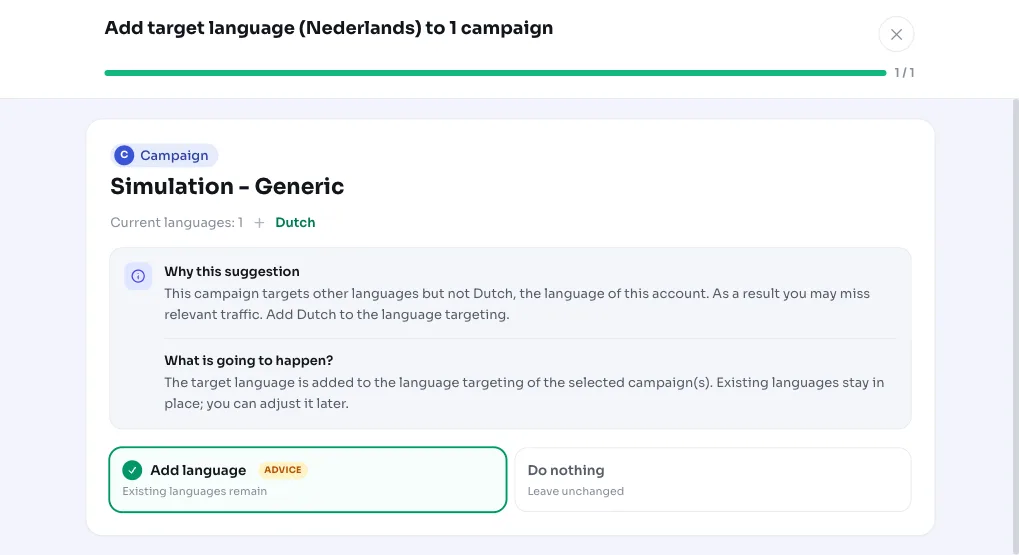
When applied, we add your account's target language as a positive language criterion to the flagged campaigns. You choose which campaigns to apply this to, so you don't have to include everything at once.
The change is reversible: the added language criterion is stored so undoing removes it again in one step. If the existing language setting is actually deliberate, you can also dismiss the recommendation; it won't come back.
- Apply: add the target language to all or a selection of the flagged campaigns.
- Undo: remove the added language criterion in one step.
- Dismiss: reject the recommendation if the current language is a deliberate choice.
Frequently asked questions
Which language should I target in Google Ads?
For most accounts, that's the language of your audience, so Dutch for a Dutch business. This recommendation uses your AdBuilder account's target language (Dutch by default) and checks whether your search campaigns actually target that language too.
How do I set the target language in Google Ads?
You don't need to look this up manually: if a campaign is missing your target language, AdBuilder adds it as a language criterion to the campaign when applied. You choose which campaigns to include.
Does language targeting target the language of the search query?
No. Language targeting in Google Ads looks at the user's language setting (the language of their Google interface or browser), not the language they're searching in. That's why it can be worthwhile to explicitly add your target language.
Is this recommendation also shown for deliberately foreign-language campaigns?
No. If the campaign name refers to the targeted language (such as EN | Search or Campaign German), or the campaign deliberately targets a different language while other campaigns do cover the account language, we skip that campaign. If no campaign covers the target language at all, we don't suggest anything.
Can I undo adding the target language?
Yes. The added language criterion is stored, so you can undo the change in one step and the campaign returns to its previous language setting.