- Category
- Search terms & negatives
- What it changes
- Links existing shared negative keyword lists to Search campaigns that are still missing them
- Reversible
- Yes, the link can be removed again
- Data we use
- Shared negative keyword lists, their links and members, active keywords, and the search terms report (90 days)
- Typical trigger
- A list is linked to the majority of your Search campaigns, but not all of them
- Priority
- Low to medium: a safe, reversible hygiene fix
What it flagsWhich Search campaigns are missing your shared negative keyword list?
A shared negative keyword list is a central list of negative keywords you link to multiple campaigns at once. Handy, since it lets you manage account-wide exclusions in one place instead of per campaign.
This recommendation looks at the lists you're already using. If a list is linked to most of your Search campaigns but missing from one or more, that's almost always an oversight: those campaigns are still receiving the traffic you meant to exclude everywhere. AdBuilder points out exactly which list-and-campaign combinations are missing.
Why it mattersWhy an exclusion list needs to apply everywhere
If you've deliberately built an account-wide list of negative keywords, you want it working everywhere. One Search campaign without the link is a leak: exactly the search terms you're blocking elsewhere in your account can get through there. That costs budget on traffic that doesn't convert.
Aligning your exclusion lists is also a matter of consistency. Reporting and optimizing gets harder when one campaign applies the same negative keywords and another doesn't. This fix is safe and fully reversible, so you can get your account-wide exclusions back in order in a few clicks.
How it worksHow AdBuilder finds missing links
AdBuilder pulls your active shared negative keyword lists (only lists of the negative keyword type) and checks which active Search campaigns each list is linked to. A list only qualifies if it's linked to a strict majority of your Search campaigns, meaning more than half. That way we don't mistake a list that's deliberately scoped to a niche for one meant account-wide.
For every campaign still missing such a majority list, AdBuilder suggests the link. But not blindly: two checks protect your own traffic before a link is suggested.
- Active keyword check: would a list member block an active keyword in that campaign (for example your own brand name in the brand campaign)? Then we skip that combination.
- Converting search term check: would a list member block a search term that's actually converting in that campaign? Then we don't link. A search term counts as converting from 2 conversions (or a conversion value above the campaign's reference CPA), measured over the last 90 days up to three days back.
- There's no conversion threshold on the recommendation itself: this is a structural hygiene check, not a performance judgment.
- AdBuilder suggests a maximum of 50 missing links at once; the title counts the number of campaigns involved.
What you can doWhat to do with this recommendation
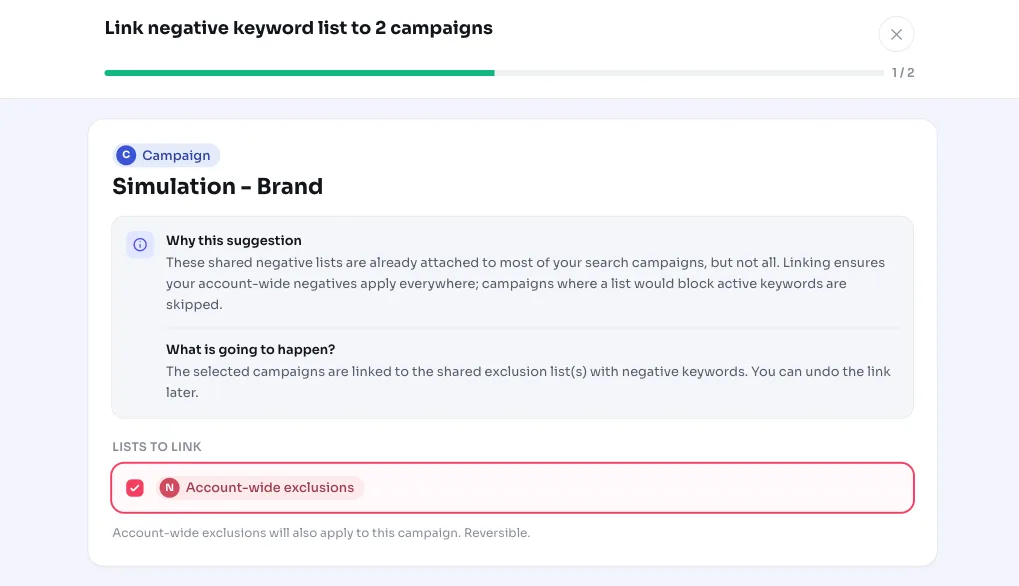
You review the suggested links and choose whether to apply them. Each link is an exclusion list being attached to a campaign; combinations that would hit your own traffic or converting search terms have already been filtered out.
- Link all: apply the whole recommendation at once and align your account-wide negative keywords everywhere.
- Choose per campaign: select only the links you want and leave the rest.
- Undo: applied a link? You can remove it again. The list members themselves aren't changed, only the link between list and campaign.
Frequently asked questions
What are negative keywords?
Negative keywords are terms you don't want your ads to show for. They block irrelevant traffic and wasted clicks. A shared negative keyword list bundles such terms so you can link them to multiple campaigns at once.
How do I create a shared negative keyword list?
You create a shared list in Google Ads under the shared library (negative keyword lists). This recommendation doesn't create a new list; it's about lists you already have that are linked to most, but not yet all, of your Search campaigns.
Does this block my own traffic?
No. Before a link is suggested, AdBuilder checks whether a list member would block an active keyword or a converting search term in that campaign. If so, that combination is dropped and not offered.
Can I undo the link?
Yes. An applied link can be removed again. Only the link between the exclusion list and the campaign is removed; the contents of the list stay untouched.