- Category
- Keywords
- What it changes
- Converts broad-match keywords to phrase or exact match and pauses the broad variant
- Reversible
- Yes, you can re-enable the broad variant and remove the new keywords
- Data we use
- Match type, clicks, cost, conversions and conversion value over 30 days, plus reference CPA and campaign age
- Typical trigger
- Broad-match keyword with 0 conversions, at least 5 clicks and cost above the waste threshold
- Priority
- Low 3 (waste)
What it flagsBroad-match keywords that only generate cost
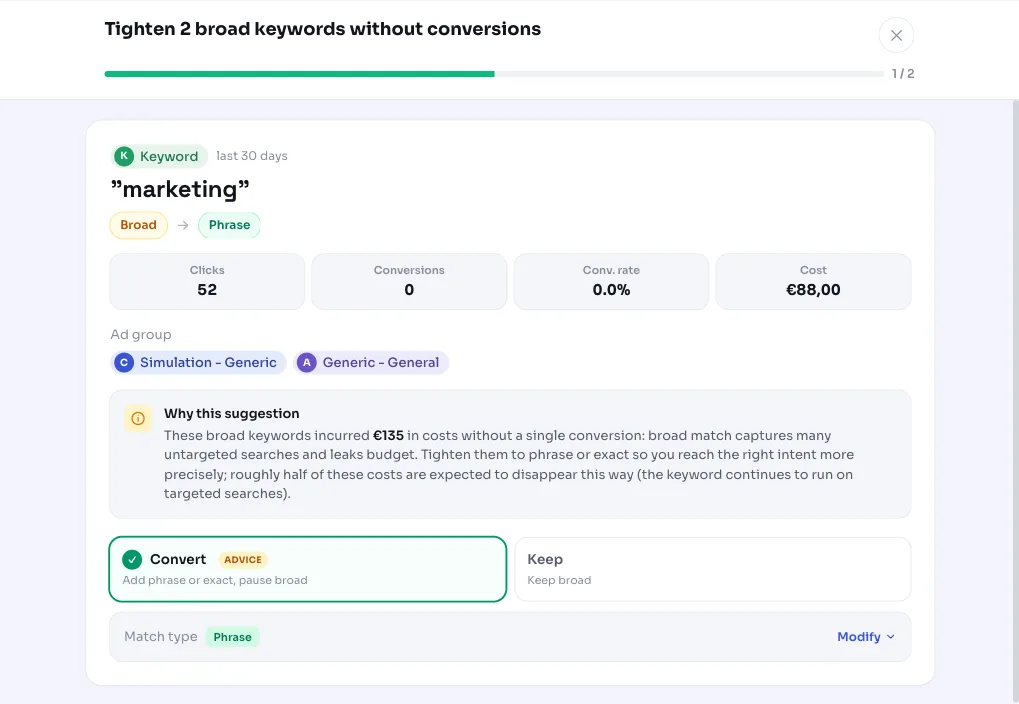
AdBuilder looks at your broad-match keywords: the widest match option in Google Ads. Broad match catches far more searches than just your exact keyword, including searches only loosely related to what you offer. That's fine as long as it converts, but once a broad keyword only brings in clicks and cost with no results, it's simply leaking budget.
This recommendation flags exactly those cases: broad-match keywords that cost money over the last 30 days but produced zero conversions and zero conversion value. It's not general advice about broad match, it's a concrete list of the keywords going wrong for you, with the amount involved.
Why it mattersBroad match should work, not leak
With broad-match keywords in Google Ads, the upside is reaching searches you wouldn't have thought of yourself. The risk is that you also pay for clicks with the wrong intent. If a broad keyword still sits at zero conversions after dozens of clicks, you're structurally paying for traffic that doesn't convert.
Tightening such a keyword to phrase or exact match keeps the searches that actually matter and cuts away the loosely matched variants around them. So you're not simply turning the keyword off, you're making it more targeted. That way the reach that performs stays in place, and the part that only costs money disappears.
How it worksThe thresholds behind this recommendation
AdBuilder uses a 30-day window. A broad-match keyword qualifies if it meets all the conditions below. The waste threshold is relative: with conversion data we set the bar at least twice the reference CPA of the campaign (or the account), with an absolute floor of €25 on medium and large accounts and €10 on small accounts. If your account has no conversions yet to build a reference CPA, a fixed fallback threshold of €5 in cost with at least 5 clicks applies.
The recommendation only runs if your conversion tracking is working. The verdict is literally 'cost with no conversion', and without reliable tracking almost every broad keyword with cost would be flagged incorrectly. If tracking is off, AdBuilder skips this part and clears any existing open items.
We include at most the 10 most expensive keywords, sorted by cost. The estimated savings figure is deliberately conservative: tightening only trims away the loosely matched searches, while the keyword itself keeps running on the targeted searches. So we claim roughly half of the measured cost as savings, not the full amount.
- Match type is broad match.
- Zero conversions and no conversion value over the last 30 days.
- At least 5 clicks, so 'zero conversions' is meaningful.
- Cost above the waste threshold: at least 2x the reference CPA with a floor of €25 (€10 on small accounts), or without conversion data at least €5 with 5+ clicks.
- No temporary dip: keywords that did convert in the 60 days before the window are left alone.
- No ramp-up: campaigns younger than 14 days are still ramping up and aren't tightened.
- Brand keywords don't count toward the reference CPA, so cheap brand conversions don't unfairly lower the bar.
What you can doTighten to phrase or exact match
The recommendation turns every flagged broad keyword into a concrete action: tighten the broad keyword to phrase or exact match and pause the broad variant. That way the keyword keeps running on searches with the right intent, and the broad net around it that only cost money disappears. This step uses the same tightening flow as the standalone recommendation for a single broad keyword.
You decide per keyword. If you're unsure about a specific keyword, check the search terms that fell under it first: if you still see relevant searches there, exact match may be too strict and phrase match a better choice. The action is reversible, so you can re-enable the broad variant later if you want.
- Tighten to phrase match: broader than exact, keeps variants around your keyword.
- Tighten to exact match: strictest, only the search intent that matches precisely.
- Pause the broad variant so it no longer draws budget.
- Skip or dismiss if you deliberately want to keep a keyword broad.
Frequently asked questions
Why doesn't AdBuilder just pause the keyword entirely?
Because a broad keyword often does bring in valuable searches, just with too much noise around them. Tightening to phrase or exact match keeps the performing part and cuts away the untargeted variants. Fully turning it off belongs to other recommendations, like pausing keywords with cost and 0 conversions.
Does this recommendation work without conversion tracking?
No. The entire verdict is based on 'cost without conversion', so without working conversion tracking, AdBuilder skips this. Otherwise almost every broad keyword with cost would be flagged incorrectly.
Is this the same as the old broad match modifier?
No. The broad match modifier no longer exists in Google Ads; current broad match matches more broadly than that old option. This recommendation is about that current, broad match: broad keywords that cost money without converting, tightened to phrase or exact match.
How much do I save by tightening a broad keyword?
The savings shown are an estimate of roughly half the measured cost. Tightening only trims away loosely matched searches; the keyword keeps running and costing money on the targeted searches, so we deliberately don't claim the full amount.
Why doesn't a broad keyword with a single conversion show up here?
The trigger is strict: zero conversions and no conversion value over 30 days. As soon as there's a conversion, the keyword falls outside this recommendation. We also leave alone keywords that converted shortly before the window, since that can point to a temporary dip.