- Category
- Ads & assets
- What it changes
- Creates callouts, sitelinks and structured snippets and links them to the selected search campaigns
- Reversible
- Yes, the added extensions get unlinked again
- Data we use
- Linked extensions at campaign, ad group and account level, plus the landing URLs of active ads
- Typical trigger
- An active search campaign is missing callouts, sitelinks or snippets at all three levels
- Priority
- Low: an improvement that doesn't block anything
What it flagsWhich campaigns are missing ad extensions
Ad extensions (called assets in Google Ads) are the extra lines under your ad: sitelinks that link to deeper pages, callouts with short selling points, and structured snippets that show a list of features. They make your ad bigger and give searchers more reasons to click you specifically.
This recommendation looks at your active search campaigns and flags which ones are completely missing one or more of these extension types. Only enabled campaigns of the search (SEARCH) type are considered. For each campaign we check per type (sitelink, callout, structured snippet) whether it's missing, and prepare matching copy in advance.
Why it mattersWhy ad extensions matter
Extensions take up extra space on the search results page and show more of what you offer at a glance. More sitelinks, callouts and snippets mean more reasons to click and often a higher CTR (click-through rate), without paying more per click.
This recommendation sits in the lowest priority tier: it's an improvement, not a fix. Nothing is broken and it doesn't block other recommendations. You're purely adding something. That's also why there's no conversion threshold attached, unlike recommendations that shift budget or adjust bids.
How it worksHow AdBuilder finds missing extensions
We pull all enabled search campaigns and then check at three levels whether an extension type is already linked: at the campaign itself, at its ad groups, and at account level. A type only counts as missing if it's absent at all three levels. That way we don't flag anything if you manage extensions account-wide, for example, since that already covers your campaigns.
If we can't reliably read one of those levels, we hold off on a verdict and skip the recommendation until the next run. That prevents a temporary glitch from wrongly marking every campaign as "missing everything".
For sitelinks, we use the landing URLs (final URLs) of your active ads as candidates, since Google requires a unique destination per sitelink. AdBuilder then generates the copy. We only offer an extension type if the generated set actually meets what Google needs to show it:
- Callouts: at least 1 callout.
- Sitelinks: at least 2 sitelinks, each with link text, a unique landing URL (not the homepage) and both description lines. Google only shows sitelinks from 2 onwards.
- Structured snippets: a header plus at least 3 values.
What you can doAdd sitelinks, callouts and snippets
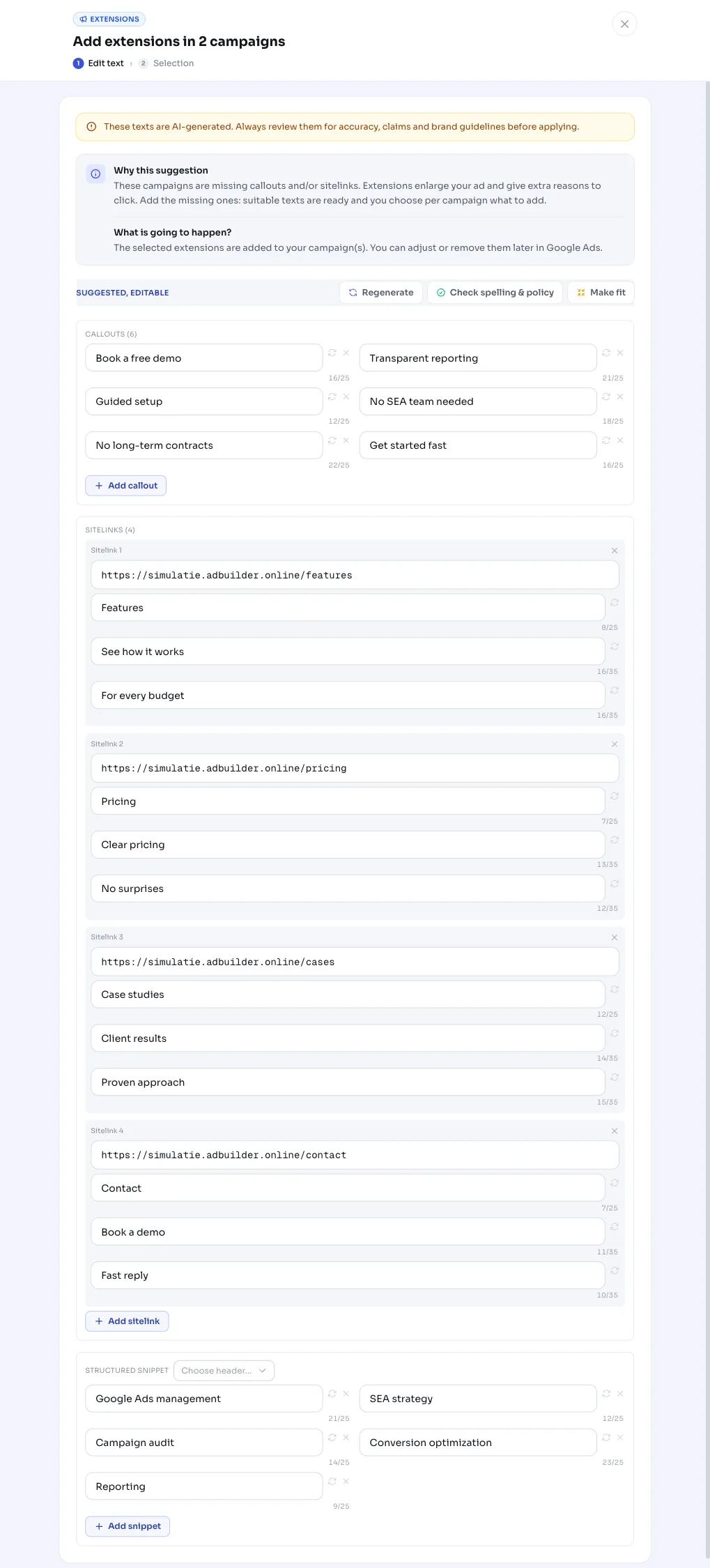
The recommendation shows in a card how many campaigns are missing something, for example Add extensions in 4 campaigns, along with the prepared copy. You decide per campaign what gets added, and you can edit each callout, sitelink and snippet value before applying.
When applied, AdBuilder creates the chosen extensions and links them to the selected campaigns, exactly where the type was still missing. If you change your mind, you can revert: the extensions get unlinked again and disappear from your ads.
- Choose per campaign which missing extensions to add.
- Adjust the proposed callouts, sitelinks (link text, URL and descriptions) and snippet values as needed.
- Apply to make the extensions live, or revert the change in one click.
Frequently asked questions
What are ad extensions?
Ad extensions (assets) are extra elements below your search ad, like sitelinks to deeper pages, callouts with short selling points and structured snippets with a list of features. They make your ad bigger and give people extra reasons to click.
Which extensions does AdBuilder add?
Callouts, sitelinks and structured snippets. For each campaign, AdBuilder checks which of these types is missing and prepares matching copy for it; you choose and edit what gets added.
Why doesn't the recommendation show up for my campaign?
If the extensions are already linked at campaign, ad group or account level, the type doesn't count as missing. It also stays away if there isn't enough usable copy to generate (for example fewer than 2 valid sitelinks) or if you've already dismissed the card.
Can I revert adding extensions?
Yes. Reverting unlinks the added extensions from your campaigns again, so they disappear from your ads. The recommendation then becomes open again.