- Category
- Tracking & measurement
- What it changes
- Sets the duplicate primary conversion action to secondary (still measured, no longer double-counted)
- Reversible
- Yes, the action can be switched back to primary
- Data we use
- Conversion actions (primary/category) plus conversion volume over 30 days
- Typical trigger
- 2 or more primary actions in the same category, both with at least 10 conversions in 30 days and similar volumes
- Priority
- High: it sits in the measurement layer and pauses bidding and budget advice while it's open
What it flagsWhen are conversions double-counted?
A conversion action in Google Ads can be set to primary or secondary. Primary actions count toward bidding: Smart Bidding optimizes on them. Secondary actions are still measured, but don't steer bidding.
This recommendation checks whether multiple primary conversion actions exist within the same conversion category (for example Purchase or Lead) that register almost the same number of conversions. That's a strong signal the same event is being counted twice, for example because a purchase action is being duplicated by a second tag alongside it.
Important: a matching category alone isn't proof. A lead-gen account can perfectly well have a quote request and a contact form side by side, both primary. That's why AdBuilder only proceeds when the volumes are genuinely close to each other.
Why it mattersWhy double counting skews your results
If the same conversion counts twice, Smart Bidding steers on inflated numbers. Your measured CPA looks lower and your ROAS higher than they really are, so the system buys pricier traffic than is sensible. You end up paying extra for conversions that are only half real.
Because an error in the count feeds into almost every bidding and budget decision, AdBuilder treats this recommendation as a measurement blocker. As long as it's open, we hold back conversion-dependent advice (like raising budget, adjusting bids, or calibrating the CPA target). Fix the count first, then scale up.
How it worksHow AdBuilder spots duplicate conversion tracking
AdBuilder groups all primary, active conversion actions by conversion category. The catch-all categories (Default, Other, Unknown, Unspecified) don't count: that bucket proves nothing. A category with two or more primary actions is a candidate.
Next, we look at conversion volume per action over the last 30 days. Two thresholds need to be met before we fire:
- Each action must have at least 10 conversions in 30 days. An action with a handful of conversions isn't proof and gets excluded.
- The volumes must be close together: the smaller divided by the larger must be at least 0.7. The same event being double-counted produces nearly identical volumes. If they diverge more (for example 40 quote requests versus 25 contact forms), they're probably two genuinely different conversions, and we stay quiet.
- Without reliable volume figures, the recommendation doesn't fire. We never demote a conversion action based on category match alone.
What you can doFixing the double counting
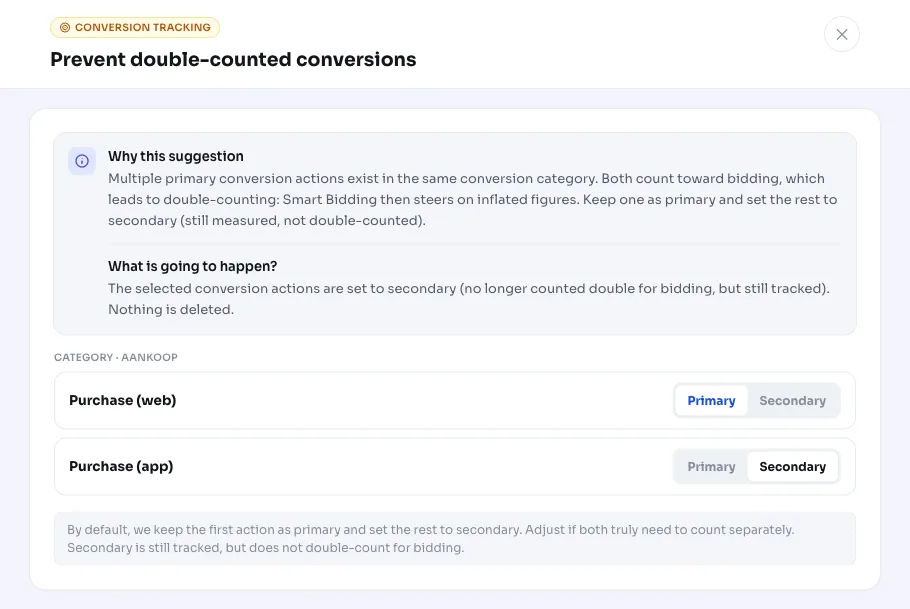
AdBuilder suggests keeping the highest-volume conversion action as primary and setting the others to secondary. That one keeps being measured, but no longer counts twice toward bidding.
You decide yourself which actions go to secondary if you want to adjust the default choice. If they don't fit, for example because they really are two different conversions, you can dismiss the recommendation.
- Apply: the duplicate action(s) become secondary, the most important one stays primary.
- Choose yourself: select which conversion actions you want to set to secondary.
- Reversible: any changed action can be set back to primary later.
- Dismiss: if they're truly separate conversions, leave them both as primary.
Frequently asked questions
Why are my conversions being double-counted in Google Ads?
Usually because the same event is measured through two primary conversion actions in the same category, for example a purchase that comes in both via a page tag and a second measurement. Both count toward bidding, so your numbers get inflated.
Do I lose measurement data if an action goes to secondary?
No. A secondary conversion action is still measured and stays visible in your reporting. It just no longer counts toward Smart Bidding, so the double counting goes away.
What if the two actions really are different conversions?
Then the recommendation shouldn't fire. AdBuilder checks whether the volumes are close together (smaller divided by larger at least 0.7). If they diverge sharply, we stay quiet. If it fires anyway and they're both legitimate, dismiss the recommendation.
Can I undo the change?
Yes. Setting an action to secondary is reversible: you can switch the conversion action back to primary later.
Why does AdBuilder pause other advice while this is open?
A double count makes almost every conversion-based bidding and budget decision unreliable. That's why we hold back that advice until the count is accurate. It comes back automatically once this recommendation is resolved.