- Category
- Targeting & structure
- What it changes
- Raises the CPC bid or adds broader or related keywords, only after your approval
- Reversible
- Yes, the old bid and any added keywords can be rolled back
- Data we use
- Impressions, impression share, rank and budget lost share over 30 days, plus search volume from Keyword Planner
- Typical trigger
- Ad group with 50 or fewer impressions in 30 days, in a campaign running for at least 14 days
- Priority
- Structure layer (layer 2): above waste, bidding and budget, below measurement and policy issues
What it flagsWhen an ad group has stalled
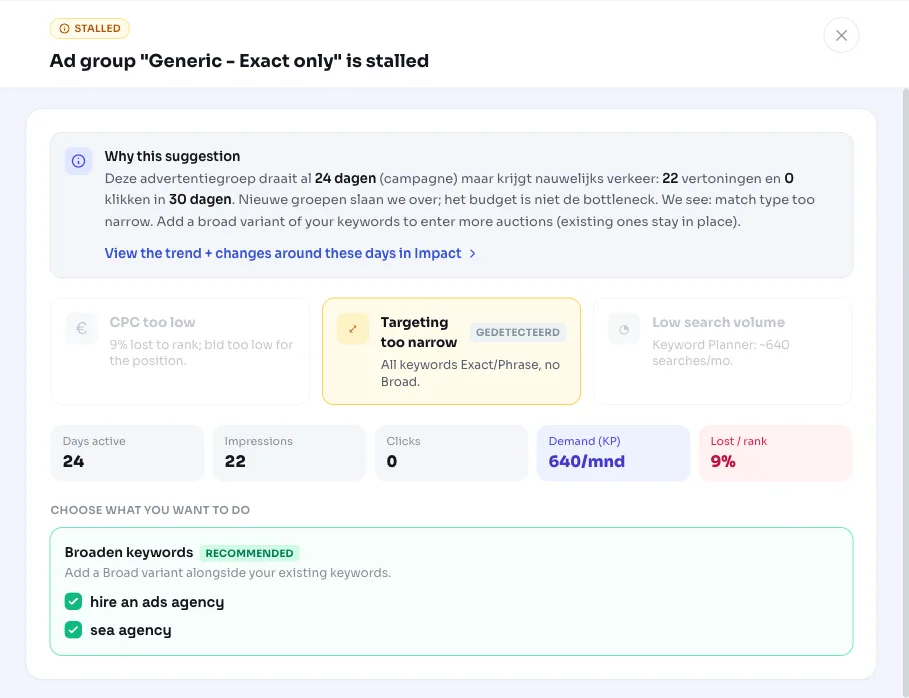
An ad group has stalled if it gets almost no impressions while the campaign is active and budget isn't exhausted. The group exists and has active keywords, but barely takes part in auctions. The recommendation shows exactly which group is affected, for example Winter tires consumer, along with how many impressions and clicks it got over the last 30 days.
This is one of the first things you'll run into when wondering why an ad group isn't getting impressions. AdBuilder doesn't just flag the signal, it also figures out the cause, so you don't have to guess.
Why it mattersWhy a stalled ad group is a waste
No impressions means no clicks, and therefore no conversions. You built the group for a reason, but in practice it delivers nothing. Without you noticing, a piece of your account just sits there doing nothing.
The annoying part is that a stalled group rarely stands out on its own: it doesn't waste money, so it doesn't show up in cost reports. That's exactly why it helps that AdBuilder actively surfaces these groups, with a concrete direction to get them working again.
How it worksHow AdBuilder identifies a stalled ad group
AdBuilder looks at active search campaigns and the ad groups within them. A group is flagged if the campaign has been running for at least 14 days (younger campaigns simply don't have data yet), the group had 50 or fewer impressions in the last 30 days, it has at least 1 active keyword, and the campaign loses less than 20% of its impressions to budget. If the campaign is instead losing a lot to budget, that's a budget issue and a different recommendation applies.
Newly built groups are skipped: if every keyword in the group was added within the last 28 days, the group first gets time to ramp up. Otherwise a brand-new ad group would immediately show up as 'stalled'. Up to 5 groups are picked up per run, starting with the quietest.
For each candidate, AdBuilder determines the cause based on performance data and search volume from Keyword Planner. There are three possible causes, which can also occur together:
- Bid too low: the group loses at least 20% of impressions to rank, or gets almost no impressions (2 or fewer) despite there being search volume. The bid or position is too low to show.
- Too narrowly matched: there's clear search volume for the topic, but the group only uses exact or phrase match keywords and no broad match keywords at all. That means you're missing auctions.
- Too little search volume: Keyword Planner shows fewer than 100 searches per month for the group's keywords. Bidding higher or broadening doesn't help much here, because the demand simply isn't there.
What you can doWhat you can do
Each cause has a matching action. AdBuilder only shows a recommendation if there's actually something to do; if there's no clear cause or no usable alternative, the group stays out of view.
If both rank loss and overly narrow matching are at play, AdBuilder picks one as the recommended lever: raising the bid takes priority over broadening, since extra auctions you'd lose on rank anyway don't help. The recommended choice is pre-checked with a label, but you can still enable the other one yourself.
- Raise bid (manual bidding only): AdBuilder calculates an increase between 10% and 60%, depending on how far below full impression share the group sits. Keywords that are clearly too expensive (with conversions and a CPA above 1.3 times the campaign average) are skipped, so you don't bid up traffic that costs too much.
- Broaden: existing keywords are added as broad match variants, so the group enters more auctions. The original keywords stay in place.
- Add related keywords: for too little search volume, AdBuilder suggests keywords with more volume (at least 50 per month and at least double the current demand). If none exist, it's a genuine niche, and the advice is to leave the group as is or pause it.
- With Smart Bidding, AdBuilder doesn't calculate a bid, since the strategy manages bids itself. You'll still get the signal plus, if relevant, the advice to broaden.
Frequently asked questions
Why isn't my ad group getting impressions?
Usually one of three reasons: the bid is too low to show (rank loss), the keywords are too narrowly matched without broad variants, or there's simply too little search volume for the topic. AdBuilder measures these three causes and pairs each with the matching action.
What does it mean when an ad group has stalled in Google Ads?
That the group is getting almost no impressions (50 or fewer in 30 days) while the campaign is active and budget isn't the bottleneck. The group barely participates, without it showing up directly in costs.
Can I undo the change?
Yes. AdBuilder restores a bid increase back to the old bid, and any added keywords can be removed again. You're not locked into anything.
Does this also work if I don't want to broaden but adjust the bid instead?
If both causes apply, AdBuilder pre-checks the recommended lever (bid over broadening), but you can enable or disable the other option yourself. You stay in full control of what gets applied.
What if there's genuinely too little search volume for the ad group?
Then AdBuilder suggests related keywords with more volume. If none exist, it's a genuine niche, and the advice is to leave the group as is, or pause it if you don't need it.