- Category
- Keywords
- What it changes
- Adds long-tail keywords as phrase-match keywords to converting ad groups
- Reversible
- Yes, added keywords can be removed in one click
- Data we use
- 30 days of cost and conversions per ad group, plus search volume from the Keyword Planner
- Typical trigger
- Search campaign with converting ad groups and cost in the last 30 days
- Priority
- Low
What it flagsRoom to expand profitable ad groups
This isn't a problem alert, it's a growth opportunity. AdBuilder looks at your search campaigns and finds the ad groups that actually converted over the last 30 days at an acceptable cost per conversion. For those groups, the recommendation suggests a handful of new long-tail keywords you're not using yet.
Long-tail keywords are longer, more specific search terms. Instead of a broad word like office chair, it's about variants like ergonomic office chair with headrest. Those more specific terms show that someone knows exactly what they're looking for, and so is closer to a purchase.
Why it mattersWhy long-tail keywords are often cheaper and more targeted
Long-tail keywords typically face less competition in the auction, keeping the click price lower. At the same time, buying intent is higher: the more specific the search, the clearer what the searcher wants. That makes these terms an efficient way to bring in extra, targeted traffic.
By only adding them to ad groups that already perform, you build further on what's demonstrably working. You're not pouring new budget into a group that costs a lot and delivers nothing, you're expanding your profitable reach. That way your account grows without adding waste.
How it worksHow AdBuilder chooses the keywords
AdBuilder pulls all active keywords from your active search campaigns over the last 30 days and adds up cost and conversions per ad group. Based on the account total, we calculate your account's average cost per conversion.
We then keep only ad groups that have at least 1 conversion and whose cost per conversion is at or below twice the account average. We sort those groups by conversion count and take the top four. If no group converts, or you have no conversion tracking, no recommendation appears: we can't know where extra traffic would pay off.
For those groups, AdBuilder generates six long-tail suggestions per group with clear buying intent. We filter out informational search terms (like how, what, guide, review, experiences, free, course or job vacancy), since they draw traffic without buying intent. We then check search volume: terms with zero search volume are dropped (Google won't serve them anyway) and the rest are sorted by volume, high to low.
- Lookback window: the last 30 days.
- Only active keywords in active search campaigns.
- Group filter: at least 1 conversion and cost per conversion at or below 2x the account average.
- Up to the four best-converting ad groups.
- Up to 5 keywords total per recommendation, sorted by search volume.
- Added as phrase-match keywords.
What you can doAdd the suggested keywords to Google Ads
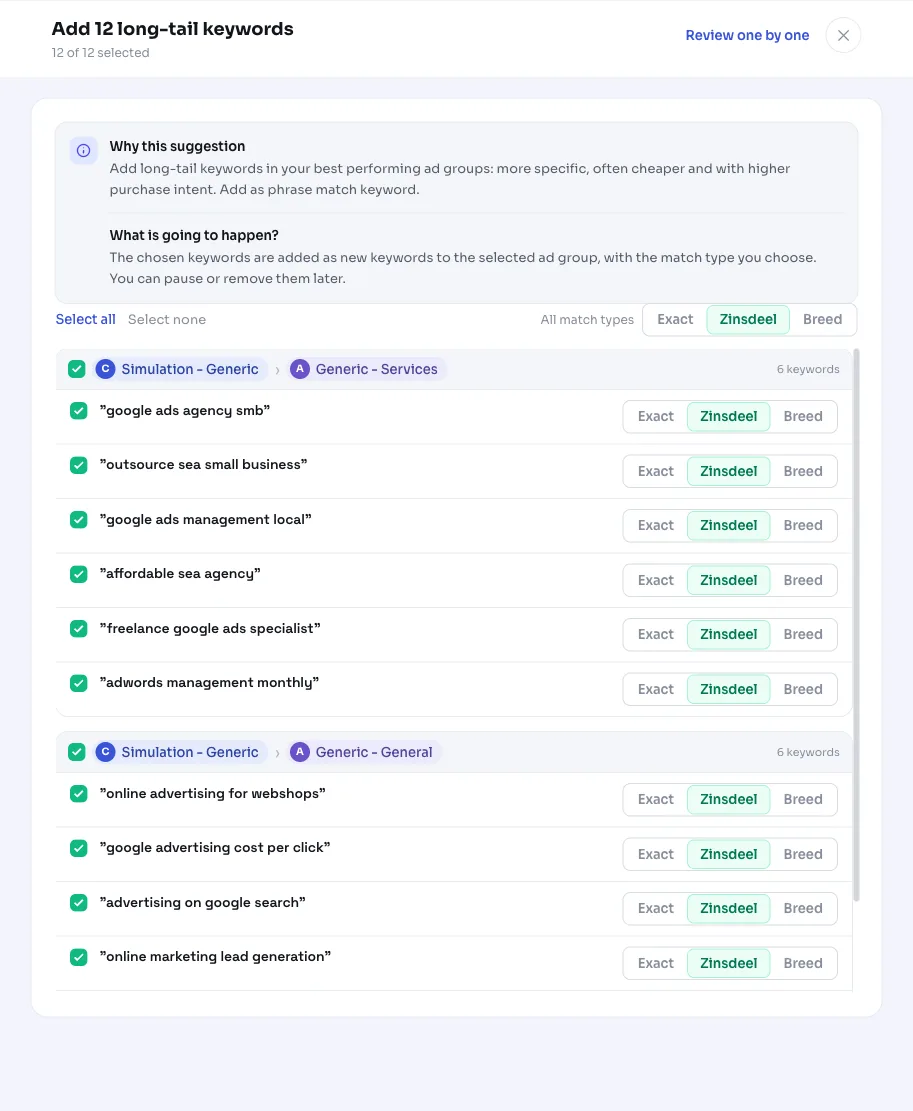
You see the suggested keywords per ad group, along with the estimated search volume, competition and indicative click price. You choose which ones to adopt and with which match type; by default we add them as phrase-match keywords.
Applying immediately sets the chosen keywords as active keywords in the relevant ad groups. If you don't like the result, you can undo it in one click: the added keywords are then removed again. You can also regenerate the list for fresh suggestions.
- Choose per ad group which keywords to add.
- Adjust the match type if needed (phrase match by default).
- Applying adds them as active keywords.
- Undoing removes the added keywords again.
- After applying, the recommendation won't reappear for 14 days, after which a fresh round can follow.
Frequently asked questions
What are long-tail keywords?
Long-tail keywords are longer, more specific search terms that often have lower search volume but higher buying intent. Think of a specific variant with a brand, size or feature added, instead of a broad, general word. They're usually cheaper per click and face less competition.
Why does AdBuilder only add them to converting ad groups?
Because that way you build on proven results. A group that already converts at an acceptable cost per conversion is a good place to add extra, targeted traffic. We deliberately skip groups that cost a lot and deliver nothing, so you don't put budget into waste.
What match type are the keywords added with?
Phrase match by default. That gives control over the searches you reach and suits specific long-tail terms well. You can adjust the match type yourself before applying.
Can I undo the addition?
Yes. Adding is fully reversible: with one click you remove the keywords from the ad groups again. So it's safe to try.
Do I need conversion tracking for this recommendation?
Yes. The recommendation chooses ad groups based on conversions and cost per conversion. Without conversion tracking, or if no group converts, the recommendation doesn't appear, since we can't determine where extra traffic would pay off.