- Category
- Search terms & negatives
- What it changes
- Removes or narrows (to exact) an overly broad negative keyword at campaign or list level
- Reversible
- Yes, the negative can be restored and a narrowing can be undone
- Data we use
- Search terms with conversions over 90 days plus your campaign and shared-list negatives
- Typical trigger
- A negative keyword blocks a search term with at least 2 conversions or with value above your reference CPA
- Priority
- High: fixes an error that's blocking conversions
What it flagsWhich negative keywords are blocking converting traffic?
Negative keywords are supposed to cut out cost without results. But an exclusion that's too broad can also stop search terms that actually convert. That's the reverse of the waste recommendations: instead of adding junk, here you need to roll back an existing negative.
AdBuilder compares your converting search terms against your negative keywords at campaign level and in your shared negative keyword lists. If a negative blocks a search term that generated conversions in the last 90 days, that exclusion shows up in this recommendation. Negatives at ad group level are deliberately left out here: those are more fine-grained and belong to the blocked keywords recommendation.
Why it mattersAn overly broad negative silently costs you revenue
An exclusion that blocks too much traffic does so silently. You see no error message and no disapproval, just fewer impressions and fewer conversions on traffic that was simply profitable. Precisely because it's invisible, this kind of error often stays in place for months.
That's why this recommendation has high priority. It fixes an error that's blocking conversions, making it a precondition before you adjust bids or scale up. As long as an overly broad negative is holding back converting traffic, you're not measuring the campaign's real potential.
How it worksFrom converting search term to the blocking negative
AdBuilder pulls the search terms from the last 90 days. That window ends 3 days back (T-3), so fresh clicks whose conversion is still trickling in aren't wrongly counted as 0 conversions. A search term counts as truly converting once it has at least 2 conversions, or when the conversion value exceeds the reference CPA. That reference CPA is the campaign's average cost per conversion, pulled toward the account average if the campaign itself has little data.
For each converting search term, AdBuilder looks for the negative keywords that apply to that campaign and checks whether one of them blocks the term. That follows Google Ads' actual matching rules: an exact negative blocks only the identical term, a phrase negative blocks if the text appears as a contiguous sequence, and a broad negative blocks as soon as all the individual words are present in the search term. Both campaign negatives and members of shared negative lists are included.
The recommendation needs conversion tracking to work, and only counts the conversion actions you've enabled in your conversion action selection. That way you don't get advice to reopen traffic based on actions you've deliberately excluded from measurement. Negatives already covered by the open blocked keywords recommendation are skipped here, so you don't get a duplicate suggestion.
- Lookback window: 90 days, ending T-3 (three days of conversion delay).
- Threshold per blocked term: at least 2 conversions, or conversion value above the reference CPA.
- Sources for negatives: campaign negatives and shared negative keyword lists (not ad group level).
- A maximum of 10 negatives at a time, sorted by most lost conversions; the rest follow in a later round.
- 30-day cooldown, and conversion tracking is required.
What you can doRemove, narrow to exact, or keep
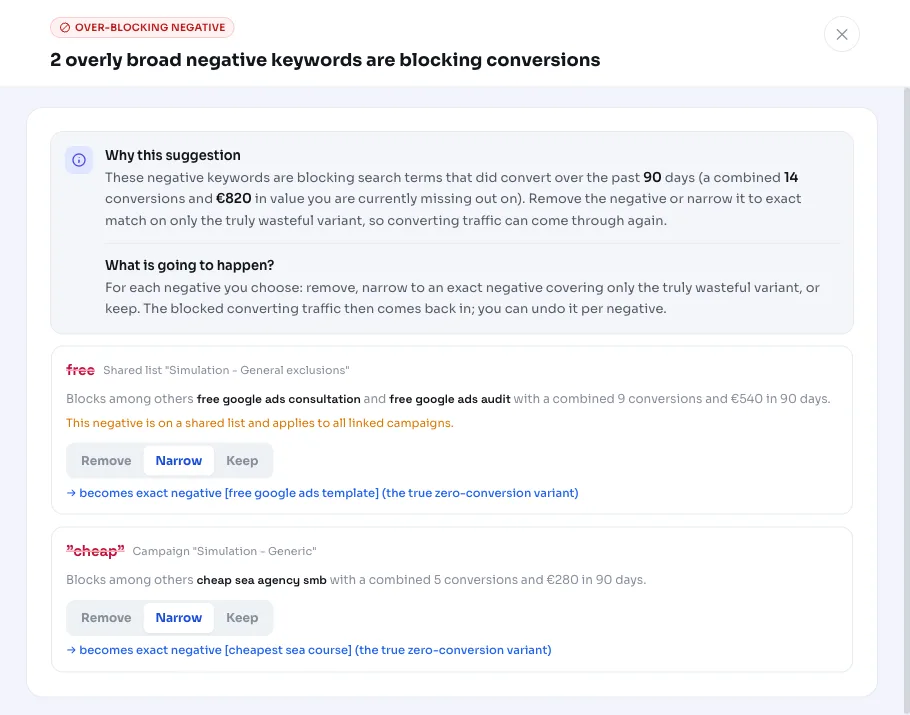
For each flagged negative, you decide what happens. Want the converting traffic back completely? Remove the exclusion. Want to keep blocking part of it? Narrow the broad negative to exact.
When narrowing, AdBuilder only converts the truly wasteful variants into exact negatives, meaning the search terms the broad negative blocked without generating any conversions. The broad negative isn't removed until those exact replacements have been created, so the wasteful terms don't all leak back in at once. A negative that's already set to exact can't be narrowed further; there you choose between removing or keeping it.
- Remove: the whole exclusion is gone, all blocked traffic comes back in.
- Narrow to exact: only the proven wasteful terms stay blocked, the converting variants come back through.
- Keep: the exclusion stays unchanged.
- Reversible: a removed negative can be restored, and a narrowing can be undone (exact removed, broad restored).
Frequently asked questions
Why isn't my keyword serving even though it converts?
A common cause is a negative keyword that's too broad and blocks the search term. This recommendation looks for exactly that: a converting search term blocked by one of your campaign- or list-level negatives, so you can remove or narrow the exclusion.
What does narrowing to exact mean?
Instead of removing the broad negative entirely, AdBuilder creates an exact negative for just the search term that actually spent money without converting. That way you keep blocking that waste, while the converting traffic the broad negative accidentally caught along the way comes back in.
Can I undo this?
Yes. A removed negative keyword can be restored, and with a narrowing, the exact negative can be removed and the broad one restored. The recommendation remembers what was applied.
Why do I only see part of the negatives?
AdBuilder shows a maximum of 10 negatives per recommendation, sorted by most lost conversions, so a large cleanup stays manageable. After you handle these, the next detection round surfaces any remaining negatives.
Does AdBuilder count all my conversions?
No, only the conversion actions you've enabled in your conversion action selection. Actions you've deliberately excluded, like a newsletter signup, don't count here as a reason to reopen traffic.