- Category
- Tracking & measurement
- What it changes
- Attribution model of primary conversion actions: last click to data-driven
- Reversible
- Yes, can be switched back to last click
- Data we use
- Conversion actions (model + data-driven status) and conversions per action over 90 days
- Typical trigger
- Primary action on last click while data-driven is available, with conversions in the last 90 days
- Priority
- Measurement layer (layer 0), an improvement that doesn't block bidding or scaling
What it flagsPrimary conversion actions are still on last click
AdBuilder checks your active conversion actions and looks at the attribution model that's set. The recommendation appears when a primary conversion action is still on last click, while Google indicates that the data-driven model is ready to use for that action.
Specifically, three things need to be true at once: the conversion action is active (ENABLED), it counts as a primary action for your goal, and the attribution model is still last click while the data-driven model's status is available. Actions already on data-driven, or where the data-driven model isn't available yet (usually due to too little data), are skipped.
Why it mattersLast click undervalues your top-of-funnel keywords
With last click, the full value of a conversion goes to the last keyword before the conversion. Everything before that, like a generic or exploratory search that brought the customer in, gets nothing. Those top-of-funnel keywords end up looking like they perform worse than they actually do.
That's not just cosmetic. Smart Bidding and your own optimizations are steered by exactly those conversion numbers. If the measurement is skewed, you'll underbid on keywords that genuinely contribute and overbid on keywords that only catch the final step. Data-driven attribution spreads the value across all touchpoints based on your own conversion data, making those judgments fairer. That's why this sits in the measurement layer: it's the foundation all your other decisions rest on.
How it worksWhich conversion actions AdBuilder selects
AdBuilder pulls your active conversion actions along with their attribution model and data-driven model status. An action qualifies if it's active, counts as primary for your goal, is still on last click, and its data-driven model is reported as available.
Then, for each action, AdBuilder counts conversions over the last 90 days. An action with no conversions is excluded: there's nothing to redistribute, and data-driven attribution isn't meaningful without data. This conversion gate only counts when the conversion query itself actually succeeded, so a temporary query error doesn't wrongly make the recommendation disappear. The remaining actions are sorted by conversion count and the copy shows up to ten of them.
- Active (ENABLED) and primary for your goal.
- Attribution model still on last click (GOOGLE_ADS_LAST_CLICK).
- Data-driven model reported as available (AVAILABLE).
- More than 0 conversions in the last 90 days.
- If your account doesn't measure conversions, this detector doesn't run and any open flag disappears.
What you can doSwitch all at once or pick per action
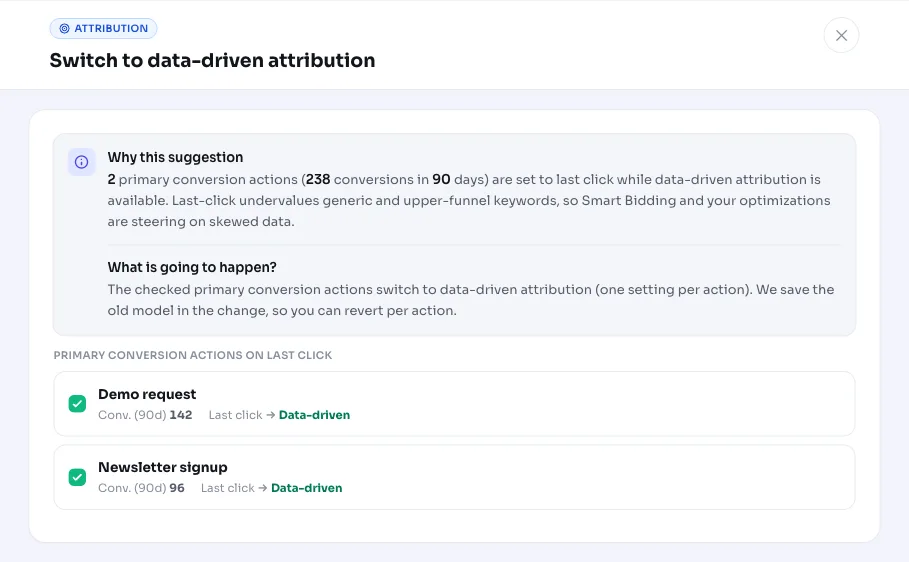
You can switch the recommended conversion actions to data-driven attribution in one click, or select a subset first and switch only those. Right before applying the change, AdBuilder double-checks the live state of each chosen action, so nothing gets changed that's already been switched over or is no longer on last click.
If Google rejects a single action (for example because data-driven turns out not to be available for it after all, or because the action is managed at manager account level above yours), the other actions still go through. Anything switched can be reverted to last click later. This change doesn't block bidding or scaling: your measurement isn't broken, this just makes it sharper.
- Switch everything to data-driven attribution at once.
- Pick a subset and switch only those conversion actions.
- Revert to last click whenever you want.
- Individual actions Google rejects don't affect the rest.
Frequently asked questions
What is data-driven attribution?
Data-driven attribution spreads a conversion's value across all the searches and clicks that contributed to it, based on your own conversion data. Unlike last click, where all the value goes to the final keyword, exploratory and generic keywords also get the credit they deserve.
How do I switch the attribution model in Google Ads from last click to data-driven?
AdBuilder does this for you: select the conversion actions in the recommendation and click to switch. The attribution model of those primary conversion actions then changes from last click to data-driven. You can also limit the selection to just some of the actions yourself.
Can I switch the attribution model in Google Ads back?
Yes. Any action that's been switched can be reverted to last click. AdBuilder keeps the previous model, so the change is reversible.
Why don't I see this recommendation on my account?
There are a few reasons. Your conversion actions may already be on data-driven, the data-driven model may not be available yet (usually too few conversions), the action in question may not be primary, or your account may not measure conversions at all. In all of these cases, AdBuilder deliberately leaves out the recommendation.