- Category
- Keywords
- What it changes
- Pauses the selected keywords (or, with manual bidding, lowers the max CPC by 20%)
- Reversible
- Yes, a paused keyword can be reopened later
- Data we use
- keyword_view over 365 days, plus the 60 days before that for the dip check, and campaign economics for the benchmark
- Typical trigger
- 0 conversions over 365 days and cost of at least 2x the reference CPA (with a floor of EUR 25, or EUR 10 for small accounts)
- Priority
- Scales with the waste: the more cost without conversion, the higher. Shows the 10 most expensive keywords
What it flagsKeywords with cost but no conversions
This recommendation looks for active keywords that cost money but deliver nothing. Specifically: a keyword that had clicks and cost over the past 365 days, but zero conversions and no conversion value. We only look at keywords that are active within an active ad group and active campaign, since that's the only place where the waste is still ongoing.
So this isn't advice about new keyword research, it's about cleaning up what's already running. Poorly performing keywords that only eat up budget are surfaced so you can act on them directly.
Why it mattersWhy you'd want to pause keywords with no conversions
Every euro going to a keyword that never converts is a euro not going to your best-performing keywords. On accounts with lots of broad or old keywords, this adds up quietly over time. By pausing the biggest wasters, you free up that same budget for traffic that does perform.
At the same time, you don't want to cut too fast. A keyword that only gets a few impressions a month, or that only converts in a particular season, deserves a fair chance. That's why AdBuilder looks over a full year rather than a few weeks, and checks whether the keyword did convert in the period before that.
How it worksHow AdBuilder determines poorly performing keywords
This recommendation only runs if conversion tracking is active on the account, since without reliable conversion data, 0 conversions means nothing. If tracking is off, AdBuilder skips this recommendation and clears out any existing open instances.
A keyword makes the list if it meets all the conditions below. Keywords that did convert in the 60 days before the yearly window are deliberately excluded: those are likely in a temporary dip, not a structural problem.
- Window: the last 365 days of data from keyword_view.
- Performance: 0 conversions and conversion value under 1 over that full year.
- Enough evidence: cost is at least 2x the reference CPA, with an absolute floor of EUR 25 (or EUR 10 for small accounts). This way we only pause once roughly two expected conversions' worth of cost has been burned with no result.
- No conversion data on the account? Then a simpler threshold applies: at least 5 clicks and at least EUR 5 in cost.
- The reference CPA is a weighted mix of the campaign's average CPA and the account's average CPA, so a new or thin campaign isn't judged on noise.
- Selection: of all candidates, we show the 10 most expensive, sorted by cost.
- Young campaigns (active less than 14 days) are still shown but marked as ramping up, with advice to wait. Their cost doesn't count toward the promised savings and they're not paused automatically.
What you can doPause or lower the CPC first
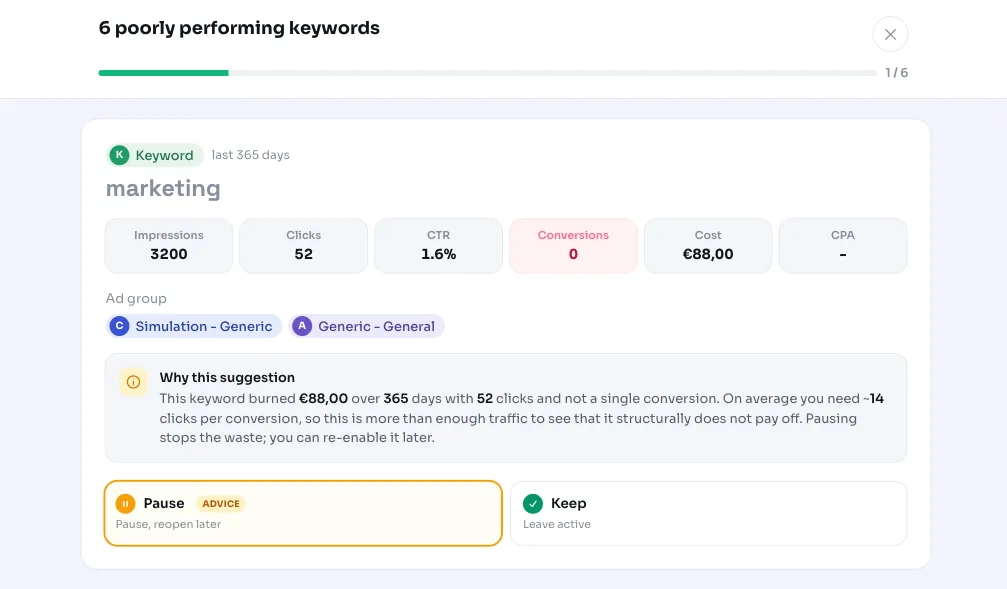
You decide what happens for each keyword. Pausing is the default advice: it stops the waste immediately, and you can reopen the keyword later if you want. AdBuilder shows the cost and number of clicks for each keyword, and as a benchmark, the campaign's average CPA and how many clicks it typically takes to get a conversion.
If the campaign uses manual bidding and the keyword has its own bid, AdBuilder offers a softer alternative: lower the max CPC by 20 percent instead of pausing. This keeps traffic and conversion chances alive while lowering your cost per click.
- Pause (recommended): stops the cost, can be reopened later.
- Lower CPC by 20 percent: only with manual bidding, a softer alternative that keeps traffic flowing.
- Choose per keyword: you don't have to handle the whole list at once.
- Dismiss: if the selection doesn't fit, dismiss the recommendation.
Frequently asked questions
Which keywords should I pause according to this recommendation?
AdBuilder suggests keywords that spent money over the past 365 days without a single conversion, and that burned enough budget at the same time (at least 2x the reference CPA, with a floor of EUR 25, or EUR 10 for small accounts). From that group, we show the 10 most expensive.
Why does the recommendation look back a full year?
A yearly window gives low-volume and seasonal keywords a fair chance to convert before we flag them. A keyword that only performs in a particular season isn't unfairly marked as waste this way.
Can I reactivate a paused keyword?
Yes. Pausing is reversible: you can reopen the keyword at any time. Nothing gets deleted, it's only paused.
What if I haven't set up conversion tracking?
Then this recommendation doesn't run. Without reliable conversion data, 0 conversions means nothing, so AdBuilder skips the verdict and clears any existing open instances while tracking is off.
Won't I lose good traffic by pausing keywords?
To limit that, keywords that converted recently (in the 60 days before the window) are kept off the list, and ramping-up campaigns get advice to wait instead. With manual bidding, you can also lower the CPC first instead of pausing, keeping your traffic and conversion chances intact.