- Category
- Bids & budget
- What it changes
- Switches a campaign's bid strategy from manual CPC to Smart Bidding (maximize conversions or maximize conversion value)
- Reversible
- Yes, can be switched back to manual bidding including the previous eCPC setting
- Data we use
- Bid strategy per campaign plus conversions, conversion value and cost over roughly 30 days (window ends 3 days back)
- Typical trigger
- Campaign bids manually (MANUAL_CPC) and has 15 or more conversions in the window
- Priority
- Medium: bid tier (tier 4 in the recommendation order)
What it detectsWhich campaigns are ready for Smart Bidding
The recommendation looks at your active search campaigns and finds campaigns still bidding on manual CPC (bid strategy MANUAL_CPC) while getting enough conversions. Specifically: a campaign qualifies once it has 15 or more conversions in the measurement window. Below that threshold there's too little signal for the bid strategy to reliably steer toward your goal, so we leave the campaign alone.
Only enabled search campaigns (advertising_channel_type SEARCH, status ENABLED) count. Campaigns already on a Smart Bidding strategy don't appear in this recommendation, since there's nothing left to switch. Of the campaigns that do qualify, we show at most 10, sorted by conversion volume, so the campaigns with the most data appear at the top.
Why it mattersWhy switching to Smart Bidding pays off
With manual bidding, you set a fixed maximum CPC per keyword or ad group yourself. Smart Bidding sets the bid per auction using signals you can't replicate manually, like device, location, time of day and search query. Once a campaign gets enough conversions, that per-auction control can typically get more out of the same budget than a fixed manual bid.
The reverse is just as true: without enough conversion data, Smart Bidding has too little to go on, and switching too early can actually hurt performance. That's why this recommendation is deliberately conservative. It only appears for a campaign with proven volume, and it internally depends on working conversion tracking. If your account doesn't measure (usable) conversions, AdBuilder skips this part and automatically removes any outstanding instances.
How it worksThe thresholds and the bid strategy we suggest
For each search campaign we pull the bid strategy, conversions, conversion value and cost over a 30-day window ending 3 days back. We deliberately leave out the last 3 days: conversions often come in with a delay, and without that margin recent volume would look artificially low. A campaign is a candidate if the bid strategy is MANUAL_CPC and the number of conversions in that window is at least 15.
Which Smart Bidding strategy we suggest depends on what your account measures. By default that's maximize conversions, with your recently measured CPA as the starting target (target CPA). Only if your account tracks real conversion value/revenue (not a placeholder of around 1 euro per conversion), you've indicated in your account settings that conversion value matters, and the campaign averages at least 2 euros of value per conversion, do we instead suggest maximize conversion value, with your recent ROAS as the starting target (target ROAS).
- Window: 30 days, ending 3 days ago (conversion-lag margin).
- Trigger: bid strategy MANUAL_CPC and 15 or more conversions in the window.
- Scope: enabled search campaigns only, at most 10 shown (most conversions first).
- Default proposal: maximize conversions with your recent CPA as the starting target.
- Value variant: maximize conversion value with your recent ROAS, only with real conversion value, the account value preference on, and at least 2 euros of value per conversion.
What you can doApply or revert the switch
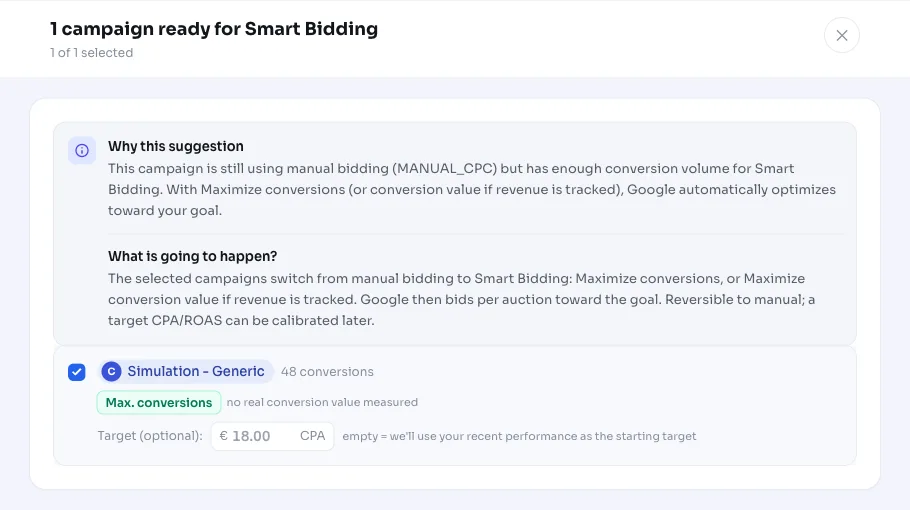
You choose per campaign whether to go along with the switch. AdBuilder updates the selected campaigns via a campaign update in Google Ads and switches the bid strategy to the suggested target. If you haven't chosen a target CPA or target ROAS, we start with your recently measured performance as the starting target. That keeps the migration bounded: Smart Bidding doesn't get free rein to push up every bid and burn through your daily budget at once.
The switch is reversible. Before switching, we read out each campaign's existing eCPC setting and save it, so reverting restores the exact old manual bidding setup. After the switch, Google Ads starts a short learning period, and you can adjust the target further later. If that target drifts too far from actual performance over time, the target-calibration recommendation picks that up as a follow-up step.
- Check or uncheck per campaign which ones you want to switch.
- Default is maximize conversions with target CPA, or maximize conversion value with target ROAS when your account measures value.
- Set your own target CPA or target ROAS; otherwise we use your recent performance as a starting point.
- Revert to manual bidding, including the previous eCPC flag.
Frequently asked questions
What exactly is Smart Bidding?
Smart Bidding is a group of bid strategies in Google Ads that automatically set the bid per auction based on your conversion goal, such as maximize conversions (with a target CPA) or maximize conversion value (with a target ROAS). You no longer set a fixed maximum CPC yourself.
When should I switch from manual bidding to Smart Bidding?
As a rule of thumb: once a campaign has enough conversion volume. AdBuilder requires at least 15 conversions in a 30-day window (ending 3 days back to account for conversion lag). Below that threshold we don't recommend switching.
Do I choose between target CPA and target ROAS myself?
AdBuilder suggests the best-fitting strategy: maximize conversions with a target CPA by default, and maximize conversion value with a target ROAS only if your account tracks real conversion value, you've turned on that preference, and the campaign averages at least 2 euros of value per conversion. You can set your own target per campaign.
Does this immediately change my budget or spend?
The bid strategy changes, not your daily budget. To stop Smart Bidding from pushing up every bid without a target, we start with your recently measured CPA or ROAS as the starting target. That keeps the switch bounded. Google Ads does start a short learning period though.
Can I revert the switch?
Yes. Before switching, AdBuilder saves your existing manual setting, including the eCPC flag, so you can go back to manual bidding exactly as it was. Keep in mind that each strategy switch starts a new short learning period.
Why don't I see this recommendation for my account?
Probably because there's no search campaign still bidding manually with 15 or more conversions in the window, or your conversion tracking isn't (usably) set up. Without working conversion tracking, we deliberately skip this recommendation, since Smart Bidding relies on exactly those conversions.