- Category
- Bidding & budget
- What it changes
- Adds an ad schedule with a higher bid on the strong dayparts
- Reversible
- Yes, you can remove the ad schedule again
- Data we use
- Cost, conversions and clicks per day and daypart over 90 days
- Typical trigger
- Manual search campaign with at least 15 conversions and dayparts with a CPA under 75% of average
- Priority
- Medium (bid optimization, not a correction or waste fix)
What it flagsWhen does your campaign convert best?
Not every hour of the week is equally valuable. Some dayparts deliver noticeably cheaper conversions than others. This recommendation exposes those differences and identifies the days and dayparts where your search campaign's cost per conversion sits well below your average.
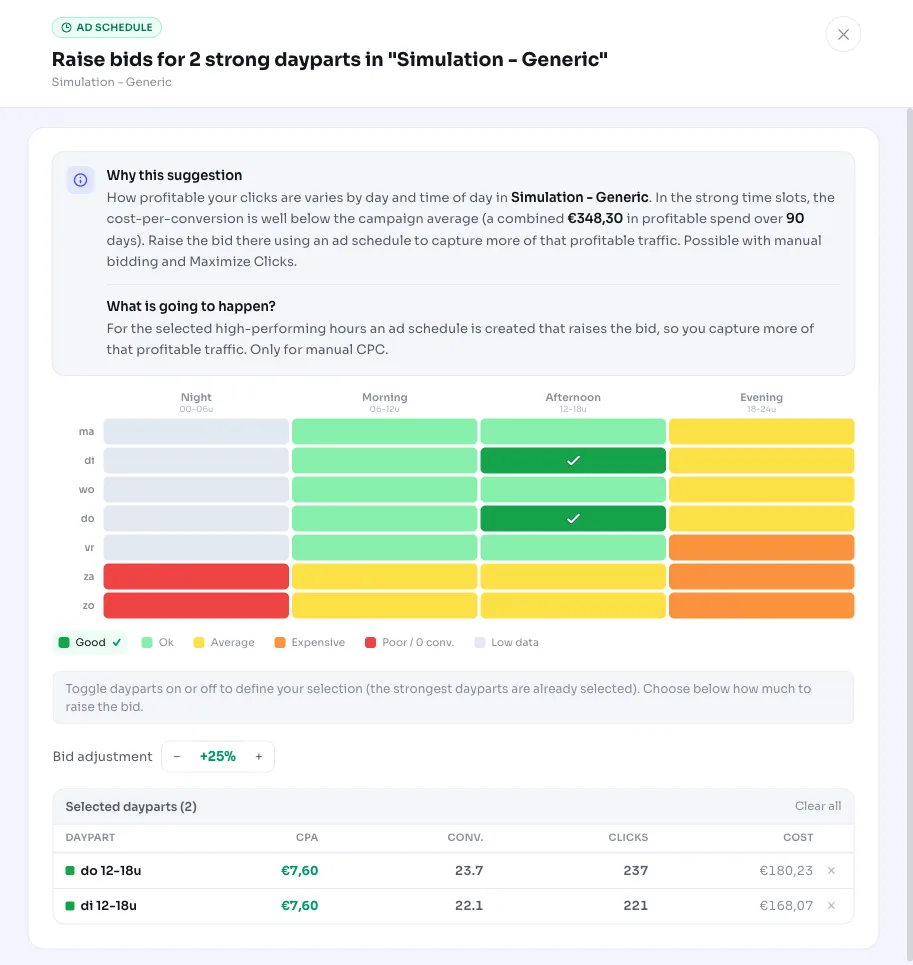
AdBuilder splits the last 90 days into 28 time slots: 7 days times 4 six-hour dayparts (night 0-6h, morning 6-12h, afternoon 12-18h, evening 18-24h). For each slot we calculate cost per conversion and compare it to the campaign average. That gives you an instant view of when your campaign converts best.
A daypart counts as 'strong' when its cost per conversion is at or below 75% of the campaign average. In other words, traffic that converts at least a quarter cheaper than average.
Why it mattersGetting more out of your best hours
If you use the same bid at every moment of the week, you're leaving opportunities on the table exactly when your traffic performs best. During strong dayparts, you can often win more impressions and clicks at a cost per conversion that's still below your average.
An ad schedule with a higher bid during those time slots helps you capture the profitable clicks you'd otherwise lose to competitors. This is the mirror image of curbing weak dayparts: here it's not about cutting waste, but scaling up profitable traffic.
Important: this only works if you control the bids per time slot yourself. With Smart Bidding, Google already calculates the optimal bid per auction and ignores fractional per-daypart bid adjustments. That's why this recommendation is meant for campaigns on manual bidding or Maximize clicks.
How it worksThe thresholds behind the recommendation
AdBuilder only looks at search campaigns that are active and on a bid strategy where daypart bid adjustments actually have an effect: manual bidding (MANUAL_CPC) or Maximize clicks (TARGET_SPEND). Smart Bidding is excluded.
The campaign must have at least 15 conversions over the last 90 days. That volume is needed to judge each time slot reliably. The window ends 3 days before today, so late conversions are included and the picture isn't skewed.
For each time slot, we only evaluate a daypart once it has at least 10 clicks and cost worth at least half an average conversion. Dayparts with too little data are excluded. A daypart counts as 'strong' if its cost per conversion is at or below 75% of the campaign average.
We add up all spend in the strong dayparts. The recommendation only appears once that total represents at least €5 in profitable spend. If your account has multiple eligible campaigns, we pick the one with the largest total profitable spend in strong dayparts.
- Only search campaigns on manual bidding or Maximize clicks
- At least 15 conversions over the last 90 days
- At least 10 clicks per daypart and enough cost to evaluate
- Strong daypart = cost per conversion at or below 75% of the campaign average
- Only appears once there's at least €5 in profitable spend in the strong dayparts
- Campaigns with an existing ad schedule are skipped
What you can doAn ad schedule with a higher bid
The recommendation lets you build an ad schedule that raises the bid on the identified strong dayparts. You'll see a heatmap of the week, so you know exactly which days and hours are involved and how strongly they perform relative to average.
AdBuilder never overwrites an existing ad schedule. If the campaign already has one running, we skip that campaign. Campaigns with an active device, location or demographic bid adjustment are also skipped, since bid adjustments compound and you could otherwise overshoot without meaning to.
The change is fully reversible: you can simply remove the ad schedule again later if the effect disappoints.
- Build the ad schedule with the suggested bid increase on the strong dayparts
- Check the heatmap first to see which time slots are involved
- Or manually adjust the bid adjustment to a percentage that suits you
- Undo the change by removing the ad schedule again
Frequently asked questions
Does this also work with Smart Bidding?
No. With Smart Bidding, Google already determines the optimal bid per auction and ignores fractional per-daypart bid adjustments. This recommendation therefore only appears for search campaigns on manual bidding or Maximize clicks.
What time period is analyzed?
The last 90 days, split into 28 time slots (7 days times 4 six-hour dayparts). The window stops 3 days before today, so conversions that come in later are included.
When does a daypart count as 'strong'?
When the cost per conversion in that time slot is at or below 75% of the campaign average, and there's enough data (at least 10 clicks). That's traffic converting at least a quarter cheaper than average.
Can I undo this again?
Yes. The recommendation adds an ad schedule that you can simply remove later. Existing schedules are never overwritten.
Why don't I see this recommendation for my campaign?
Usually because the campaign uses Smart Bidding, has fewer than 15 conversions in 90 days, already has an ad schedule, or because no daypart performs enough below average to reach €5 in profitable spend.