- Category
- Search terms & negatives
- What it changes
- Adds negative keywords: per campaign, account-wide, or via an exclusion list
- Reversible
- Yes, any added exclusion can be removed again
- Data we use
- Search terms report (cost, clicks, conversions) over the last 30 to 90 days
- Typical trigger
- 0 conversions, at least 5 clicks, cost above the waste floor, and an info word in the search term
- Priority
- Cleanup action in the critical detection bucket; weighted by the wasted spend
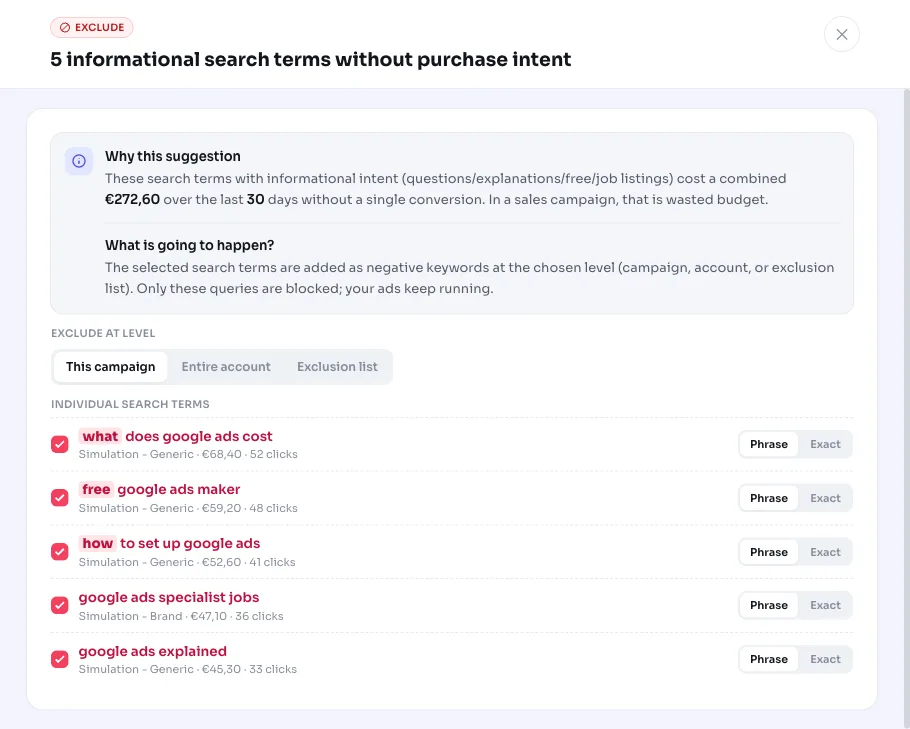
What it flagsSearch terms that want to know something, not buy something
Informational search terms are searches where someone wants to look something up or learn about it, not buy anything. Think of terms starting with what, how, why, or who, or markers like free, course, jobs, guide, manual, review, and experiences. That visitor might click your ad, but is nowhere near the buying stage yet.
AdBuilder reads your search terms report and aggregates the numbers per search term and campaign. Search terms that cost clicks and money, deliver zero conversions over the measurement period, and contain a recognizable info word end up in this recommendation. That gives you a single list of informational search terms eating your budget without results.
Why it mattersInfo traffic costs money and delivers nothing in a sales campaign
In a campaign aimed at sales or leads, you pay for every click. Traffic with pure info intent barely converts there by definition: someone searching for how does a heat pump work wants to understand first, not order. One such term is small change, but together those wasted clicks add up fast.
Excluding these search terms as negative keywords stops the waste and keeps your budget for keywords with purchase intent. It also prevents broad and phrase match types from repeatedly picking up these info variants. It's one of the most direct ways to get your negative keywords in order.
How it worksThe actual thresholds behind this recommendation
AdBuilder looks at each search term (aggregated per search term and campaign) over the chosen lookback window. A term makes the list if it meets all the conditions below. The heaviest one is the cost condition: it ensures we only flag terms that spent real money, measured against what a conversion normally costs in this account.
The lookback window is dynamic and scales with your account volume: 30 days for high volume (at least 100 conversions in 30 days), otherwise 60 days (at least 30 conversions) or 90 days. The window ends 3 days before today, as a buffer for conversions that come in with a delay. Conversion tracking must be on: without tracking we can't judge 0 conversions, so only the click and CTR review variant runs, not this recommendation.
When you open the recommendation, AdBuilder refines the list once more and removes borderline cases with purchase intent, for example request a free quote, which is commercial despite the word free.
- No result: 0 conversions and no conversion value in the measurement period.
- Enough traffic: at least 5 clicks, so that 0 conversions is meaningful.
- Cost high enough: with conversion data, at least the higher of the floor and 2x the reference CPA. The floor is EUR 25 for medium and high volume accounts and EUR 10 for low volume accounts. Without a reference CPA, at least EUR 5 applies (scaled with the window) plus 5 clicks.
- Info intent: the search term contains a question or info word from a multilingual list (what, how, why, free, course, jobs, guide, review, meaning, example, manual, pdf, wiki, and more, in all languages AdBuilder supports).
- No double counting: terms already claimed by the wasteful search terms recommendation are left out here.
- Own keyword protected: if the term is your own active keyword in the same ad group, we don't suggest a negative (that's a pause decision, not an exclusion).
What you can doExclude as a negative keyword, at your level
You see up to the 20 costliest search terms, sorted by cost, plus the info words that recur across multiple search terms. A recurring word like that can be excluded broadly in one go instead of each variant separately. You choose what to exclude and at which level; mark a term as not applicable if it's actually relevant to you.
Everything you add is reversible: any exclusion created (and any new list link) can be removed later by AdBuilder.
- Choose which search terms or broad info words to exclude.
- Choose the level: only the campaign where the term appeared, all Search campaigns (account-wide), or a shared exclusion list (existing or new, automatically linked to your Search campaigns).
- Choose the match type of the negative keyword per search term or word.
- Undo the exclusion if you change your mind.
Frequently asked questions
What are informational search terms?
Searches where someone is looking for information rather than wanting to buy something. They often contain a question word (what, how, why) or a marker like free, course, jobs, guide, or review. In a sales campaign, they almost never convert.
What is search intent and why does it matter?
Search intent is the goal behind a search: looking for information versus buying. This recommendation filters on info intent, because those terms specifically cost clicks without delivering a sale or lead. Terms with purchase intent are left alone.
What's the difference with the wasteful search terms recommendation?
Wasteful search terms looks purely at cost without conversions against a CPA threshold, regardless of the words. This recommendation additionally filters specifically on info-intent words. Terms already claimed by the first one are left out here so you don't count the same saving twice.
Does this work without conversion tracking?
No. Without conversion tracking we can't reliably judge 0 conversions. Only the variant that surfaces search terms based on clicks and click-through rate runs instead, not this recommendation.
Could this accidentally exclude good search terms?
We limit that risk in three ways: when you open it, we refine the list and remove commercial borderline cases, your own active keywords are never suggested, and you choose per term what to exclude. And because everything is reversible, you can always undo an exclusion.