- Category
- Keywords
- What it changes
- Pauses the broad-match keyword and recreates the same keyword as phrase match (or exact)
- Reversible
- Yes, the created phrase-match keyword is removed and the broad-match keyword is turned back on
- Data we use
- Clicks, cost, conversions and conversion rate per keyword over 30 days, plus your account average conversion rate
- Typical trigger
- Broad keyword of 2+ words, at least 20 clicks and 1 conversion, more than €5 in cost, conversion rate below 70% of the account average
- Priority
- Trim waste (a milder step than pausing)
What it flagsA broad keyword converting below your average
With broad match, you give Google a lot of room to also show your ad on loosely related searches. That can add reach, but it also attracts searches that don't really fit what you offer. Those clicks cost money and rarely convert.
This recommendation looks at broad keywords that do convert, but clearly worse than the rest of your account. Specifically: the keyword gets enough clicks yet has a conversion rate far below your account average. That's a sign the broad matching is letting in too much noise.
Important: this is about broad keywords that still do generate conversions. Broad keywords with zero conversions belong to a different recommendation (tighten or pause), and single-word keywords are skipped here since phrase match barely differs from broad for those.
Why it mattersPhrase match holds onto the intent
With phrase match, your ad keeps running on searches that contain your keyword with the same meaning, while loosely matched traffic at the edges falls away. You keep the core searches that convert and trim the vague rest that eats your budget.
It's deliberately the milder step. Instead of pausing the keyword right away, you just narrow the matching. That way you lose as little relevant volume as possible while improving the average quality of traffic on that keyword.
Note the honest framing: this isn't budget you get back. The keyword keeps running on the targeted searches. The savings figure is an estimate of the loosely matched traffic that falls away, not money flowing back into your account.
How it worksThe thresholds that trigger the recommendation
AdBuilder reviews your active keywords over the last 30 days and calculates your account average conversion rate. Without a meaningful average, there's nothing to compare, and the recommendation doesn't appear. This recommendation only runs while conversion tracking is on.
A broad keyword qualifies if it meets all the conditions below. To rule out noise, we also test statistically whether the shortfall in conversion rate really isn't due to chance (a one-sided binomial test, 10% threshold). That way, 1 conversion instead of 2 on a handful of clicks won't trigger an action on its own.
From the remaining keywords, we show the 10 with the largest estimated savings. The estimated monthly savings uses half the overspend, since converting to phrase match narrows the matching rather than eliminating the full amount.
- The keyword is active and set to broad match.
- It has at least 2 words (single-word keywords are excluded).
- It has at least 20 clicks (more if the account conversion rate is low, enough to see roughly 2 expected conversions).
- It cost more than €5 in the measurement period.
- It had at least 1 conversion.
- The conversion rate is below 70% of your account average, calculated excluding the keyword itself (leave-one-out), and that gap is statistically significant.
What you can doConvert to phrase or exact match
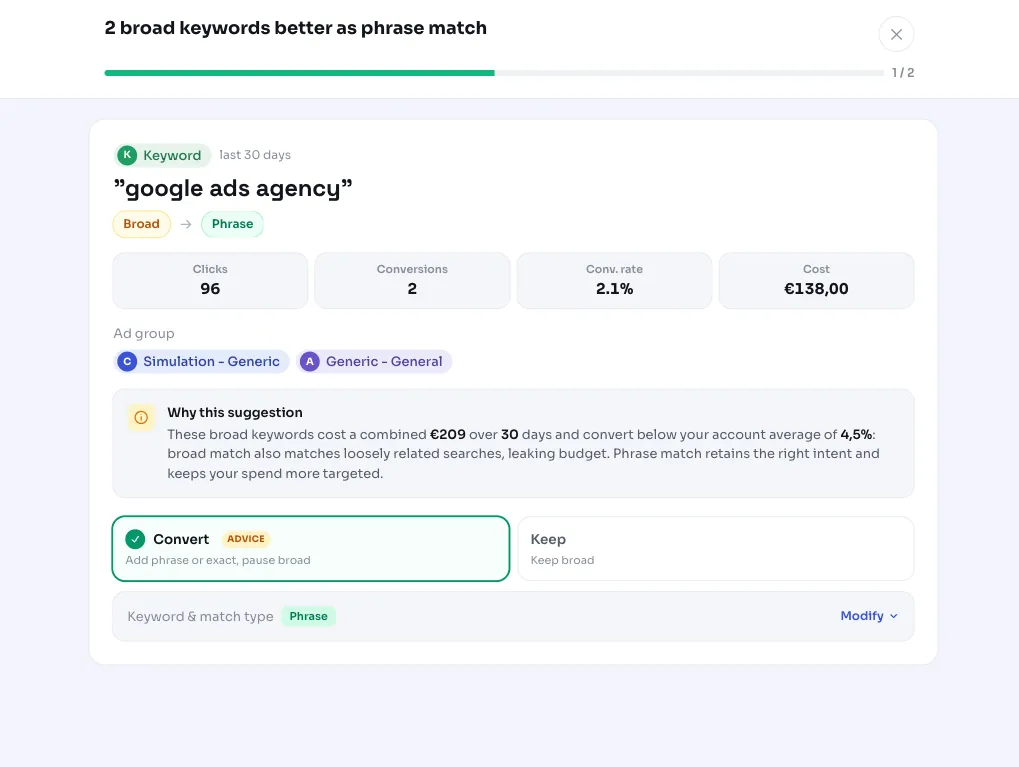
You get a list of broad keywords with the clicks, cost, conversions and estimated savings for each. You check off which ones you want to address; you don't have to do them all at once.
When applied, AdBuilder pauses the broad-match keyword and recreates the same keyword as phrase match (the default advice) or optionally exact match. The broad keyword's bid carries over to the new variant. The original broad-match keyword is paused, not deleted.
The action is reversible: undoing it removes the created phrase-match keyword again and sets the broad-match keyword back to active. Good to know: the new phrase-match variant is technically a new keyword, so it starts with a clean history and builds its own performance record from scratch.
- Convert to phrase match: the default advice, holds onto intent and trims loose matches.
- Convert to exact match: a stricter narrowing for keywords where you only want the precise intent.
- Choose per keyword: only pick the items where you're sure broad matching is letting in noise.
Frequently asked questions
What's the difference between broad match and phrase match?
With broad match, Google also shows your ad on loosely related searches, giving more reach but also more noise. With phrase match, your ad runs on searches that contain your keyword with the same meaning, so it's more targeted. This recommendation shifts a broad keyword from broad to phrase match when broad converts below your average.
Do I get the spent budget back?
No. The keyword keeps running on the core searches; only the loosely matched traffic at the edges falls away. The savings shown are an estimate of that lost traffic, not money you get back. That's why we deliberately calculate with half the overspend.
When should I use phrase match instead of broad?
Phrase match fits when a broad keyword brings in a lot of traffic that doesn't really match what you offer. This recommendation identifies such cases with data: at least 20 clicks, more than €5 in cost, some conversions, but a conversion rate significantly below your account average.
Why do you skip single-word keywords?
For a single-word keyword, phrase match barely differs from broad, so converting it delivers little benefit. That's why this recommendation only looks at broad keywords of 2 or more words.
Can I undo this?
Yes. Undoing removes the created phrase-match variant and sets the original broad-match keyword back to active. When applied, the broad-match keyword is only paused, not deleted, so it's always recoverable.