- Category
- Keywords
- What it changes
- Tightens the match type or pauses the keyword, chosen per keyword
- Reversible
- Yes, tightened variants can be removed and paused keywords turned back on
- Data we use
- Impressions, clicks and CTR per keyword versus the ad group, plus cost and conversions for the pause advice (window typically 30 days)
- Typical trigger
- Keyword CTR below half the group average, with at least 100 impressions on the keyword and 200 in the group
- Priority
- Quality signal; waste recommendations on the same keyword take priority
What it flagsKeywords with a low click-through rate
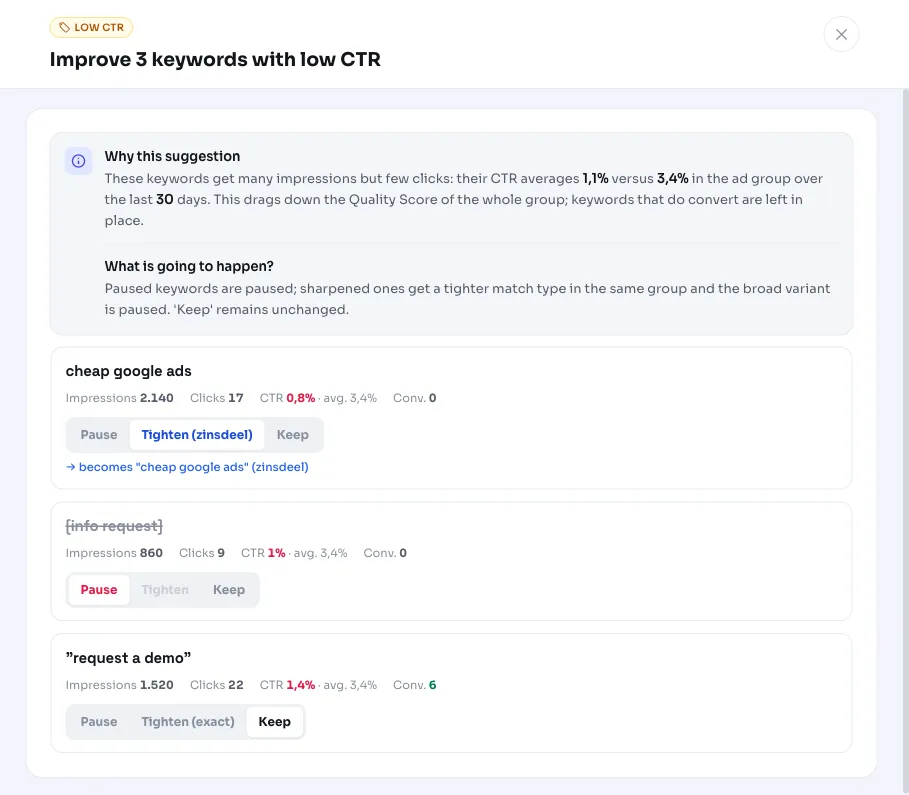
AdBuilder looks at the active keywords in your search campaigns and compares each keyword's click-through rate (CTR) with the average of its own ad group. A keyword that gets a lot of impressions but few clicks stands out: its CTR is below half the group average. Those are the low-CTR keywords this recommendation surfaces.
It's a quality signal, not a waste alert. It's about keywords that get shown often but rarely clicked, regardless of what they actually cost. The comparison is deliberately relative to the keyword's own ad group, since what counts as a healthy CTR varies a lot by industry and search intent.
Why it mattersA weak CTR drags down the Quality Score of the whole group
A low click-through rate lowers a keyword's Quality Score, and weak keywords pull the ad group average down with them. A lower Quality Score means a higher CPC and a worse ad position for the whole group, including the keywords that are doing well.
By fixing the weak keywords, you protect the group's Quality Score and keep your CPC under control. Keywords that do convert are always left alone: a low CTR with conversions isn't a problem, it just means the keyword clicks selectively but effectively.
How it worksWhen a keyword gets flagged as weak
The detector runs on your active keywords (status ENABLED) in active ad groups and campaigns, over a window that typically covers 30 days. For lower-volume accounts, that window extends to 60 or 90 days so there's enough data behind the comparison. The low-CTR part doesn't need conversion tracking: it runs on click and impression data, which is complete day by day.
- The ad group needs at least 200 impressions, and the keyword itself at least 100 impressions. Below those thresholds, the signal is too thin.
- Significance requirement: at the group average, the keyword should have generated at least around 5 clicks (keyword impressions times the group's average CTR is 5 or more). Otherwise a low CTR on 100 impressions is just noise.
- The keyword's CTR is below half (0.5x) the ad group's average CTR.
- We show up to 10 keywords at a time, sorted by impressions (the heaviest hitters first).
What you can doTighten, pause, or keep, per keyword
You decide what happens for each keyword. AdBuilder fills in a default choice based on match type and performance, but you're in control. The options are:
- Tighten: broad match keywords get moved to phrase match, phrase match keywords to exact match. This targets the right search intent more precisely and cuts down on loose, unfocused queries. This is the default choice for broad and phrase match keywords.
- Pause: only suggested for an exact match keyword that's genuinely costing money without results. This requires conversion tracking to be active, the keyword to have 0 conversions, and costs above the waste threshold: at least 2x the campaign's reference CPA, with an absolute floor of EUR 25 (EUR 10 for small accounts), or without a reliable reference CPA, at least 5 clicks and EUR 5 in costs.
- Keep: keywords that convert are left alone, as are exact match keywords that aren't (yet) burning money. You can always pause a keyword like that manually later.
What you can doWhat happens when you apply it
If you choose tighten, AdBuilder creates the tighter variant in the same ad group and pauses the original keyword, so you're not serving the same keyword twice. If you choose pause, the keyword is set to inactive.
Everything is reversible: newly created tightened variants can be removed again, and paused keywords can be reactivated. Watch the order with other recommendations: if a waste recommendation (like keywords:poor or broad-noconv) is already active on the same keyword, that one takes priority and the low-CTR item for that keyword drops away, so you don't get two conflicting actions.
Frequently asked questions
How can I improve CTR in Google Ads?
Start with the keywords that get shown often but rarely clicked. Tighten broad match keywords to phrase or exact match so they match more precisely, and make sure your ad copy matches search intent. This recommendation points out the weakest keywords per ad group for you, so you can fix them in a targeted way.
What's a good CTR in Google Ads?
There's no fixed number: a good CTR depends on your industry, match type, and search intent. That's why AdBuilder doesn't use an absolute benchmark, but compares each keyword to the average of its own ad group. A keyword stands out as soon as its CTR drops below half that group average.
What causes a low CTR in Google Ads?
Often the keyword is matching on searches that don't fit your ad well (too broad), or your ad copy doesn't match what people are searching for. Tightening the match type helps with the first issue; weak ad copy is addressed separately through the ad recommendations.
Are converting keywords ever paused too?
No. Keywords with at least 1 conversion always get the advice 'keep', even with a low CTR. A low click-through rate with conversions isn't a problem.
Does this recommendation work without conversion tracking?
Yes. The low-CTR signal is based on clicks and impressions and runs fine without conversion tracking. Only the pause advice requires conversion tracking, since we need to be sure a keyword is costing money without results. Without tracking, the advice stays limited to tighten or keep.