- Category
- Keywords
- What it changes
- Sets paused keywords, ads, or ad groups back to active
- Reversible
- Yes, every item can go back to paused with one click
- Data we use
- Status changes (change_event) from the last 28 days, plus cost and conversions over 90 days
- Typical trigger
- Manually paused within 28 days, with at least 3 conversions and a CPA below the campaign average over 90 days
- Priority
- High (recovery tier, since the item isn't serving right now)
What it flagsA well-converting item is sitting paused
AdBuilder looks at keywords, ads, and ad groups you paused in the last 28 days that are still paused now. For those items, we calculate how they performed in the 90 days before the pause. If an item was converting efficiently at that point, chances are it's paused by accident or someone forgot to turn it back on.
We only look at pauses set manually in the interface or editor, not changes made via the API. The latter are AdBuilder's own actions (think of an ad pointing to a dead page that got paused for that reason). We obviously don't want to undo those right away. What's left is the intended case: a person turned off a well-performing item, and it isn't serving anymore.
Only items with active parents qualify. A paused keyword or paused ad counts only if both the ad group and campaign are active, otherwise it still won't serve after reactivation. A paused ad group is flagged at the group level, so the keywords and ads underneath aren't suggested separately as well. Negative keywords fall outside this recommendation.
Why it mattersA forgotten pause quietly costs conversions
A paused item doesn't show, so it gets no clicks and no conversions. If that item was pulling in efficient conversions right before, the pause is pure loss: you're not paying anything for it anymore, but you're missing the revenue too. That kind of gap is easy to miss in the daily rush, especially if the pause was meant to be temporary.
That's why this recommendation sits in the high-priority recovery tier, alongside the alert that an ad group has no active ad. It's not about fine-tuning, it's about something that's simply not running right now while it was making money. AdBuilder also estimates an amount: the missed conversion value per month, or if there's no known value, the number of missed conversions per month.
How it worksFrom status change to proof the item was converting
The detection runs in steps with fixed thresholds. First we pull the status changes from the last 28 days and keep only the manual changes to paused. Then, for each candidate, we check whether the item genuinely converted well over the 90 days before that.
For the reference CPA we use a leave-one-out approach: the item being assessed doesn't count in its own benchmark. We blend the campaign average with the account average (with smoothing, K = 5) and subtract the item's own cost and conversions. That way a group you paused precisely because its CPA was too high can't accidentally show up as well-converting. If the account has no conversions and therefore no valid benchmark, we flag nothing.
- Status change lookback: 28 days (the change_event source doesn't go back much further).
- Performance lookback: 90 days of cost and conversions, the same window we use for CPA judgments.
- Evidence threshold: at least 3 conversions in those 90 days, so it's not a fluke.
- Efficiency threshold: cost per conversion at or below the reference CPA (leave-one-out, campaign blended with account, K = 5).
- Scope: the item is still paused now, the parent ad group and campaign are active, negative keywords don't count.
- Source of the pause: manual pauses only, AdBuilder's own API mutations are excluded.
- Count: up to 10 items, sorted by number of conversions.
- Conversion gate: the recommendation only runs if conversion tracking is on and the recommendation isn't disabled globally.
What you can doReactivate, or deliberately leave the pause in place
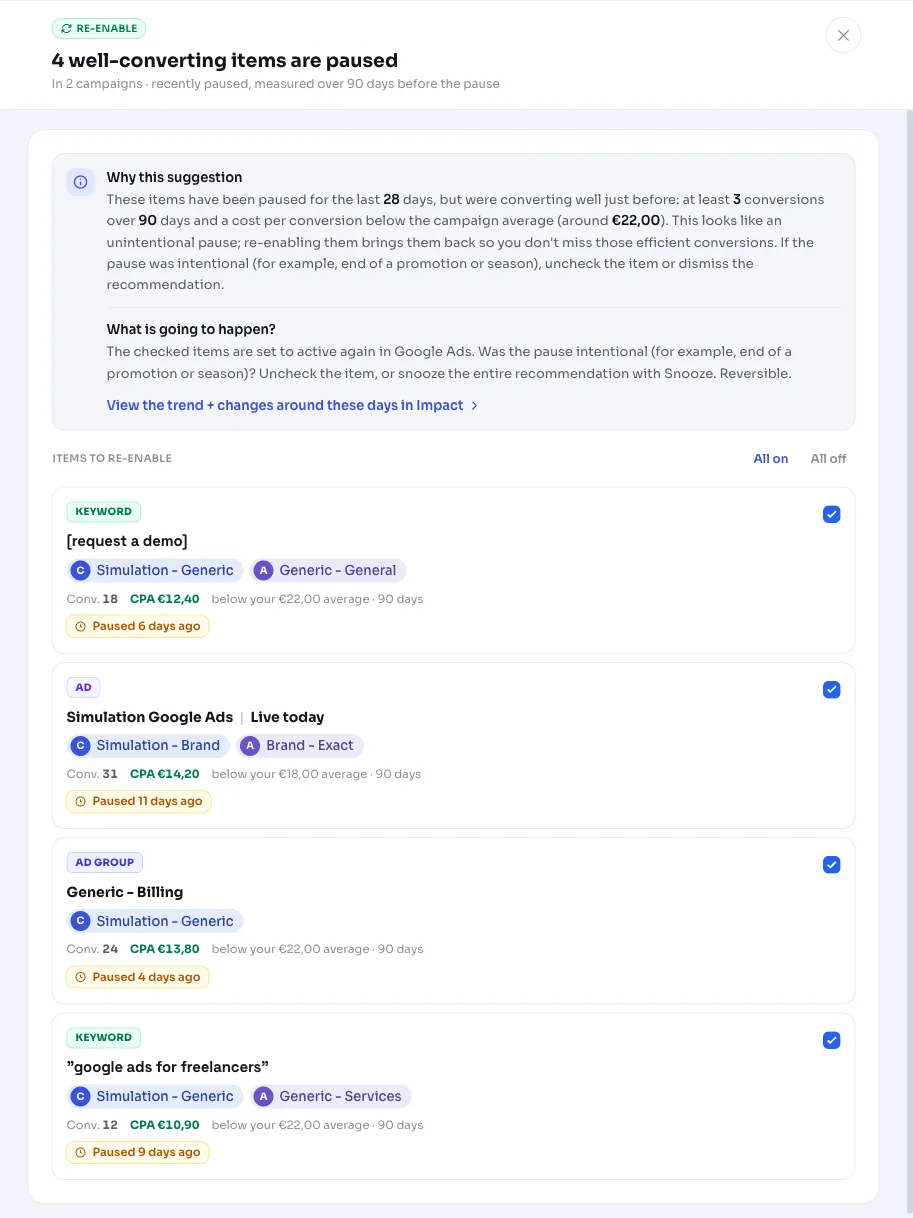
You get a list of up to ten items, each with the campaign, ad group, number of conversions, and how many days ago it was paused. You can turn everything back on at once, or check only the items you want to reactivate. AdBuilder sets those to active in Google Ads.
If a pause was intentional, say the end of a promotion or a season that's passed, leave the item unchecked or dismiss the recommendation. Everything you reactivate is reversible: you can set any item back to paused with one click by undoing the action.
- Reactivate all: turns every suggested item back on at once.
- Choose per item: check only the items you want back.
- Uncheck or dismiss: leave a deliberately paused item alone.
- Undo: a reactivated item goes back to paused.
Frequently asked questions
How do I turn a paused keyword back on?
AdBuilder shows the paused keywords that were converting well in a recommendation. Check the items you want back and confirm, and we'll set them back to active in Google Ads. You can also do it per item and leave the rest as is.
How does AdBuilder know a keyword was paused by accident?
We combine two signals: the item was manually set to paused in the last 28 days, and it converted well in the 90 days before that (at least 3 conversions with a CPA below the campaign average). That combination points to an unintentional or forgotten pause. Only you can be certain, so you decide whether to reactivate it.
Does AdBuilder also suggest reactivating items it paused itself?
No. Pauses made via the API are excluded, since those are AdBuilder's own actions, like pausing an ad that pointed to a dead page. Only manual pauses from the interface or editor qualify.
What if the pause was intentional, like the end of a promotion?
Then leave the item unchecked or dismiss the recommendation. Nothing changes until you click reactivate yourself, and anything you turn on can always be set back to paused.
Why don't I see this recommendation in my account?
The recommendation only runs if conversion tracking is on and there's actually a converting item that was recently paused manually with its parent group and campaign still active. If your account has no conversions or no pauses like that, the alert stays quiet.