- Category
- Targeting & structure
- What it changes
- Attaches selected audiences in observation mode to the flagged search campaigns
- Reversible
- Yes, the audience attachment and observation mode are restored when undone
- Data we use
- Cost per search campaign over 30 days and the attached audience criteria at campaign and ad group level
- Typical trigger
- An active search campaign with at least EUR 20 in cost over 30 days and no audiences attached at all
- Priority
- Low (growth and refinement, blocks nothing)
What it flagsSearch campaigns without audiences attached
AdBuilder looks at your active search campaigns and checks whether audiences are attached. We look at two types: remarketing lists (RLSA, USER_LIST in Google Ads) and interest groups such as in-market and affinity (USER_INTEREST). A campaign counts as 'has audiences' as soon as at least one of these audiences is actively attached at either campaign or ad group level.
If AdBuilder finds an active search campaign that's already spending money but has no audience attached at all, this recommendation appears. Once you attach audiences yourself later, the signal disappears automatically, since the check looks at both levels and both audience types.
Why it mattersMore insight and bidding flexibility without limiting your reach
Without attached audiences, you're missing insight into who's seeing your ads. You don't know which visitor groups convert well and which don't, and you can't bid up on the most promising groups (that's RLSA: bidding higher on people who already visited your site).
Attaching happens in observation mode. That means the audiences are only measured and don't limit your reach: your ads keep showing to everyone who matches your keywords. So you first gather data, and once you see a group performing well, you can start adjusting bids for it specifically.
How it worksWhich campaigns AdBuilder flags
AdBuilder tallies the cost per active search campaign over the past 30 days. A campaign qualifies if it spent at least EUR 20 in that period and has no audiences attached at either level. There's no conversion threshold: campaigns that aren't converting yet are included too, precisely because audience insight can help there.
The flagged campaigns are sorted by cost (highest first) and the list is capped at 12 campaigns per recommendation. If there are more than 12, AdBuilder explicitly mentions the remainder: those follow in a later round. That way the recommendation never promises more than it can attach at once.
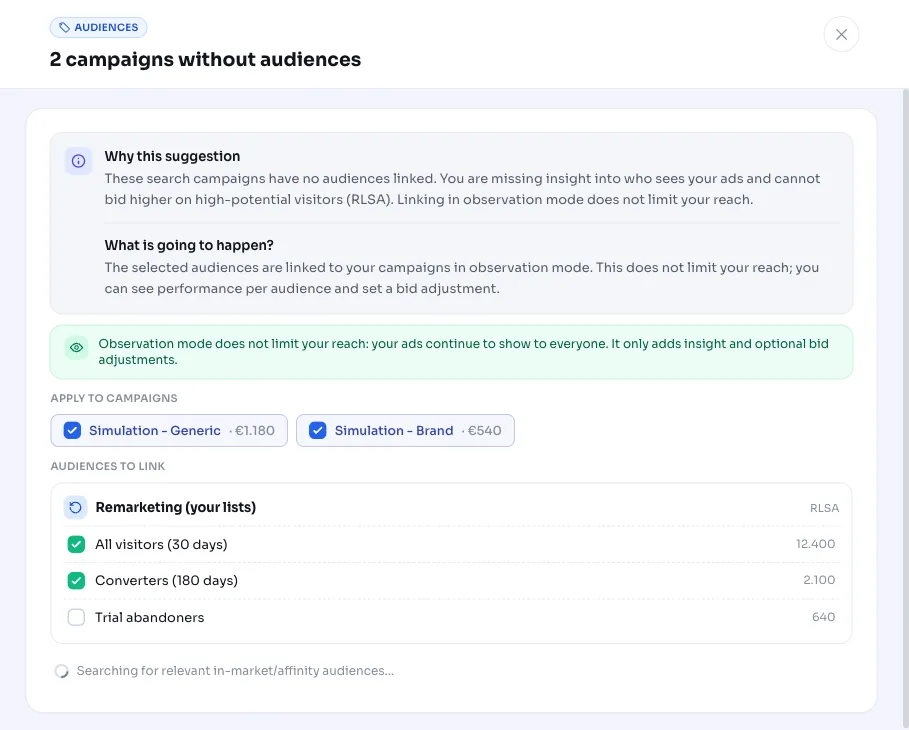
When you open the recommendation, AdBuilder pulls the available remarketing lists from your account (largest first) and also suggests relevant in-market and affinity segments. Those suggestions are based on your brand and your best-performing keywords, so they fit your account.
- Active search campaigns only (channel type SEARCH, status ENABLED).
- At least EUR 20 in cost over the last 30 days.
- No audience attached at campaign or ad group level, neither remarketing nor interest.
- No conversion threshold; the most expensive campaigns come first.
- Maximum of 12 campaigns per recommendation, the rest follows later.
What you can doChoose audiences and attach them in observation mode
You choose within the recommendation which campaigns and which audiences to attach. AdBuilder first explicitly sets the relevant campaigns to observation mode and then attaches the chosen audiences, so reach is guaranteed not to shrink. Everything that's changed can be undone: the attachments are removed and the original setting is restored.
- Select one or more of the flagged search campaigns.
- Choose from remarketing lists (RLSA), in-market segments and affinity segments.
- AdBuilder attaches in observation mode, purely for measurement and later bidding.
- Not happy with it? Undo the attachment and observation mode in one click.
Frequently asked questions
Which audiences can I add?
Three types: remarketing lists of your own visitors (RLSA), in-market segments (people actively considering something) and affinity segments (people with a certain interest). AdBuilder pulls your available remarketing lists and suggests in-market and affinity segments that fit your brand and keywords.
Does this limit my reach?
No. Audiences are attached in observation mode. They're only measured; your ads keep showing to everyone searching your keywords. AdBuilder explicitly sets the campaign to observation mode before attaching anything.
From what cost level does this recommendation appear?
From EUR 20 in cost over the last 30 days on an active search campaign with no audiences attached at all. There's no conversion threshold.
Can I undo the attachment?
Yes. Both the attached audiences and the observation mode setting are reversible. Undoing removes the attachments and restores the campaign's original targeting setting.