- Category
- Bids & budget
- What it changes
- Nothing, this is an advisory signal with no change in Google Ads
- Reversible
- Not applicable, nothing is changed
- Data we use
- Daily spend for the month to date, your hard monthly limit and conversions
- Typical trigger
- At least 20% through the month and a projection more than 15% above your monthly limit
- Priority
- Low, it's a signal rather than a direct intervention
What it detectsWhat this recommendation does
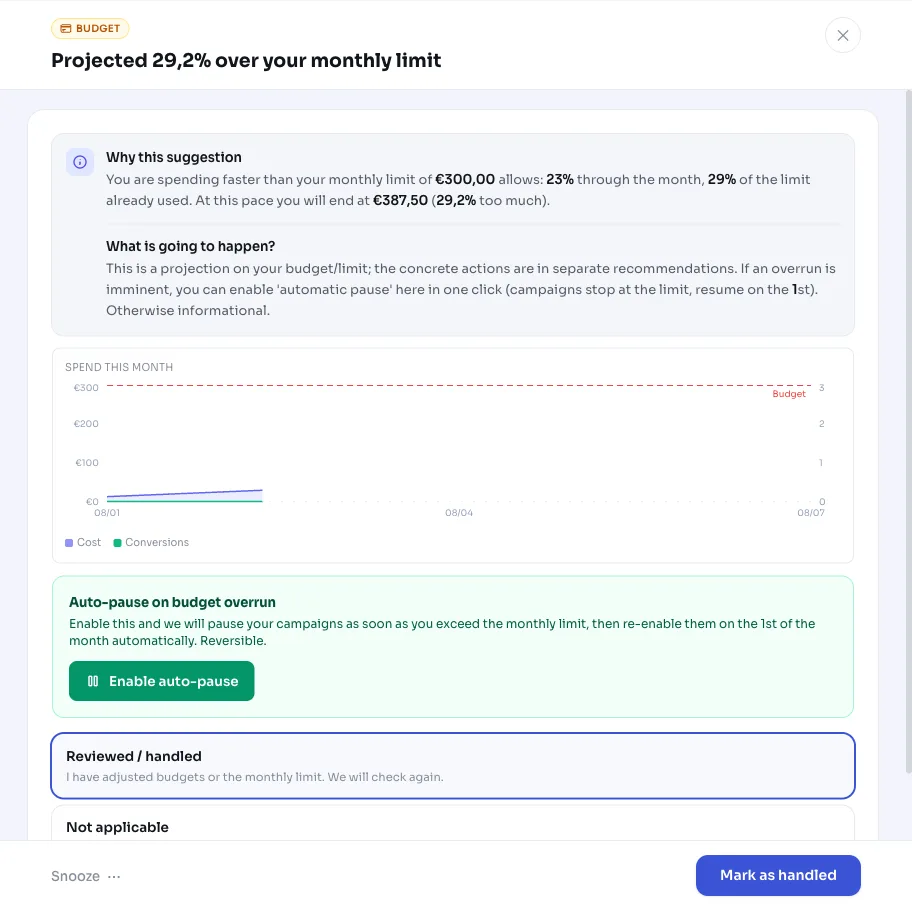
AdBuilder tracks how much you've spent this month so far and projects that forward to the end of the month. Say you're 40% through the month and have already spent €600; the projection then comes out at €1,500 for the whole month. If that projection sits clearly above your set monthly limit, this signal appears.
It's a purely advisory signal: AdBuilder doesn't change anything in your Google Ads account here and doesn't adjust budgets or bids. You see the projection along with a chart of your cumulative spend and a red reference line at your monthly limit, so you can decide yourself whether and how to adjust.
Why it mattersWhy an over-budget projection is useful
The question of why your Google Ads is going over budget often only comes up once the month is already over and the bill is a nasty surprise. By then it's too late to do anything. By projecting midway through the month, you spot a looming overrun while you can still change something about it.
Important to know: this signal monitors your optional hard monthly limit, not your derived monthly budget. That derived monthly budget is simply the sum of your daily budgets, and by definition you can't exceed it. The hard monthly limit is a boundary you set yourself to cap your total spend. If you've set that limit and auto-pause is on, your campaigns stop as soon as you go over it. The signal states that explicitly, so you know the brake is already in place.
How it worksHow AdBuilder calculates the projection
The calculation is deliberately simple and transparent. AdBuilder divides your month-to-date spend by how far you are through the month. For that progress, we don't use the calendar day, but the last day for which figures have actually come in. Google's daily figures run about a day behind; dividing by the calendar day would make the projection structurally too low.
The signal only appears once two conditions are met, so you don't get noise at the start of the month:
- You're at least 20% through the month, since a projection is still too unreliable before that.
- The projection sits more than 15% above your monthly limit.
- A hard monthly limit is set that's greater than zero; without a limit there's nothing to monitor and the signal stays hidden.
What you can doWhat you can do with this signal
Because this is advice rather than a ready-made intervention, you decide the next step yourself. A few options:
- Lower the daily budgets of campaigns that are spending too fast, so your spend drops back within the limit.
- Turn on auto-pause over the limit if you want to strictly enforce that you never exceed your monthly limit.
- Adjust your monthly limit if the higher spend is actually fine and results are keeping pace.
- Leave the signal as is or dismiss it if you've deliberately chosen to spend more this month.
Frequently asked questions
Why is my Google Ads going over budget?
Usually because your campaigns are spending faster than the average pace needed to stay within your monthly limit. AdBuilder projects your month-to-date spend forward to month-end. If that projection sits more than 15% above your set monthly limit, this signal appears.
What budget exactly is meant here?
The hard monthly limit you set yourself as an upper bound on your total spend. Not the derived monthly budget, which is the sum of your daily budgets and which you can't exceed anyway. Without a set monthly limit, this signal never appears.
Does AdBuilder automatically change my budget for this signal?
No. This is an advisory signal and doesn't change anything in your Google Ads account. You can separately turn on the auto-pause-over-limit setting, which stops your campaigns once you actually go over the limit, independent of this signal.
When does the budget projection appear?
Only once you're at least 20% through the month and the projection is more than 15% above your monthly cap. If a more concrete budget alert is already open, such as an 80% or 90% of limit alert or a proposal to lower campaign budgets, this projection signal is suppressed to avoid duplicate alerts.