- Category
- Quality Score & landing page
- What it changes
- Pauses the ad or sitelink with the dead URL
- Reversible
- Yes, one click reverts it to the previous status
- Data we use
- Final URLs of active ads and sitelinks, crawled live
- Typical trigger
- A final URL returns 404/410/server error or doesn't respond
- Priority
- Critical (policy/quality)
What it flagsWhen this recommendation appears
AdBuilder pulls the final URLs from all your active ads (campaign, ad group, and ad all enabled) and your active sitelinks, and checks every unique page. If a page returns an error page (404, 410, or a server error in the 500 range) or doesn't respond at all (timeout, DNS error, refused or dropped connection), the landing page is considered unreachable.
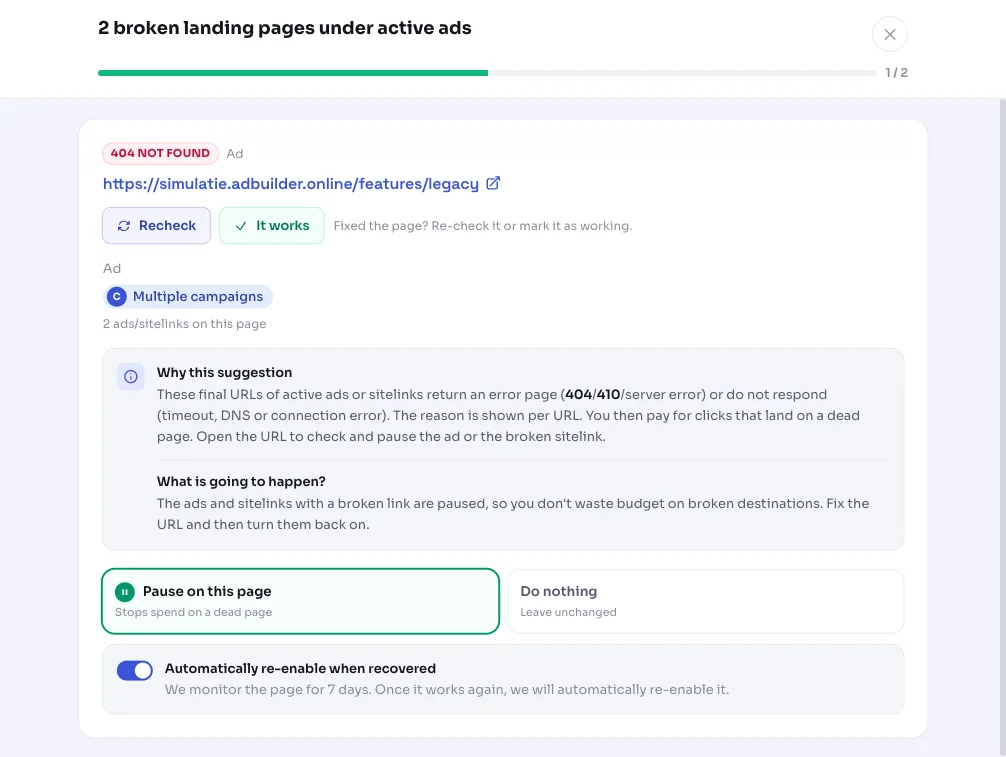
You get one card per broken URL with the reason attached, for example 404 or timeout. If the same dead URL appears under multiple campaigns, we bundle that into a single alert instead of separate cards. If everything works, you see nothing: the recommendation only appears if an ad URL is actually broken.
Why it mattersWhy a broken URL in an ad is expensive
Every click on an ad with a dead landing page costs money, while the visitor sees an error page and immediately clicks away. That's directly wasted budget, and a page that doesn't work never generates a conversion. With a 404 landing page in Google Ads, you pay full price for visits that are guaranteed to deliver nothing.
An unreachable destination also hurts your landing page experience, one of the factors behind your Quality Score in Google Ads. A lower Quality Score means, over time, a higher cost per click or fewer impressions for the same bid.
That's why AdBuilder treats this as a critical, high-priority alert. As long as a broken destination is open on a campaign, we deliberately hold back advice to scale that same campaign (more budget or higher bids): fix the destination first, then increase traffic.
How it worksHow we check your final URLs
The check is a live check of the page at the moment of analysis, not a look back at historical numbers. We follow redirects and first try a lightweight HEAD request; if the server rejects that, we fall back to a regular GET, with a 12-second timeout per page. This limits false alerts from sites that reject simple bots or HEAD requests.
- Source: the final URLs of active ads and active sitelinks. We check up to 300 unique URLs per run, prioritized by usage (URLs behind the most ads and sitelinks first). If there are more, we explicitly report how many weren't checked this time.
- Broken = a 404, 410, or server error (500 through 599), or a hard network error such as a timeout, DNS error, or refused connection.
- Deliberately not treated as broken: a 401, 403, 429, 451, or 999. These are anti-bot, login, or firewall responses; our checker gets blocked, which isn't proof the page itself is dead.
- A network error gets checked again once before being reported. If it keeps failing and our own test connection also doesn't get a response from anywhere, the issue is probably on our end, and we report nothing, to avoid pausing ads incorrectly.
- This check works independently of conversion tracking: you don't need conversion measurement to get a dead landing page flagged.
What you can doWhat you can do if an ad URL doesn't work
Always open the flagged URL yourself first to check what's going on. If the page is indeed broken, you can address it directly in AdBuilder; if you fix the page on your own site, the alert disappears automatically at the next check.
- Pause the ad(s) or sitelink(s) with the dead link, per page. You can check or uncheck individual ads and sitelinks, so you only pause what you want.
- After pausing, we keep tracking the URLs for 7 days and check them daily. If the page recovers within that window, we automatically turn the ad back on by default (you can turn this off), and you get a recovery notice.
- Think the page actually works and our checker just got blocked? Mark the URL as fine; it then drops off the list and the ad keeps running.
- Everything is reversible: a paused ad or sitelink can be reverted to its previous status with one click.
Frequently asked questions
How do I check my final URLs in Google Ads?
AdBuilder does that automatically: we crawl the final URLs of your active ads and sitelinks and flag pages that return a 404, 410, or server error, or don't respond. You don't need to check every destination yourself; you only get an alert when something is actually broken.
What happens to my Quality Score with a broken landing page?
An unreachable page worsens your landing page experience, a factor behind Quality Score in Google Ads. That can lead to a higher cost per click or fewer impressions. Fixing the page quickly or pausing the ad prevents that.
Does AdBuilder automatically pause my ad for a dead URL?
No. We flag the broken URL, you decide. If you choose to pause it, we pause the ad or sitelink and track the page for 7 days; if it recovers, the ad turns back on automatically by default. You can turn off that automatic reactivation.
Why doesn't the tool flag a 403 or 429 as a broken URL?
A 403, 429, 401, 451, or 999 are anti-bot, login, or firewall responses. These usually mean our checker is being blocked, not that the page is dead. We deliberately don't flag these as broken, to avoid incorrectly pausing a working ad.
Can I undo the pause?
Yes. Every action is reversible: you can revert a paused ad or sitelink to its previous status with one click. And if the page recovers within the 7-day tracking window, that happens automatically by default.