- Category
- Keywords
- What it changes
- Raises the max CPC bid of efficient keywords (manual bidding only)
- Reversible
- Yes, the original bid is restored when you undo it
- Data we use
- Impressions, impression share, share lost to rank, conversions and CPA per keyword
- Typical trigger
- At least 5 conversions, 100 impressions, 10% share lost to rank, and a CPA at or below the campaign average
- Priority
- Medium, re-evaluated daily
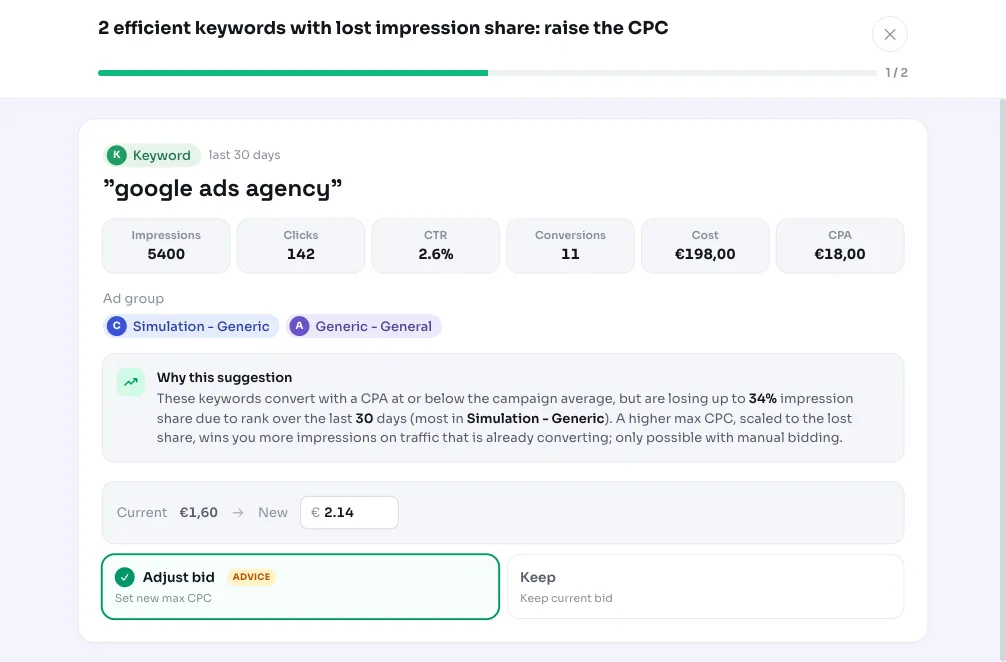
What it flagsEfficient keywords that are missing impressions
AdBuilder looks at keywords that are already performing well: they convert at a cost per conversion (CPA) at or below their campaign average. At the same time, they're losing impression share because their auction position is too low. In Google Ads this is called impression share lost to rank: auctions your ad was eligible for but wasn't shown (prominently enough) in because your bid or quality fell short.
So this isn't about keywords draining your budget, it's about keywords that make money and still have room to grow. Because your max CPC is set too low, you're leaving profitable traffic on the table. This recommendation only appears for campaigns using manual bidding, since that's the only case where you control the max CPC yourself.
Why it mattersGrowing on traffic that already pays off
Raising a bid costs more money by definition, so it's only sensible when the traffic is demonstrably profitable. That's why this recommendation is tightly scoped: it only appears once a keyword has enough conversions to judge reliably and converts efficiently compared to the rest of the campaign.
Once those conditions are met, raising bids on well-performing keywords is one of the safest ways to grow. You're buying extra impressions on exactly the keywords you already know convert, instead of gambling on new or unproven traffic.
How it worksThe thresholds behind the bid increase
AdBuilder pulls impressions, impression share, share lost to rank, conversions and cost per keyword over the last 30 days. For accounts with few conversions, that window automatically extends to 60 or 90 days so the verdict rests on enough data: under 100 conversions in 30 days becomes 60 days, under 30 conversions becomes 90 days.
To weigh the lost share fairly, AdBuilder works back to the estimated number of biddable auctions per day (impressions divided by impression share). Days with a low share still count in full. To determine whether a keyword is genuinely efficient, AdBuilder compares its CPA to the campaign average excluding the keyword itself (leave-one-out). That way a heavy keyword can't drag its own bar down.
A keyword makes the list if it meets all the conditions below. The 10 keywords with the largest lost share are proposed at most.
- Manual bidding (MANUAL_CPC) and its own max CPC greater than zero.
- At least 5 conversions in the window: fewer is too thin evidence for a bid increase.
- At least 100 impressions.
- At least 10% impression share lost to rank.
- A CPA at or below the campaign average (leave-one-out): the keyword is efficient.
- Only active (ENABLED) keywords, ad groups and campaigns.
What you can doApply the suggested max CPC
AdBuilder proposes a new max CPC per keyword. The increase is scaled to the lost share: at least +10% and at most +60%. The more impression share you're losing to rank, the bigger the proposed step. The new bid is rounded to whole cents, and keywords where rounding wouldn't produce a real increase are dropped.
You can apply the recommendation all at once or undo it later: undoing resets AdBuilder to the original bid. For Google Ad Grants accounts, the suggested max CPC is capped at €2, keeping it within that program's rules.
AdBuilder coordinates this recommendation with the underused budget recommendation: keywords for which that recommendation already proposes a CPC increase are skipped here, so you never apply the same change twice.
- Apply: raise all proposed bids at once.
- Undo: the original bids are restored.
- Dismiss: hide the recommendation if you don't want to scale up these keywords.
Frequently asked questions
When should I raise my CPC on a keyword?
Only raise a bid once a keyword already converts efficiently (CPA at or below the campaign average) and is missing impressions because its position is too low. AdBuilder targets exactly that combination: at least 5 conversions, 100 impressions and 10% impression share lost to rank. That way you only raise bids on traffic that already pays off.
Why don't I see this recommendation for my campaign?
The bid increase only appears for campaigns using manual bidding (MANUAL_CPC). If you use Smart Bidding, the bid strategy already sets bids per auction, and AdBuilder focuses on your goals or budget instead. It also stays silent without enough conversions, impressions or lost share.
How much does the bid go up?
The increase is scaled to the share you're losing to rank, with a floor of +10% and a ceiling of +60%. If you're losing, say, 25% share to rank, the proposed step is roughly +25%. The new max CPC is rounded to whole cents.
Can I undo the bid increase?
Yes. AdBuilder stores the original bid and restores it on the keyword in Google Ads when you undo. You can try the change risk-free and revert it if you want.