- Category
- Bidding & budget
- What it changes
- Creates a temporary seasonality adjustment (conversion rate modifier) per campaign in Google Ads
- Reversible
- Yes, rolling back removes the created adjustments again
- Data we use
- Seasonal calendar, your conversion history from last year and recurring peaks across multiple years
- Typical trigger
- At least 1 smart bidding campaign and a busy moment within 21 days
- Priority
- Medium (bidding tier)
What it detectsA busy moment is coming up
AdBuilder looks ahead to short, busy moments where your conversion rate is temporarily higher (or lower) than usual: a sale, a product launch, or a holiday like Black Friday, Christmas or King's Day. The recommendation appears as soon as such a moment falls within 21 days and you have at least one campaign running on smart bidding.
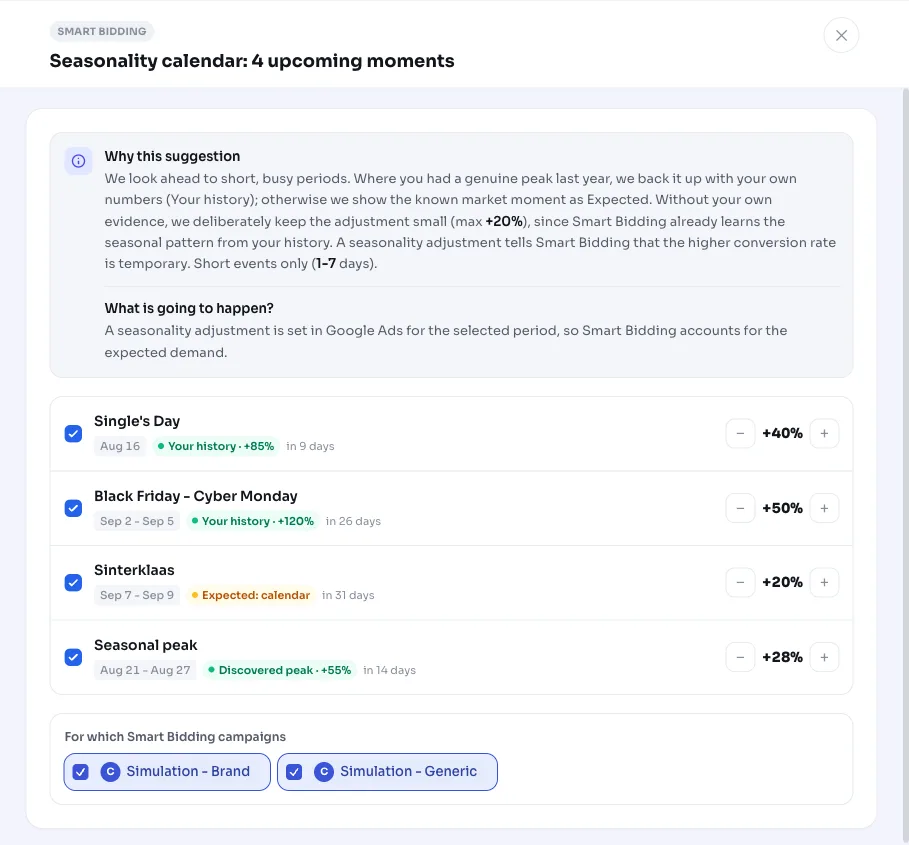
The title is a seasonal calendar with the number of upcoming moments, for example Seasonal calendar: 3 upcoming moments. Moments already covered by an existing seasonality adjustment in Google Ads are skipped, so an applied recommendation doesn't reappear.
Why it mattersSmart bidding doesn't know the spike is temporary
Smart bidding learns your normal seasonal pattern on its own from your history. What trips it up is a short, sharp outlier: a sale lasting a few days where people buy much faster than usual. On day one of a promotion like that, the bid strategy is playing catch-up, and afterward it can keep chasing the spike for a while.
A seasonality adjustment tells smart bidding in advance that the conversion rate for those specific days is temporarily different. That way you bid appropriately right from the start of the busy period, without your bid strategy treating it as the new normal. It's a targeted bid nudge for a defined window, not a permanent change to your bid strategy.
How it worksFrom calendar and your own history to a bid nudge
We combine two sources. The first is a seasonal calendar with known market moments (including Black Friday through Cyber Monday, Christmas, Singles' Day, Valentine's Day, Easter, Mother's Day, Father's Day, and country-specific days like King's Day or Independence Day). A holiday only counts if your account actually targets that country: on an account targeting the Netherlands and the US, King's Day only applies to your Dutch campaigns and Independence Day only to the US ones.
The second source is your own history. Where you showed a genuine spike around a calendar moment last year, we back the adjustment with your own numbers (labeled Your history). That only happens with at least 3 conversions in last year's event window and a measured lift of at least 30% in conversion rate, otherwise a one-off outlier is too much of a coincidence. AdBuilder also detects recurring spikes across multiple years of history: a week counts as a seasonal spike when it comes in at least 30% above your yearly baseline in at least 2 years, with at least 5 conversions per year. Detected spikes get a separate badge.
The size of the adjustment depends on how strong your evidence is. With your own history, we take roughly half of the measured lift, capped at +90%. Without your own evidence, we deliberately keep it small: a calendar moment gets at most +20%, since smart bidding already learns the normal seasonal pattern on its own. Every adjustment runs for a maximum of 14 days (1 to 7 days is ideal); anything longer we leave to smart bidding. Detected spikes are merged into at most two adjacent weeks.
- Window: moments within 21 days are shown.
- History backing: at least 3 conversions last year and at least 30% lift.
- Detected spike: at least 30% lift in at least 2 years and at least 5 conversions per year.
- Adjustment: roughly half the measured lift, capped at +90%; calendar without history at most +20%.
- Duration: 1 to 14 days; detected spikes at most 2 weeks.
What you can doChoose, adjust and apply
For each moment you see the period, the source (Your history, Expected or Detected spike) and the suggested adjustment. By default we apply all shown moments to all involved smart bidding campaigns, but you can make your own selection.
Applying creates a campaign-level seasonality adjustment in Google Ads for the chosen moments and campaigns. The adjustment is fully reversible: reverting removes the adjustments AdBuilder created, including those from an earlier round.
- Choose which moments to apply and to which campaigns.
- Adjust the size per moment yourself if you have a different estimate.
- Campaigns with conversion-based smart bidding on Search, Shopping, Display and Performance Max are eligible; Demand Gen and App are out of scope.
- Revert the adjustment at any time with a single action.
Frequently asked questions
What is a seasonality adjustment in Google Ads?
A seasonality adjustment tells smart bidding that your conversion rate is temporarily higher or lower than normal for a short, defined period. Your bid strategy takes that into account during that window and then falls back to its normal pattern afterward. It's meant for short events of 1 to 14 days, not long periods.
Does this directly raise my bid?
No, it's not a fixed bid increase. You give smart bidding a signal that the conversion rate is temporarily different. The bid strategy translates that into appropriate bids for those days itself. In Google Ads this comes in as a conversion rate modifier at the campaign level.
Why do you sometimes deliberately keep the adjustment small?
If we don't have evidence from your own history, a calendar moment gets at most +20%. That's because smart bidding already learns the normal seasonal pattern from your data on its own. A large, unsupported adjustment would be redundant and more likely to confuse the bid strategy than help it.
Can I revert it?
Yes. Reverting removes the seasonality adjustments AdBuilder created from Google Ads, including those from an earlier application. If you remove an adjustment, the related moment may naturally come back as a recommendation later.
Which campaigns are eligible?
Campaigns using smart bidding on conversions or conversion value, on the Search, Shopping, Display and Performance Max channels. Demand Gen and App are out of scope because the adjustment doesn't work reliably there. A holiday only applies to campaigns that actually target that country.