- Category
- Bidding & budget
- What it changes
- A bid adjustment (modifier) per region on the campaign, lowered or raised. Nothing gets excluded.
- Reversible
- Yes, created location adjustments are removed and adjusted modifiers are reset.
- Data we use
- Cost, clicks and conversions per region over 30 days (60 or 90 on smaller accounts), plus conversions per region over 90 days for the trend.
- Typical trigger
- Manual bidding or Maximize clicks, at least 1 conversion in the campaign, and a region with at least 5 clicks whose cost per conversion deviates strongly.
- Priority
- Low 4 (bidding), after the exclusion and waste recommendations.
What it detectsWhen regions are out of line
Within a search campaign you pay the same bid by default, whether a click comes from a region that converts cheaply or one that only costs money. AdBuilder breaks down your campaign's performance per region and looks for locations that clearly deviate from the campaign average.
Two situations stand out. A region with enough traffic but zero conversions burns budget, and a region where the cost per conversion is significantly higher or lower than average deserves a different bid. In both cases, this recommendation adjusts the bid per location without excluding the region entirely.
Why it mattersWhy bidding per region pays off
A campaign that bids equally hard everywhere leaves money on the table. In one region you're buying conversions way too expensively, in another you're underperforming because the bid is too low for traffic that's actually doing well. Tuning the bid per region keeps your cost per conversion under control and gets more out of the spots that are already doing well.
Important difference from excluding a region entirely: a bid adjustment only dampens or boosts, you stay active in the region. That's a milder move than excluding, and it suits regions that are expensive but not completely worthless. If a region consistently performs with zero conversions, excluding it (the Exclude underperforming locations recommendation) is usually a better fit, and that one takes priority over this bid adjustment for the same region.
How it worksHow AdBuilder calculates the bid adjustment
This recommendation only looks at search campaigns running on manual bidding (Manual CPC) or Maximize clicks. Google actually applies a bid adjustment per location for those bid strategies. Conversion-driven Smart Bidding ignores such fractional adjustments, so this recommendation stays quiet there. The campaign also needs at least 1 conversion, and we only look per region once there are at least 5 clicks (otherwise the data is too thin to say anything).
As a benchmark we use the campaign average excluding the region being assessed itself (a leave-one-out benchmark), so a large region doesn't skew its own verdict. That average only counts if at least 3 conversions remain outside the region; below that we don't compare cost per conversion at all. The new bid adjustment is always relative to the existing one: if an adjustment is already in place, we build on top of it.
The size of the adjustment is tempered toward a pooled reference, so a one-off lucky or unlucky measurement doesn't produce an exaggerated bid. A decrease never goes below Google's floor of 0.1 (minus 90%), an increase is capped at plus 50% per step, and adjustments are rounded to steps of 0.05. We only suggest an adjustment if it would actually make the bid lower or higher than it already is, and we show at most the 20 highest-cost regions at a time.
- No conversions: the bid is halved, but only if the region has burned enough to be worth roughly 2 expected conversions. That cost floor is 25 euros (10 euros on small accounts); without conversion data as a guide, at least 5 clicks and 5 euros apply.
- 10 conversions or more: if the cost per conversion is higher than 1.4 times the average, we lower the bid; if it's 0.7 times the average or lower (clearly more efficient), we raise it.
- 3 to 9 conversions: the same judgment, but on a cost per conversion pooled toward the campaign, so only truly extreme deviations get an adjustment.
- For the conversion paths, the region must also have cost at least 10 euros.
What you can doWhat you do with the recommendation
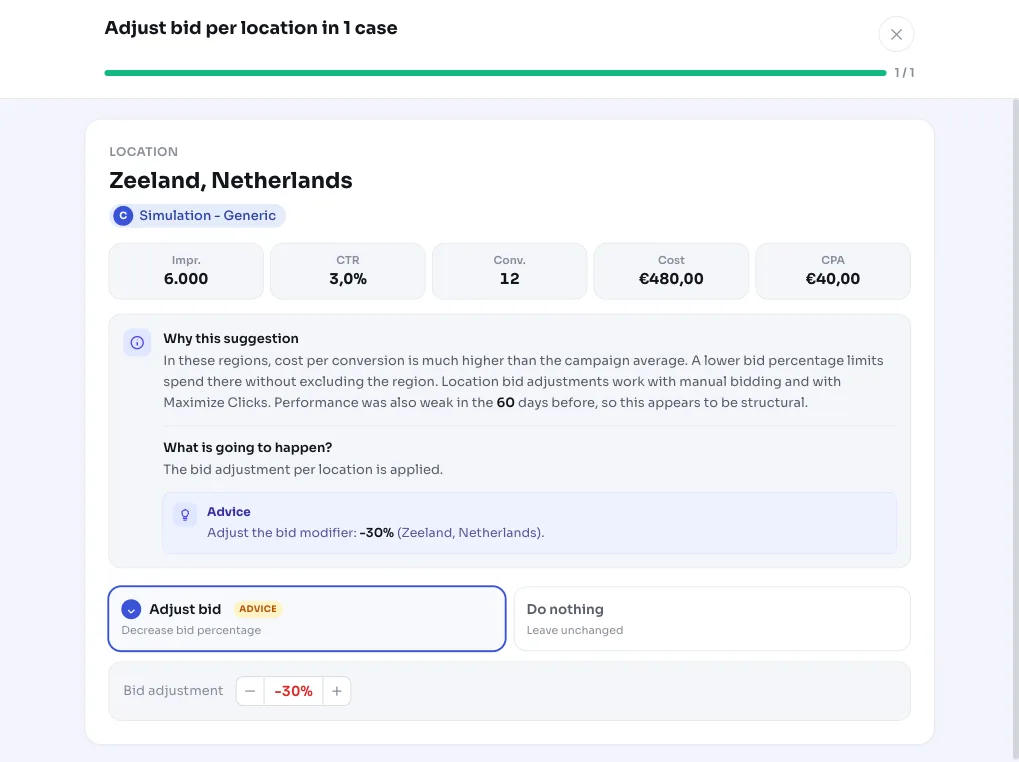
You see the proposed bid (lower or higher) per region, along with the corresponding cost and conversions. You can tick the proposals you want to apply and override the adjustment per region yourself if you want a different value. Applying it sets the bid adjustment in Google Ads: for a region that already has a location criterion, the adjustment is updated; otherwise a new one is created.
AdBuilder makes sure a new location adjustment stays within your existing target area, so your targeting doesn't accidentally get broader. Regions outside the target area are skipped. The whole recommendation is reversible: if you roll it back, we remove the newly created adjustments and reset adjusted modifiers to their previous value.
If a region still converted in the 60 days before that, AdBuilder notes it could partly be a temporary dip and advises starting mild. If performance was already weak before that too, it looks structural.
- View the proposed bid per region and check or uncheck it.
- Override the bid adjustment per region yourself.
- Apply: update existing adjustments, create new ones within the target area.
- Roll back in one click; everything is reversible.
Frequently asked questions
Which campaigns does adjusting bid per location work for?
Search campaigns running on manual bidding (Manual CPC) or Maximize clicks. With conversion-driven Smart Bidding, Google doesn't apply such bid adjustments per location, so AdBuilder doesn't show this recommendation there.
How do I adjust bids per location with AdBuilder?
You tick the proposed regions, adjust the change if you want, and click apply. AdBuilder updates an existing location adjustment or creates a new one within your target area. You can roll it back at any time.
Does this exclude a region?
No. This recommendation only lowers or raises the bid in a region, you stay active there. If you want to exclude a region that's only costing you money, the recommendation to exclude underperforming locations is a better fit; it also takes priority over a bid adjustment for the same region.
What period does it look at?
The last 30 days by default. On smaller accounts that window can be 60 or 90 days, so there's enough data. For the trend, AdBuilder also looks at conversions per region over the last 90 days.
How much is the bid adjusted?
The adjustment is relative to what's already set and is tempered: a decrease never goes below minus 90%, an increase is capped at plus 50% per step. For a region without conversions, the bid is halved, provided that region has burned enough budget.